Batch Payment File Upload for Supplier Payroll in the UK

Batch Payment File Upload for Supplier Payroll in the UK

Content

Share

Batch Supplier Payments in the UK: How to Upload a CSV File and Pay Suppliers via Faster Payments  When a finance manager rekeys 40 supplier payments into a banking portal, one wrong digit can turn a routine Friday payment run into a Monday investigation. A **batch payment file upload for supplier payroll UK** workflow replaces that manual process by preparing a structured payment file, uploading it through a bank or EMI portal, validating the entries, authorising the run, and releasing multiple supplier payments simultaneously.  This guide explains how that workflow operates end to end — covering accepted file formats, payment rails, approval controls, multi-currency setup, and the operational distinction between supplier payment runs and employee payroll workflows that providers and accounting platforms treat differently.  > **Not legal, regulatory, or tax advice.** This article is for informational purposes only. EQWIRE is an FCA-regulated electronic money institution. For regulatory guidance specific to your business, consult a qualified adviser.  ---  ## Key Takeaways  - Batch file uploads replace manual payment entry, reducing keying errors and improving approval control and audit visibility. - Accepted file formats — CSV, XML, BACS — vary by provider and payment type; there is no single UK-wide standard. - Faster Payments and the account structure behind the upload determine execution speed and access, not the file format alone. - Supplier payment runs and employee payroll workflows are treated as separate operational flows by most providers and accounting platforms. - Multi-currency AP batches — particularly GBP and EUR — typically require separate file logic, dedicated currency balances, and distinct routing decisions.  ---  ## How Does Batch Supplier Payment File Upload Work in the UK?  **A batch supplier payment upload lets finance teams submit one structured file — usually CSV or XML — through a bank or EMI portal to validate, approve, and release multiple supplier payments at once.**  The lifecycle moves through these stages: invoice or contractor payout approval, export or preparation of a structured payment file, upload into the payment portal, a review screen that parses each row, a maker-checker or authorisation step, release to the payment network, settlement, and reconciliation back to the originating records.  Finance teams care less about the upload step itself and more about what surrounds it: approval routing, file validation rules, settlement timing, and how rejected lines are handled. Payment-file imports are standard across provider documentation, but exact format requirements and validation logic differ meaningfully by provider and payment type — a CSV that imports cleanly in one portal may fail entirely in another. [Currencycloud's bulk upload workflow](https://support.currencycloud.com/hc/en-gb/articles/360018707379-Bulk-upload-CSV-upload), for example, includes a multi-step review and confirmation process distinct from bank-portal flows.  > **Who this guide is for:** Finance leads, operations managers, and founders at SMBs, import/export companies, and SaaS businesses running recurring UK supplier payments — particularly those managing GBP and EUR payout cycles or using EMI accounts alongside or instead of traditional UK banking.  [Visual: Workflow diagram — Approved invoices to settled supplier payouts] Alt text: Diagram showing the end-to-end flow from accounting software or spreadsheet export, through CSV preparation and portal upload, to validation, approval, and settlement via UK payment rails.  ---  ## Why Do Businesses Move from Manual Entry to Batch Payment File Uploads?  **Businesses move to batch uploads because manual payment entry slows payout cycles, creates keying errors, and weakens auditability** — particularly as supplier volume grows.  If you pay the same suppliers every week, the real gain is not just speed. It is control: one validated file, one approval workflow, one audit trail, and fewer opportunities for payment data to break between invoice approval and release.  Recurring batch uploads also reduce the time cost of repetitive runs. A finance team managing a weekly 30-supplier settlement cycle can maintain a validated template file, update amounts and references, and reuse the structure — rather than re-entering every beneficiary each cycle. For a UAE parent company paying UK suppliers in GBP, the ability to upload a clean GBP file and route it via a multi-currency EMI account without re-entering UK banking details each time is an operational gain, not just a convenience.  The move from one-by-one entry to structured file upload also strengthens approval flows: instead of reviewing individual payments mid-process, the finance lead reviews the full batch before any authorisation step. For businesses subject to audit requirements or internal controls, this is a material operational improvement.  ---  💡 **Still entering supplier payments one by one?** The next step is not a full finance-stack overhaul. It is a review of file preparation, approval routing, and payment-account capabilities before the next payout cycle. **[Download the batch payment file checklist →](https://eqwire.com/)** Validate fields, currencies, approvers, and cut-off risks before your next supplier run.  ---  ## Which Payment Rails and Account Types Affect UK Batch Supplier Payments?  **UK file-upload workflows depend on the payment rail and account structure behind the upload — not just the CSV itself.** Knowing which rail a payment moves through determines timing, limits, and operational planning.  ### Faster Payments  Faster Payments is the dominant rail for domestic UK supplier payments. [Pay.UK](https://www.wearepay.uk/what-we-do/payment-systems/faster-payment-system/) confirms the system operates continuously — 24 hours a day, 365 days a year. Domestic GBP payments sent over Faster Payments can settle near-instantly, but actual release timing still depends on the provider's controls, transaction limits, and any fraud or compliance checks the provider applies. Providers are permitted under FCA guidance to delay settlement where they reasonably suspect fraud or dishonesty.  ### Bacs  [Bacs Direct Credit](https://www.bacs.co.uk/bacs-schemes/getting-started/bacs-direct-credit/) operates on a three-working-day cycle and is widely used for employee salaries, recurring direct debits, and high-volume supplier programmes where predictable settlement timing matters more than speed. Bacs submissions must meet specific cut-off windows, and the three-day cycle is fixed. It is not suitable for urgent supplier payments.  ### Cross-border payment execution  For EUR supplier payments, the identifiers required depend on the provider and destination corridor. In standard [SEPA Credit Transfer](https://eur-lex.europa.eu/eli/reg/2012/260/2014-01-31/eng) cases, IBAN is the primary identifier; some providers or non-SEPA corridors may also request BIC or SWIFT routing details, but BIC is not a universal SEPA requirement for standard credit transfers. SWIFT — a secure financial messaging network rather than a payment scheme — is used for cross-border instructions outside SEPA corridors, including payments to non-European suppliers.  ### EMI accounts and UK payment rails access  FCA-regulated EMIs provide business payment infrastructure and multi-currency accounts that can access UK payment rails, including Faster Payments, without operating under a traditional banking licence. Critically, [per FCA guidance](https://www.fca.org.uk/firms/emi-payment-institutions-safeguarding-requirements), EMIs must safeguard relevant client funds — but safeguarded funds are **not** covered by the FSCS in the same way as deposits held at a regulated bank. Businesses choosing between an EMI account and a traditional bank account should understand that distinction when evaluating their account structure. EQWIRE's [How We Protect Your Money](https://eqwire.com/how-we-protect-your-money) page explains how safeguarding works in practice. For businesses outside the UK using UK payment rails through EMI infrastructure, see [GBP Faster Payments for Offshore Company](https://eqwire.com/news/gbp-faster-payments-for-offshore-company).  ---  ## What File Formats Are Accepted for Batch Supplier Payments UK EMI Workflows?  **CSV is the most common format, but accepted file types and required fields differ by provider, payment type, and account setup — there is no single UK-wide standard.**  Understanding exactly what the destination platform accepts is a prerequisite for building a repeatable file workflow.  **CSV (Comma-Separated Values)** is the default for most SMB and mid-market workflows and is supported across the widest range of UK providers and EMIs. However, column structure, field naming conventions, and mandatory fields differ between platforms. A CSV built for one portal will not necessarily import cleanly into another.  **XML** is more common in enterprise bank environments and structured cross-border payment workflows. [Revolut Business](https://help.revolut.com/business/help/receiving-payments/sending-money-to-an-external-bank-account/what-are-bulk-payments/) supports CSV, XML, and BACS-format files for local UK bulk payments, with up to 1,000 entries per file.  **BACS files** follow a format governed by Pay.UK and are used for direct debit and credit workflows, particularly for payroll and high-volume supplier programmes routed through the Bacs network.  **Provider-specific templates:** - [Wise](https://wise.com/help/articles/2663296/whats-a-batch-payment-template) supports CSV and XLSX batch payment templates. - [Currencycloud](https://support.currencycloud.com/hc/en-gb/articles/360018707379-Bulk-upload-CSV-upload) uses a CSV-based bulk upload with multi-level authorisation. - HSBCnet and Santander Connect publish detailed CSV import specifications for their respective portal environments.  > **In practice:** A finance team migrating from one bank to an EMI — or switching between UK providers — should download and validate the new provider's template before the first live run. Template fields that were optional in one system may be mandatory in another, and a missing column can cause the entire file to fail.  [Visual: Annotated sample CSV template] Alt text: Sample CSV layout with typical required fields highlighted: beneficiary name, sort code, account number, IBAN, amount, currency, payment reference, and payment date — with a note that exact formats and mandatory fields vary by provider.  ---  ## Step-by-Step: How to Upload a CSV File to Pay UK Suppliers via Faster Payments  The process for a batch CSV upload through a UK bank or EMI portal follows a consistent sequence, though validation rules and approval mechanics vary by platform.  1. **Finalise approved supplier payouts.** Confirm which invoices or recurring payouts are due in this cycle. Amounts, payment dates, and beneficiary details should be signed off before the file is built — not during it. 2. **Download the correct payment template from the provider portal.** Do not adapt a template from a different provider. Verify the template version is current and enabled for your account. 3. **Populate beneficiary and payment fields.** For GBP domestic payments: beneficiary name, sort code, account number. For EUR or international: IBAN, and BIC/SWIFT where required by the provider or corridor. Include payment amount, currency, and a unique payment reference per row. 4. **Check currency, references, and payment dates.** Verify currencies match the correct account balance, each row has a unique and complete reference, and payment dates fall on valid working days for the relevant rail. 5. **Upload the file into the provider portal.** Use the designated bulk upload or payment import section. On some platforms — including [HSBCnet](https://www.hsbcnet.com/-/media/hsbcnet/client-transition/hinv-hsbcnet-file-upload-specification-guide.pdf) — file-upload capability must be separately enabled and authorised before it becomes available. 6. **Review parsed entries and fix rejected lines.** Most portals display a validation screen after upload. Review flagged rows — invalid sort codes, formatting issues, missing fields, duplicate entries — and correct or remove them before proceeding. 7. **Complete the approval or authentication step.** Depending on the provider, this may involve a single authoriser, a maker-checker sequence, or a multi-user approval aligned to the organisation's transaction limits and signatory rules. Currencycloud adds a separate confirmation step; HSBCnet requires authorised users in line with the account signature matrix. 8. **Release and monitor payment status.** Submit the batch and track individual payment status. Retain the batch reference and any confirmation output for reconciliation.  > **Approval matrix note:** Before the first batch run, confirm with the account administrator which user roles have upload access, review access, and release authority. In a maker-checker setup, the person who uploads the file typically cannot also be the person who authorises it.  ---  ## How Do GBP and EUR Supplier Batch Workflows Change the File Setup?  **Once GBP and EUR sit in the same operating cycle, the payment file and approval logic usually become more complex — typically requiring separate files by currency and route.**  Domestic GBP supplier payments route over Faster Payments using sort code and account number. EUR payments require a different structure — IBAN for SEPA, and in some cases BIC or SWIFT routing for non-SEPA destinations. Combining both in a single payment file often causes validation failures, or the platform routes all rows through the same rail regardless of currency, which can result in misdirected payments or unexpected fees.  Accounting software adds another layer. [Xero](https://central.xero.com/s/article/Pay-multiple-bills-UK) treats supplier batch payment files and employee payroll as separate operational flows, and explicitly confirms that foreign currency transactions are not available in batch payments — only the organisation's base currency is supported. Finance teams exporting payment files from Xero should verify what the platform produces before assuming a multi-currency batch export will be accepted by the payment portal.  > **In practice:** Most finance teams running recurring GBP and EUR supplier cycles maintain separate files by currency — one GBP file routed via Faster Payments, one EUR file handled through SEPA or SWIFT. This adds a step to the workflow but removes ambiguity at validation, simplifies approval, and keeps reconciliation cleaner.  [Visual: Comparison table — Faster Payments vs Bacs vs SEPA/SWIFT cross-border] Alt text: Side-by-side table comparing Faster Payments, Bacs, and cross-border rails (SEPA/SWIFT) across speed, typical use case, settlement timing, currency, and supplier-batch relevance.  ---  ## What Errors Delay a Bulk Supplier Payment File Upload?  **Most upload failures come from formatting, beneficiary-data, currency, or approval problems — not the upload itself.**  | Error | Why it happens | How to fix it | Who owns it | |---|---|---|---| | Invalid sort code or account number | Transposition error in manual entry | Re-validate against the supplier's bank confirmation | AP team | | IBAN formatting error | Wrong length, missing check digits | Verify against the supplier's invoice or use an IBAN checker | AP team | | Missing payment reference | Row left blank or auto-generated reference truncated | Confirm reference field is populated and within character limits | File preparer | | Duplicate row | Same beneficiary, amount, and reference entered twice | Add duplicate detection to the review step before upload | Finance lead | | Unsupported characters | Special characters in name or reference fields | Strip non-standard characters from all text fields | File preparer | | Mixed currencies in wrong template | GBP and EUR rows combined in a single-currency file | Separate files by currency before upload | Finance lead | | Date format mismatch | DD/MM/YYYY vs MM/DD/YYYY between regions | Match the date format explicitly required by the provider's template | File preparer | | Maker-checker bottleneck | Authoriser unavailable at submission time | Confirm approver availability before the payment cut-off | Finance/Ops lead | | Insufficient funding | Currency balance too low at release time | Verify balances before upload, not after | Treasury / Finance |  **Confirmation of Payee** is also relevant here. [Pay.UK's CoP service](https://www.wearepay.uk/what-we-do/overlay-services/confirmation-of-payee/) is an account name-checking tool designed to reduce misdirected payments and APP fraud on UK domestic transfers. Where available through the provider, running a CoP check on new or amended beneficiary details before submitting a batch adds a material layer of protection.  Provider file and entry limits vary. [Revolut Business](https://help.revolut.com/business/help/receiving-payments/sending-money-to-an-external-bank-account/what-are-bulk-payments/) sets a 1,000-entry cap per local UK bulk payment file. Other providers apply different limits. Check the provider's documentation before building a file that exceeds those constraints.  ---  💡 **Increasing payout volume or frequency?** Before scaling, verify whether the current account setup supports review screens, role-based approvals, payment-file validation, and multi-currency routing. **[Book a supplier payments workflow review →](https://eqwire.com/)** We'll assess your current CSV format, approval flow, GBP/EUR routing, and reconciliation gaps.  ---  ## How to Run Bulk Supplier Payments via CSV Upload Without Reconciliation Friction  The upload is only half the workflow. What happens after submission determines whether the batch run is genuinely efficient or simply moves manual effort downstream.  **Reference consistency** is the foundation. Each payment row should carry a unique, human-readable reference connecting it to a specific invoice or payout record in the accounting system. Generic references — "payment," "invoice," "May" — create matching problems that require manual investigation after settlement.  **Status tracking** after release varies by provider. Some portals return real-time payment confirmation at the individual-transaction level; others batch-update status in scheduled windows. Finance teams should understand their provider's reporting model before committing to reconciliation timelines with suppliers.  **Rejected-line handling** requires a defined process before the first batch runs. When a payment in a batch fails post-submission — returned payment, invalid account, or insufficient funds — there must be a clear owner, a re-submission path, and a way to flag the gap in the accounting record. Without this, rejected lines accumulate and create reporting discrepancies.  **Approval logs** should be retained for audit and compliance. Most platforms maintain records of who uploaded, reviewed, and authorised each batch. For businesses subject to audit, internal controls, or regulatory requirements, these logs are material records — not just operational history.  **Recurring templates** reduce preparation time for regular supplier runs. Maintaining a validated template with standing beneficiary data and updating only amounts, references, and dates keeps each cycle short and reduces the risk of re-entering errors from scratch.  ---  ## Pre-Upload Checklist for a Bulk Supplier Payment File UK Business Account  Before submitting any batch file:  - [ ] Correct file template or format selected for the specific provider and payment type - [ ] All supplier details validated — sort codes, account numbers, IBANs verified against supplier records - [ ] Confirmation of Payee run for new or changed beneficiaries where the provider supports it - [ ] Payment rail confirmed — Faster Payments, Bacs, SEPA, or SWIFT as appropriate - [ ] Currencies grouped correctly — separate files by currency where required - [ ] Sufficient funding available in the correct currency balance at time of release - [ ] Approval roles assigned and authorisers confirmed available before cut-off - [ ] File-upload permissions active at the account level - [ ] Payment dates confirmed as valid working days for the relevant rail - [ ] Test batch completed if using a new template, provider, or workflow - [ ] Rejected-line process agreed — owner, re-submission path, accounting flag  ---  ## Next Steps: Choosing Payment Infrastructure for Recurring Supplier Runs  At a certain volume or frequency, manual uploads or single-currency workflows start to show operational strain: batch runs that take longer than they should, recurring validation errors on the same fields, difficulty managing GBP and EUR supplier payments in the same cycle, and no clear visibility into payment status after submission.  Modern FCA-regulated EMI infrastructure — multi-currency accounts with domestic and international payment rails, UK Faster Payments connectivity, and role-based approval controls — addresses most of these friction points without requiring the traditional UK banking relationship. For global businesses paying UK suppliers from overseas, the relevant questions are account structure, file format support, approval workflow, and multi-currency capability. Additional context on cross-border supplier payment operations is available at [How to Pay UK Suppliers from a UAE Business Account](https://eqwire.com/news/how-to-pay-uk-suppliers-from-uae-business).  **Who this is for:** - Businesses running recurring UK supplier payment cycles in GBP and EUR - Finance teams managing AP batch runs, contractor payouts, or bulk supplier settlements - Global companies using UK-facing payment infrastructure through EMI or multi-currency accounts - Operations leads looking to reduce manual entry, strengthen approval controls, and improve reconciliation visibility  [EQWIRE](https://eqwire.com/) provides multi-currency accounts, GBP and EUR payment infrastructure, and UK Faster Payments access for global businesses managing recurring supplier payment operations. [EQWIRE is FCA-regulated](https://eqwire.com/important-information) and operates under safeguarding requirements applicable to e-money institutions.  ---  💡 **Running recurring UK supplier payments across GBP and EUR?** **[Book a supplier payments workflow review →](https://eqwire.com/)** We'll review your current file format, approval flow, currency routing, and reconciliation gaps — and confirm whether the current account structure fits the payout volume.  ---  ## Conclusion  **Batch payment file upload for supplier payroll UK** workflows replace manual entry with a structured, repeatable process: prepare a validated file, upload it, review the entries, authorise the batch, and reconcile the results. Done correctly, that reduces keying errors, shortens payout cycles, and creates a cleaner audit trail for finance teams running regular supplier payment operations.  The practical challenges are operational, not conceptual. Accepted file formats vary by provider. Payment rails — Faster Payments, Bacs, SEPA, SWIFT — determine settlement speed and routing requirements. Supplier payment runs and employee payroll follow different workflows in most platforms. Multi-currency AP batches require separate file logic and dedicated currency balances. Confirmation of Payee protects against misdirected payments on domestic UK transfers. And reconciliation friction tends to surface not at upload, but downstream, when references are missing and rejected lines have no clear owner.  Addressing those points before increasing batch volume — with the right account structure, validated file templates, role-based approval controls, and a rejected-line process in place — is where the operational efficiency actually comes from.  ---  ## FAQs  **Q: How to upload a CSV file to pay UK suppliers via Faster Payments?** A: Download the correct payment template from the provider portal. Populate the required fields: beneficiary name, sort code, account number, amount, currency, a unique payment reference, and payment date. Upload the file through the bulk payment or payment import section of the portal, review the parsed entries for validation errors, complete the required approval or authentication step, and release the batch. Per [Pay.UK](https://www.wearepay.uk/what-we-do/payment-systems/faster-payment-system/), Faster Payments operates continuously, but actual settlement timing depends on the provider's controls and any compliance checks applied.  **Q: What file formats are accepted for batch supplier payments UK EMI?** A: Accepted formats vary by provider and payment type. CSV is the most widely supported, but some platforms also accept XML, BACS-format files, or proprietary spreadsheet templates. [Revolut Business](https://help.revolut.com/business/help/receiving-payments/sending-money-to-an-external-bank-account/what-are-bulk-payments/) supports CSV, XML, and BACS for local UK payments. [Wise](https://wise.com/help/articles/2663296/whats-a-batch-payment-template) supports CSV and XLSX. Always use the format and template specified by the specific provider — there is no UK-wide standard.  **Q: What is the batch payment file format for UK supplier payroll EMI account?** A: The correct format depends on the EMI or bank provider. In most cases, the file must include beneficiary name, account identifiers (sort code and account number for GBP domestic; IBAN for EUR SEPA payments), payment amount, currency, a unique payment reference, and value date. Exact field requirements and column structure differ by provider. Download the provider-specific template and validate it before building any recurring workflow.  **Q: How to run bulk supplier payments via CSV upload UK?** A: Approve the invoices or recurring payouts, populate the provider's payment file template with validated beneficiary and payment data, upload through the payment portal, review parsed entries and fix rejected rows, complete the required authorisation step, release the batch, and reconcile payment status against accounting records once settlement is confirmed.  **Q: Can supplier batch payments UK GBP EUR EMI setups support both currencies in one operating workflow?** A: Some multi-currency EMI setups support both GBP and EUR supplier payments within the same account infrastructure, but the file structure, currency balances, and routing logic typically need to be managed separately by currency. Mixing GBP and EUR rows in a single payment file often causes validation failures. Most finance teams running regular multi-currency supplier batches maintain separate files by currency and reconcile each against the relevant balance.  **Q: What should teams check before sending a bulk supplier payment file UK business account batch?** A: Confirm the correct template is in use, all beneficiary details are validated, Confirmation of Payee has been run on new or amended beneficiaries where available, the correct payment rail is confirmed, currencies are separated correctly, sufficient funding is available in each currency balance, approval roles are assigned, upload permissions are active, payment dates are valid working days, and a process exists for handling any rejected lines post-submission.

Batch Payment File Upload for Supplier Payroll in the UK

This article is for informational purposes only and does not constitute legal, financial, compliance, or tax advice. Banking eligibility, regulatory requirements, and provider policies vary by jurisdiction and change over time. Businesses should consult qualified legal counsel and compliance professionals before making corporate structuring or banking decisions. EQWIRE does not guarantee account approval with any provider mentioned or referenced in this article.

When a finance manager rekeys 40 supplier payments into a banking portal, one wrong digit can turn a routine Friday payment run into a Monday investigation. A batch payment file upload for supplier payroll UK workflow replaces that manual process by preparing a structured payment file, uploading it through a bank or EMI portal, validating the entries, authorising the run, and releasing multiple supplier payments simultaneously.

This guide explains how that workflow operates end to end — covering accepted file formats, payment rails, approval controls, multi-currency setup, and the operational distinction between supplier payment runs and employee payroll workflows that providers and accounting platforms treat differently.

Key Takeaways

  • Batch file uploads replace manual payment entry, reducing keying errors and improving approval control and audit visibility.

  • Accepted file formats — CSV, XML, BACS — vary by provider and payment type; there is no single UK-wide standard.

  • Faster Payments and the account structure behind the upload determine execution speed and access, not the file format alone.

  • Supplier payment runs and employee payroll workflows are treated as separate operational flows by most providers and accounting platforms.

  • Multi-currency AP batches — particularly GBP and EUR — typically require separate file logic, dedicated currency balances, and distinct routing decisions.

How Does Batch Supplier Payment File Upload Work in the UK?

A batch supplier payment upload lets finance teams submit one structured file — usually CSV or XML — through a bank or EMI portal to validate, approve, and release multiple supplier payments at once.

The lifecycle moves through these stages: invoice or contractor payout approval, export or preparation of a structured payment file, upload into the payment portal, a review screen that parses each row, a maker-checker or authorisation step, release to the payment network, settlement, and reconciliation back to the originating records.

Finance teams care less about the upload step itself and more about what surrounds it: approval routing, file validation rules, settlement timing, and how rejected lines are handled. Payment-file imports are standard across provider documentation, but exact format requirements and validation logic differ meaningfully by provider and payment type — a CSV that imports cleanly in one portal may fail entirely in another. Currencycloud's bulk upload workflow, for example, includes a multi-step review and confirmation process distinct from bank-portal flows.

Who this guide is for: Finance leads, operations managers, and founders at SMBs, import/export companies, and SaaS businesses running recurring UK supplier payments — particularly those managing GBP and EUR payout cycles or using EMI accounts alongside or instead of traditional UK banking.
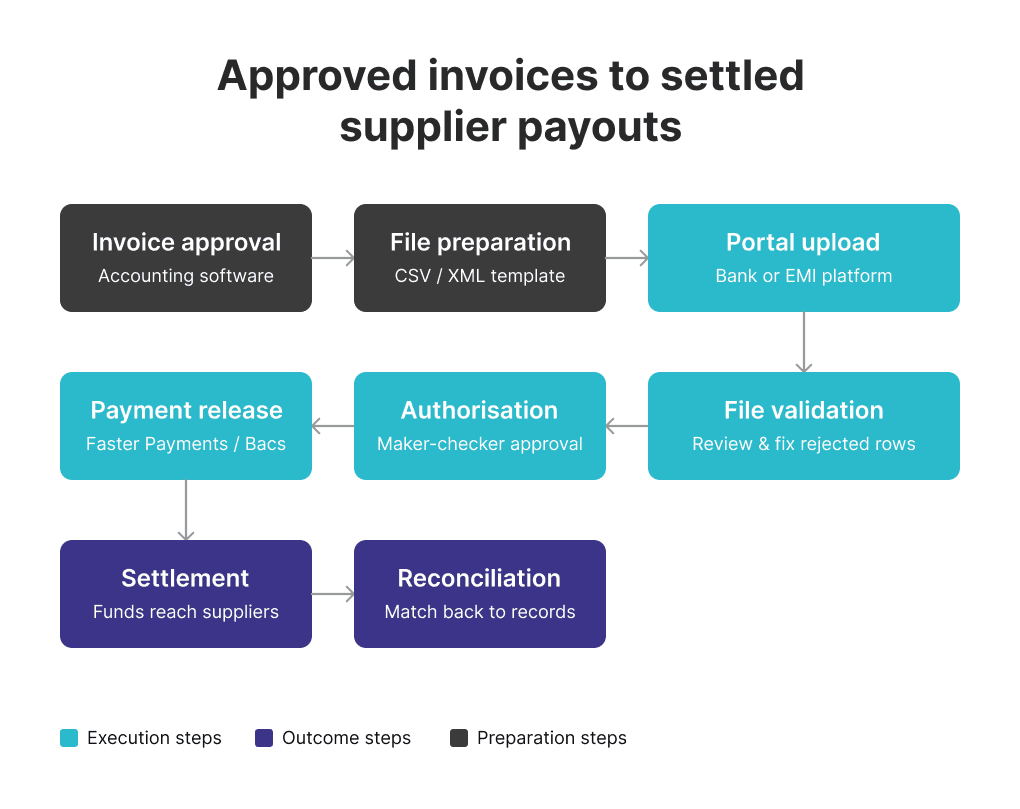
Diagram showing the end-to-end flow from accounting software or spreadsheet export, through CSV preparation and portal upload, to validation, approval, and settlement via UK payment rails.

Why Do Businesses Move from Manual Entry to Batch Payment File Uploads?

Businesses move to batch uploads because manual payment entry slows payout cycles, creates keying errors, and weakens auditability — particularly as supplier volume grows.

If you pay the same suppliers every week, the real gain is not just speed. It is control: one validated file, one approval workflow, one audit trail, and fewer opportunities for payment data to break between invoice approval and release.

Recurring batch uploads also reduce the time cost of repetitive runs. A finance team managing a weekly 30-supplier settlement cycle can maintain a validated template file, update amounts and references, and reuse the structure — rather than re-entering every beneficiary each cycle. For a UAE parent company paying UK suppliers in GBP, the ability to upload a clean GBP file and route it via a multi-currency EMI account without re-entering UK banking details each time is an operational gain, not just a convenience.

The move from one-by-one entry to structured file upload also strengthens approval flows: instead of reviewing individual payments mid-process, the finance lead reviews the full batch before any authorisation step. For businesses subject to audit requirements or internal controls, this is a material operational improvement.

Which Payment Rails and Account Types Affect UK Batch Supplier Payments?

UK file-upload workflows depend on the payment rail and account structure behind the upload — not just the CSV itself. Knowing which rail a payment moves through determines timing, limits, and operational planning.

Faster Payments

Faster Payments is the dominant rail for domestic UK supplier payments. Pay.UK confirms the system operates continuously — 24 hours a day, 365 days a year. Domestic GBP payments sent over Faster Payments can settle near-instantly, but actual release timing still depends on the provider's controls, transaction limits, and any fraud or compliance checks the provider applies. Providers are permitted under FCA guidance to delay settlement where they reasonably suspect fraud or dishonesty.

Bacs

Bacs Direct Credit operates on a three-working-day cycle and is widely used for employee salaries, recurring direct debits, and high-volume supplier programmes where predictable settlement timing matters more than speed. Bacs submissions must meet specific cut-off windows, and the three-day cycle is fixed. It is not suitable for urgent supplier payments.

Cross-border payment execution

For EUR supplier payments, the identifiers required depend on the provider and destination corridor. In standard SEPA Credit Transfer cases, IBAN is the primary identifier; some providers or non-SEPA corridors may also request BIC or SWIFT routing details, but BIC is not a universal SEPA requirement for standard credit transfers. SWIFT — a secure financial messaging network rather than a payment scheme — is used for cross-border instructions outside SEPA corridors, including payments to non-European suppliers.

EMI accounts and UK payment rails access

FCA-regulated EMIs provide business payment infrastructure and multi-currency accounts that can access UK payment rails, including Faster Payments, without operating under a traditional banking licence. Critically, per FCA guidance, EMIs must safeguard relevant client funds — but safeguarded funds are not covered by the FSCS in the same way as deposits held at a regulated bank. Businesses choosing between an EMI account and a traditional bank account should understand that distinction when evaluating their account structure. EQWIRE's How We Protect Your Money page explains how safeguarding works in practice. For businesses outside the UK using UK payment rails through EMI infrastructure, see GBP Faster Payments for Offshore Company.

What File Formats Are Accepted for Batch Supplier Payments UK EMI Workflows?

CSV is the most common format, but accepted file types and required fields differ by provider, payment type, and account setup — there is no single UK-wide standard.

Understanding exactly what the destination platform accepts is a prerequisite for building a repeatable file workflow.

CSV (Comma-Separated Values) is the default for most SMB and mid-market workflows and is supported across the widest range of UK providers and EMIs. However, column structure, field naming conventions, and mandatory fields differ between platforms. A CSV built for one portal will not necessarily import cleanly into another.

XML is more common in enterprise bank environments and structured cross-border payment workflows. Revolut Business supports CSV, XML, and BACS-format files for local UK bulk payments, with up to 1,000 entries per file.

BACS files follow a format governed by Pay.UK and are used for direct debit and credit workflows, particularly for payroll and high-volume supplier programmes routed through the Bacs network.

Provider-specific templates:

  • Wise supports CSV and XLSX batch payment templates.

  • Currencycloud uses a CSV-based bulk upload with multi-level authorisation.

  • HSBCnet and Santander Connect publish detailed CSV import specifications for their respective portal environments.

In practice: A finance team migrating from one bank to an EMI — or switching between UK providers — should download and validate the new provider's template before the first live run. Template fields that were optional in one system may be mandatory in another, and a missing column can cause the entire file to fail.
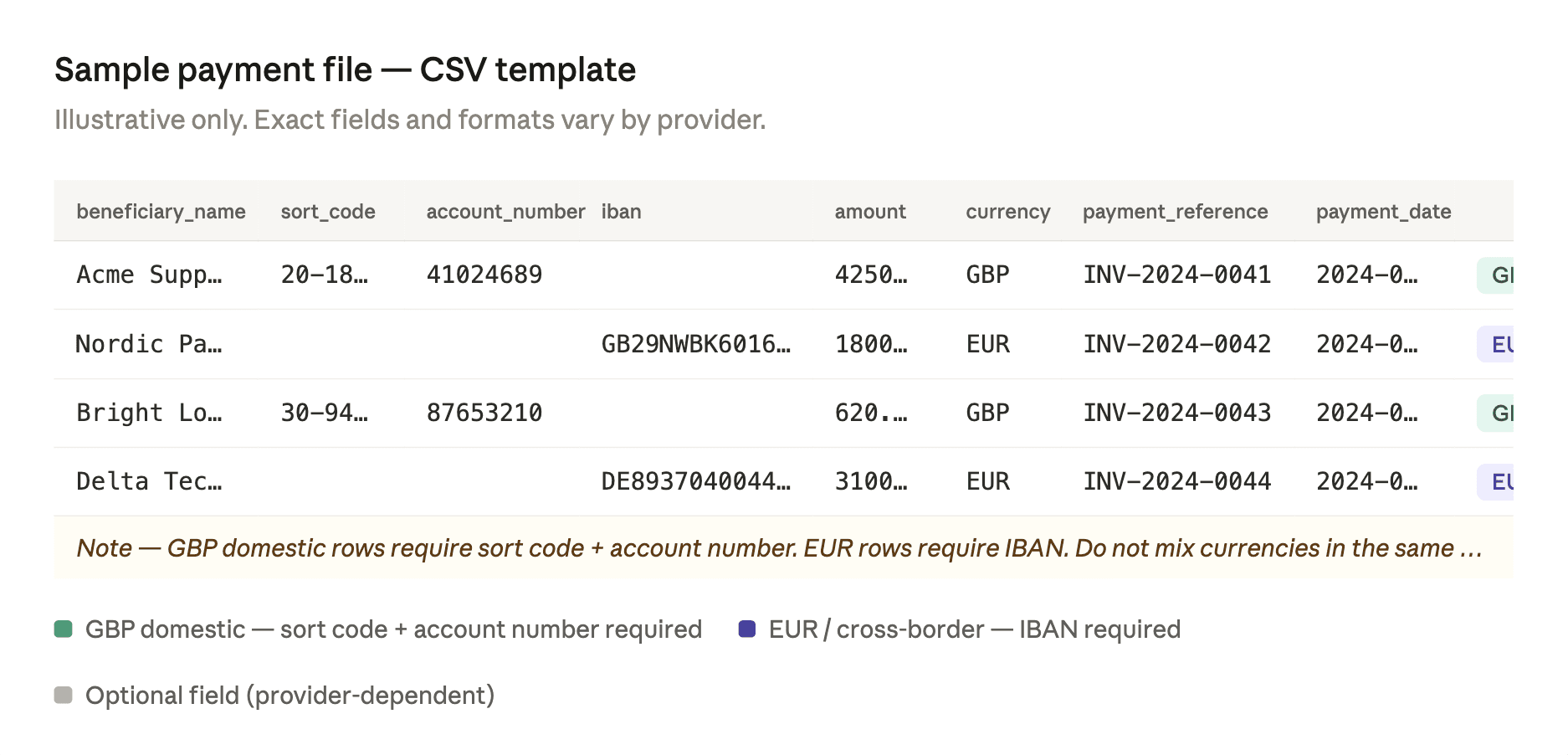
Sample CSV layout with typical required fields highlighted: beneficiary name, sort code, account number, IBAN, amount, currency, payment reference, and payment date — with a note that exact formats and mandatory fields vary by provider.

Step-by-Step: How to Upload a CSV File to Pay UK Suppliers via Faster Payments

The process for a batch CSV upload through a UK bank or EMI portal follows a consistent sequence, though validation rules and approval mechanics vary by platform.

  1. Finalise approved supplier payouts. Confirm which invoices or recurring payouts are due in this cycle. Amounts, payment dates, and beneficiary details should be signed off before the file is built — not during it.

  2. Download the correct payment template from the provider portal. Do not adapt a template from a different provider. Verify the template version is current and enabled for your account.

  3. Populate beneficiary and payment fields. For GBP domestic payments: beneficiary name, sort code, account number. For EUR or international: IBAN, and BIC/SWIFT where required by the provider or corridor. Include payment amount, currency, and a unique payment reference per row.

  4. Check currency, references, and payment dates. Verify currencies match the correct account balance, each row has a unique and complete reference, and payment dates fall on valid working days for the relevant rail.

  5. Upload the file into the provider portal. Use the designated bulk upload or payment import section. On some platforms — including HSBCnet — file-upload capability must be separately enabled and authorised before it becomes available.

  6. Review parsed entries and fix rejected lines. Most portals display a validation screen after upload. Review flagged rows — invalid sort codes, formatting issues, missing fields, duplicate entries — and correct or remove them before proceeding.

  7. Complete the approval or authentication step. Depending on the provider, this may involve a single authoriser, a maker-checker sequence, or a multi-user approval aligned to the organisation's transaction limits and signatory rules. Currencycloud adds a separate confirmation step; HSBCnet requires authorised users in line with the account signature matrix.

  8. Release and monitor payment status. Submit the batch and track individual payment status. Retain the batch reference and any confirmation output for reconciliation.

Approval matrix note: Before the first batch run, confirm with the account administrator which user roles have upload access, review access, and release authority. In a maker-checker setup, the person who uploads the file typically cannot also be the person who authorises it.

How Do GBP and EUR Supplier Batch Workflows Change the File Setup?

Once GBP and EUR sit in the same operating cycle, the payment file and approval logic usually become more complex — typically requiring separate files by currency and route.

Domestic GBP supplier payments route over Faster Payments using sort code and account number. EUR payments require a different structure — IBAN for SEPA, and in some cases BIC or SWIFT routing for non-SEPA destinations. Combining both in a single payment file often causes validation failures, or the platform routes all rows through the same rail regardless of currency, which can result in misdirected payments or unexpected fees.

Accounting software adds another layer. Xero treats supplier batch payment files and employee payroll as separate operational flows, and explicitly confirms that foreign currency transactions are not available in batch payments — only the organisation's base currency is supported. Finance teams exporting payment files from Xero should verify what the platform produces before assuming a multi-currency batch export will be accepted by the payment portal.

In practice: Most finance teams running recurring GBP and EUR supplier cycles maintain separate files by currency — one GBP file routed via Faster Payments, one EUR file handled through SEPA or SWIFT. This adds a step to the workflow but removes ambiguity at validation, simplifies approval, and keeps reconciliation cleaner.
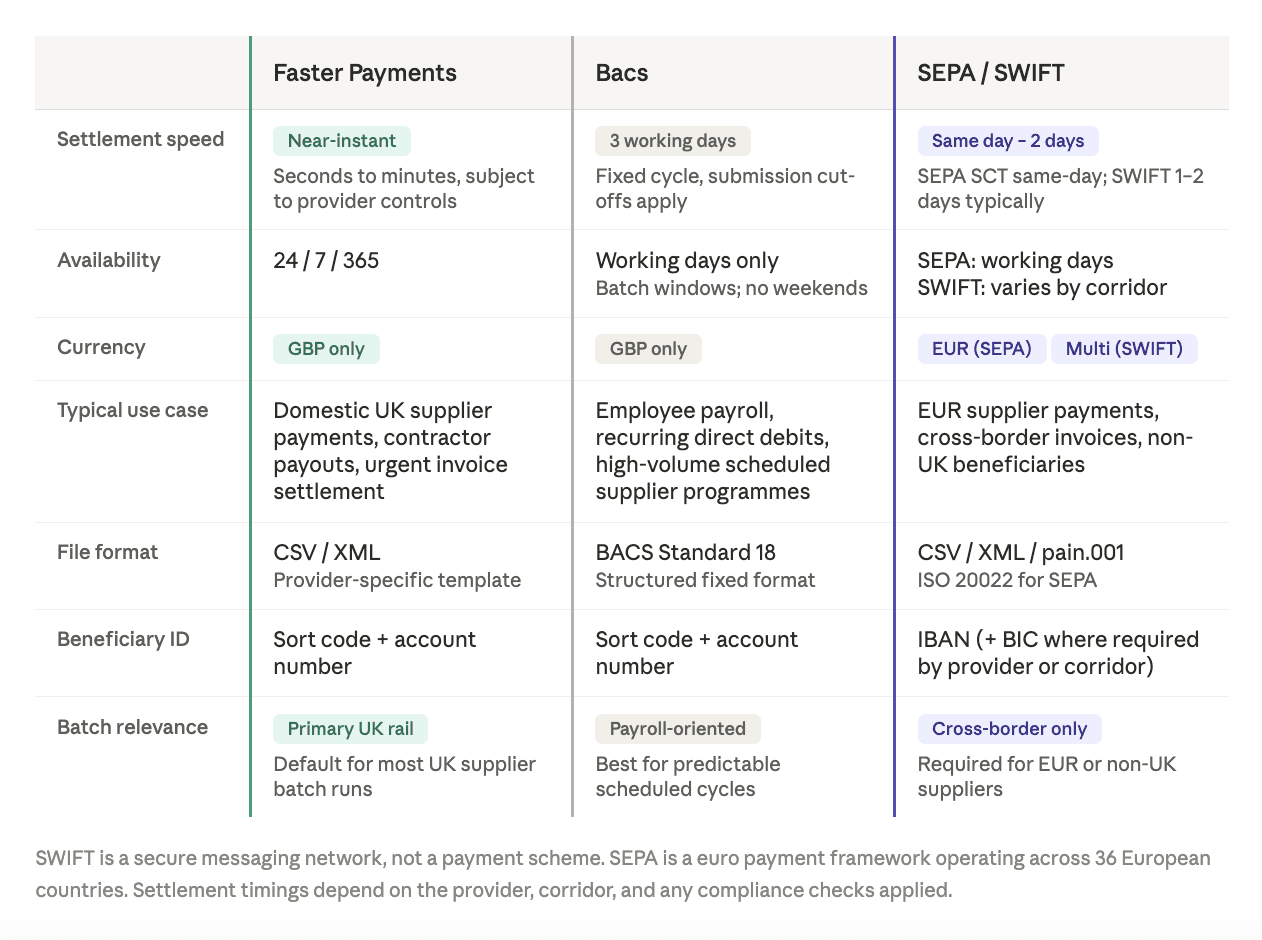
Side-by-side table comparing Faster Payments, Bacs, and cross-border rails (SEPA/SWIFT) across speed, typical use case, settlement timing, currency, and supplier-batch relevance.

What Errors Delay a Bulk Supplier Payment File Upload?

Most upload failures come from formatting, beneficiary-data, currency, or approval problems — not the upload itself.

Error

Why it happens

How to fix it

Who owns it

Invalid sort code or account number

Transposition error in manual entry

Re-validate against the supplier's bank confirmation

AP team

IBAN formatting error

Wrong length, missing check digits

Verify against the supplier's invoice or use an IBAN checker

AP team

Missing payment reference

Row left blank or auto-generated reference truncated

Confirm reference field is populated and within character limits

File preparer

Duplicate row

Same beneficiary, amount, and reference entered twice

Add duplicate detection to the review step before upload

Finance lead

Unsupported characters

Special characters in name or reference fields

Strip non-standard characters from all text fields

File preparer

Mixed currencies in wrong template

GBP and EUR rows combined in a single-currency file

Separate files by currency before upload

Finance lead

Date format mismatch

DD/MM/YYYY vs MM/DD/YYYY between regions

Match the date format explicitly required by the provider's template

File preparer

Maker-checker bottleneck

Authoriser unavailable at submission time

Confirm approver availability before the payment cut-off

Finance/Ops lead

Insufficient funding

Currency balance too low at release time

Verify balances before upload, not after

Treasury / Finance

Confirmation of Payee is also relevant here. Pay.UK's CoP service is an account name-checking tool designed to reduce misdirected payments and APP fraud on UK domestic transfers. Where available through the provider, running a CoP check on new or amended beneficiary details before submitting a batch adds a material layer of protection.

Provider file and entry limits vary. Revolut Business sets a 1,000-entry cap per local UK bulk payment file. Other providers apply different limits. Check the provider's documentation before building a file that exceeds those constraints.

Increasing payout volume or frequency?

Before scaling, verify whether the current account setup supports review screens, role-based approvals, payment-file validation, and multi-currency routing.
Book a supplier payments workflow review →

We'll assess your current CSV format, approval flow, GBP/EUR routing, and reconciliation gaps.

How to Run Bulk Supplier Payments via CSV Upload Without Reconciliation Friction

The upload is only half the workflow. What happens after submission determines whether the batch run is genuinely efficient or simply moves manual effort downstream.

Reference consistency is the foundation. Each payment row should carry a unique, human-readable reference connecting it to a specific invoice or payout record in the accounting system. Generic references — "payment," "invoice," "May" — create matching problems that require manual investigation after settlement.

Status tracking after release varies by provider. Some portals return real-time payment confirmation at the individual-transaction level; others batch-update status in scheduled windows. Finance teams should understand their provider's reporting model before committing to reconciliation timelines with suppliers.

Rejected-line handling requires a defined process before the first batch runs. When a payment in a batch fails post-submission — returned payment, invalid account, or insufficient funds — there must be a clear owner, a re-submission path, and a way to flag the gap in the accounting record. Without this, rejected lines accumulate and create reporting discrepancies.

Approval logs should be retained for audit and compliance. Most platforms maintain records of who uploaded, reviewed, and authorised each batch. For businesses subject to audit, internal controls, or regulatory requirements, these logs are material records — not just operational history.

Recurring templates reduce preparation time for regular supplier runs. Maintaining a validated template with standing beneficiary data and updating only amounts, references, and dates keeps each cycle short and reduces the risk of re-entering errors from scratch.

Pre-Upload Checklist for a Bulk Supplier Payment File UK Business Account

Before submitting any batch file:

  • [ ] Correct file template or format selected for the specific provider and payment type

  • [ ] All supplier details validated — sort codes, account numbers, IBANs verified against supplier records

  • [ ] Confirmation of Payee run for new or changed beneficiaries where the provider supports it

  • [ ] Payment rail confirmed — Faster Payments, Bacs, SEPA, or SWIFT as appropriate

  • [ ] Currencies grouped correctly — separate files by currency where required

  • [ ] Sufficient funding available in the correct currency balance at time of release

  • [ ] Approval roles assigned and authorisers confirmed available before cut-off

  • [ ] File-upload permissions active at the account level

  • [ ] Payment dates confirmed as valid working days for the relevant rail

  • [ ] Test batch completed if using a new template, provider, or workflow

  • [ ] Rejected-line process agreed — owner, re-submission path, accounting flag

Next Steps: Choosing Payment Infrastructure for Recurring Supplier Runs

At a certain volume or frequency, manual uploads or single-currency workflows start to show operational strain: batch runs that take longer than they should, recurring validation errors on the same fields, difficulty managing GBP and EUR supplier payments in the same cycle, and no clear visibility into payment status after submission.

Modern FCA-regulated EMI infrastructure — multi-currency accounts with domestic and international payment rails, UK Faster Payments connectivity, and role-based approval controls — addresses most of these friction points without requiring the traditional UK banking relationship. For global businesses paying UK suppliers from overseas, the relevant questions are account structure, file format support, approval workflow, and multi-currency capability. Additional context on cross-border supplier payment operations is available at How to Pay UK Suppliers from a UAE Business Account.

Who this is for:

  • Businesses running recurring UK supplier payment cycles in GBP and EUR

  • Finance teams managing AP batch runs, contractor payouts, or bulk supplier settlements

  • Global companies using UK-facing payment infrastructure through EMI or multi-currency accounts

  • Operations leads looking to reduce manual entry, strengthen approval controls, and improve reconciliation visibility

EQWIRE provides multi-currency accounts, GBP and EUR payment infrastructure, and UK Faster Payments access for global businesses managing recurring supplier payment operations. EQWIRE is FCA-regulated and operates under safeguarding requirements applicable to e-money institutions.

Running recurring UK supplier payments across GBP and EUR?

Book a supplier payments workflow review →
We'll review your current file format, approval flow, currency routing, and reconciliation gaps — and confirm whether the current account structure fits the payout volume.

Conclusion

Batch payment file upload for supplier payroll UK workflows replace manual entry with a structured, repeatable process: prepare a validated file, upload it, review the entries, authorise the batch, and reconcile the results. Done correctly, that reduces keying errors, shortens payout cycles, and creates a cleaner audit trail for finance teams running regular supplier payment operations.

The practical challenges are operational, not conceptual. Accepted file formats vary by provider. Payment rails — Faster Payments, Bacs, SEPA, SWIFT — determine settlement speed and routing requirements. Supplier payment runs and employee payroll follow different workflows in most platforms. Multi-currency AP batches require separate file logic and dedicated currency balances. Confirmation of Payee protects against misdirected payments on domestic UK transfers. And reconciliation friction tends to surface not at upload, but downstream, when references are missing and rejected lines have no clear owner.

Addressing those points before increasing batch volume — with the right account structure, validated file templates, role-based approval controls, and a rejected-line process in place — is where the operational efficiency actually comes from.

FAQ

How to upload a CSV file to pay UK suppliers via Faster Payments?

Download the correct payment template from the provider portal. Populate the required fields: beneficiary name, sort code, account number, amount, currency, a unique payment reference, and payment date. Upload the file through the bulk payment or payment import section of the portal, review the parsed entries for validation errors, complete the required approval or authentication step, and release the batch. Per Pay.UK, Faster Payments operates continuously, but actual settlement timing depends on the provider's controls and any compliance checks applied.

What file formats are accepted for batch supplier payments UK EMI?

Accepted formats vary by provider and payment type. CSV is the most widely supported, but some platforms also accept XML, BACS-format files, or proprietary spreadsheet templates. Revolut Business supports CSV, XML, and BACS for local UK payments. Wise supports CSV and XLSX. Always use the format and template specified by the specific provider — there is no UK-wide standard.

What is the batch payment file format for UK supplier payroll EMI account?

The correct format depends on the EMI or bank provider. In most cases, the file must include beneficiary name, account identifiers (sort code and account number for GBP domestic; IBAN for EUR SEPA payments), payment amount, currency, a unique payment reference, and value date. Exact field requirements and column structure differ by provider. Download the provider-specific template and validate it before building any recurring workflow.

How to run bulk supplier payments via CSV upload UK?

Approve the invoices or recurring payouts, populate the provider's payment file template with validated beneficiary and payment data, upload through the payment portal, review parsed entries and fix rejected rows, complete the required authorisation step, release the batch, and reconcile payment status against accounting records once settlement is confirmed.

Can supplier batch payments UK GBP EUR EMI setups support both currencies in one operating workflow?

Some multi-currency EMI setups support both GBP and EUR supplier payments within the same account infrastructure, but the file structure, currency balances, and routing logic typically need to be managed separately by currency. Mixing GBP and EUR rows in a single payment file often causes validation failures. Most finance teams running regular multi-currency supplier batches maintain separate files by currency and reconcile each against the relevant balance.

ornament

Power your payments
with EQWIRE

Create your account in minutes and experience smooth, secure global payments.

The new standard in global payments — seamless, compliant, and built for the digital era.

EQWIRE is a UK Electronic Money Institution (EMI) authorised, regulated and supervised by the Financial Conduct Authority (EQWIRE UK Limited, the firm reference number is 901100). Whilst Electronic Money products are not covered by the Financial Services Compensation Scheme (FSCS) your funds will be held in one or more segregated accounts and safeguarded in line with the Electronic Money Regulations 2011 – for more information please see How We Protect Your Money page.


For data protection purposes, EQWIRE is registered with the Information Commissioner’s Office as an independent data controller. EQWIRE’s registration reference number is ZA805830.


Copyright 2026 EQWIRE. All rights reserved. EQWIRE name and logo are registered EU trademarks (registration numbers are 018396653 and 018396654). EQWIRE is the trade name of EQWIRE UK Limited, a company registered in England (company registration number is 12533411).


Developed by wsa.design

The new standard in global payments — seamless, compliant, and built for the digital era.

EQWIRE is a UK Electronic Money Institution (EMI) authorised, regulated and supervised by the Financial Conduct Authority (EQWIRE UK Limited, the firm reference number is 901100). Whilst Electronic Money products are not covered by the Financial Services Compensation Scheme (FSCS) your funds will be held in one or more segregated accounts and safeguarded in line with the Electronic Money Regulations 2011 – for more information please see How We Protect Your Money page.


For data protection purposes, EQWIRE is registered with the Information Commissioner’s Office as an independent data controller. EQWIRE’s registration reference number is ZA805830.


Copyright 2026 EQWIRE. All rights reserved. EQWIRE name and logo are registered EU trademarks (registration numbers are 018396653 and 018396654). EQWIRE is the trade name of EQWIRE UK Limited, a company registered in England (company registration number is 12533411).


Developed by wsa.design

The new standard in global payments — seamless, compliant, and built for the digital era.

EQWIRE is a UK Electronic Money Institution (EMI) authorised, regulated and supervised by the Financial Conduct Authority (EQWIRE UK Limited, the firm reference number is 901100). Whilst Electronic Money products are not covered by the Financial Services Compensation Scheme (FSCS) your funds will be held in one or more segregated accounts and safeguarded in line with the Electronic Money Regulations 2011 – for more information please see How We Protect Your Money page.


For data protection purposes, EQWIRE is registered with the Information Commissioner’s Office as an independent data controller. EQWIRE’s registration reference number is ZA805830.


Copyright 2026 EQWIRE. All rights reserved. EQWIRE name and logo are registered EU trademarks (registration numbers are 018396653 and 018396654). EQWIRE is the trade name of EQWIRE UK Limited, a company registered in England (company registration number is 12533411).


Developed by wsa.design