•
•
How to Receive Adyen Payouts Without Forced FX Conversion
Quick answer: To avoid FX conversion on Adyen payouts, confirm the payout currency is supported for your acquiring region and payment method, add one payout account per currency on the merchant account, and use a receiving account that holds those currencies without auto-conversion. If a currency has no payout account, Adyen can fall back to the primary settlement currency.
Introduction
Collecting GBP and EUR through Adyen does not automatically mean receiving payouts in those currencies. Without the correct payout-account structure in place, Adyen may settle all payouts into a single primary settlement currency — converting GBP to EUR, or EUR to GBP, before funds reach the merchant's bank.
This is not a platform error. It is expected behaviour: when a currency has no configured payout account, Adyen can route that payout to the primary settlement currency instead. The result is avoidable FX conversion on every cycle, with corresponding costs and reconciliation complications.
This article explains how to receive Adyen payouts without forced FX conversion. It covers the Adyen-side configuration, the receiving-account checks, and the reconciliation steps finance teams should run before going live. It does not cover DCC — a separate shopper-facing product — or Adyen's marketplace currency-conversion pilot, which is a distinct, limited-availability feature for marketplace platforms.
Check This First
Before changing any settings, run this two-minute diagnosis:
Symptom | Likely cause | Fix |
|---|---|---|
GBP sales settling as EUR | No GBP payout account on the merchant account | Add GBP payout account in Customer Area |
EUR sales settling as GBP | No EUR payout account, EUR is primary currency | Add EUR payout account in Customer Area |
Both currencies settling correctly in Adyen, but single currency arriving at bank | Receiving account auto-converts on arrival | Review account structure with the receiving institution |
Conversion persisting after payout accounts added | Primary settlement currency mismatch, or payment-method settlement support gap | Contact Adyen support; check payment-method support table |
Unexpected cross-border payout fee | Currency supported only via cross-border, not local payout | Verify local payout availability for the acquiring region |
Can a Business Receive Adyen Payouts Without Forced FX Conversion?
Yes — but only when three conditions align simultaneously.
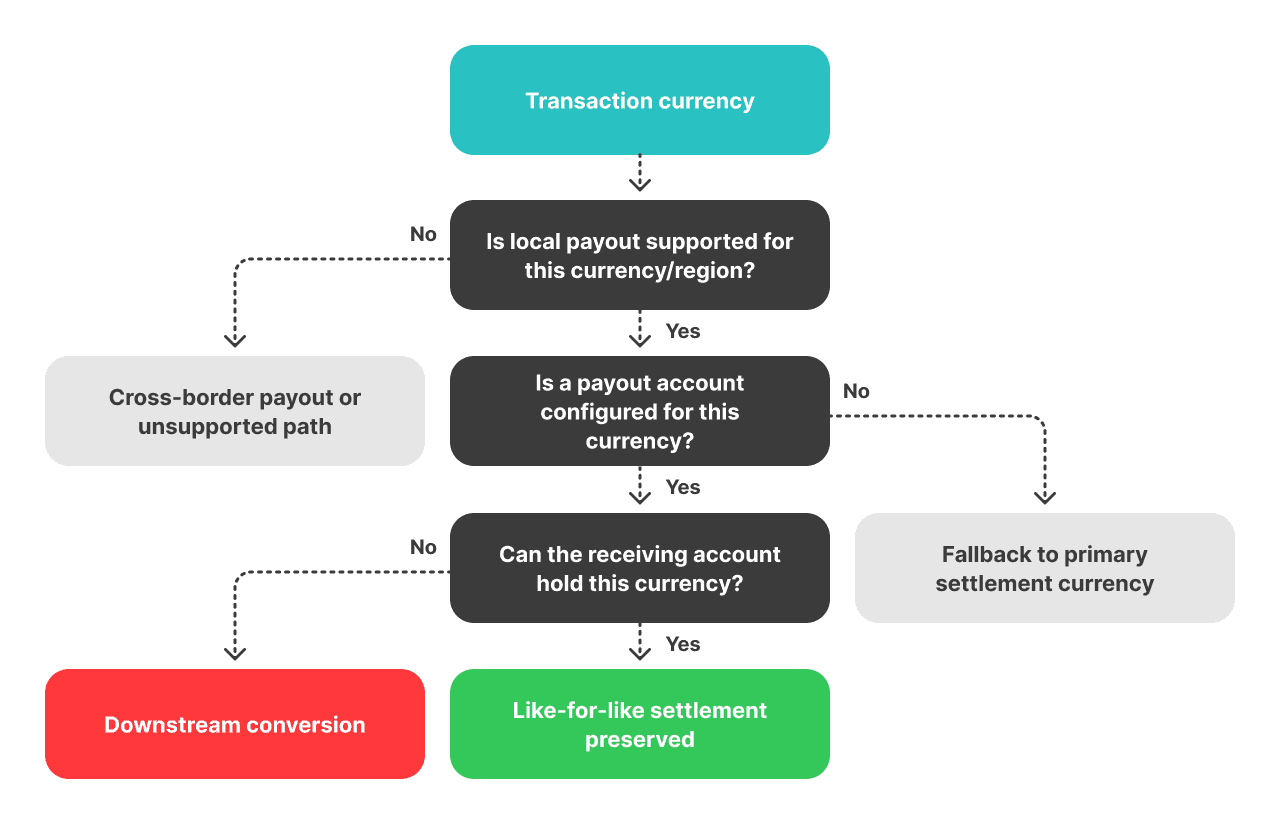
Adyen calls this Like4Like (like-for-like) settlement. For a given transaction, Adyen will pay out in the transaction currency if: (1) that currency is supported for local payout in the merchant's acquiring region, (2) the payment method used supports settlement in that currency, and (3) a payout account for that currency has been configured on the merchant account.
If any condition is missing, Adyen does not queue the funds for later. It can convert them into the primary settlement currency and pay out from there.
A concrete example: a UK merchant with EUR as the primary settlement currency has configured both a GBP payout account and an EUR payout account. GBP card transactions settle in GBP; EUR card transactions settle in EUR. Now remove the GBP payout account. GBP transactions will convert to EUR before payout — not because Adyen has changed how it processes payments, but because GBP no longer has a destination.
Note on payment-method support: card-scheme settlement support can override payout-currency intent for specific payment methods. Verify per payment method, not just per currency. Adyen's supported currencies documentation lists both.
Why Does Adyen Convert Some Payouts into the Primary Settlement Currency?
Adyen's help documentation is direct: currencies without payout accounts are transferred to the primary settlement currency.
Two terms that frequently cause confusion:
Payout currency — the currency in which Adyen sends funds to the merchant's receiving account.
Primary settlement currency — the fallback currency Adyen uses when no payout account exists for a given transaction currency.
A merchant may have multiple transaction currencies active and still see all payouts in a single currency. The reason is usually that only one payout account — the primary — has ever been configured, and every other transaction currency is quietly falling back to it.
A second layer of the same problem can exist on the receiving side. Some bank accounts and EMI products may auto-convert inbound foreign currency depending on the account structure. When this happens, GBP arrives at Adyen correctly, Adyen pays out in GBP correctly, but the receiving account converts it to EUR on arrival. The financial outcome is identical to a misconfigured Adyen setup — but the cause and fix are different.
How to Configure an Adyen Settlement Account for GBP and EUR (UK Setup)
Adyen pays out at the merchant-account level. Configuration must be done per merchant account, not once globally. For businesses with multiple merchant accounts — different legal entities, brands, or markets — each account requires its own payout-account review.
Check the UK payout support table for GBP and EUR
The Adyen supported payout currencies table lists availability by acquiring region. As of March 2026, both GBP and EUR appear with local payout support for UK merchant accounts — meaning payouts route via Faster Payments (GBP) or SEPA (EUR) rather than through a cross-border SWIFT flow. This matters for speed and cost. Verify this table directly before configuration, as Adyen's support matrices are updated periodically.
Add a payout account for each currency in Customer Area
Each payout currency requires its own payout account in Customer Area under Finance → Payout accounts. Only one payout account per currency is permitted on a given merchant account. To add a GBP payout account, provide the sort code and account number of a receiving account that holds GBP. For EUR, provide an IBAN for an account with genuine EUR balance capability.
Adyen's documentation confirms that the same bank details can be reused for multiple payout currencies if the receiving account is a genuine multi-currency account. This means a single account can receive GBP and EUR from Adyen under separate payout-account configurations, as long as both currencies are actually held in separate balances at the receiving institution.
When the primary settlement currency also needs to change
Adding payout accounts resolves most cases. If conversion persists after payout accounts are correctly added, the primary settlement currency may need updating — for example, if it was historically set to a currency the merchant no longer wants as a fallback, or if it does not match the merchant's primary operating currency.
Changing the primary settlement currency is not available in Customer Area. It requires contacting Adyen support directly. Submitting this request before confirming payout-account coverage is the most common sequencing mistake.
[Visual: UK GBP/EUR Payout Support Table — A simplified two-row excerpt from Adyen's UK payout support matrix, showing GBP and EUR with payout type (local), relevant local rail (Faster Payments / SEPA), and availability note. Not a full reproduction of the Adyen table.] Alt text: Simplified excerpt of Adyen's UK payout support matrix showing GBP local payout via Faster Payments and EUR local payout via SEPA, current as of March 2026.
How to Stop Adyen Converting GBP to EUR on Settlement: Step-by-Step
Work through these steps in order. Reversing the sequence — or jumping to a support ticket before checking payout-account coverage — is the most common reason the problem persists.
Step 1 — Confirm GBP local payout support for the acquiring region and payment methods. Check the Adyen supported currencies table. Verify that GBP local payout is available for the merchant account's acquiring region and for the specific payment methods in use. This is a prerequisite. Without it, payout-account configuration alone will not produce like-for-like settlement.
Step 2 — Add a GBP payout account in Customer Area. Navigate to Finance → Payout accounts and add a GBP payout account linked to a receiving account that holds GBP. If no payout account exists for GBP, this is the most likely root cause.
Step 3 — Confirm the receiving account holds GBP without auto-conversion. A GBP payout account points to a specific receiving account. Verify with the receiving institution whether GBP credits are held in a GBP balance or automatically converted to a base currency on arrival. This step must happen independently of Adyen settings.
Step 4 — Review the primary settlement currency only if conversion persists. If GBP conversion continues after steps 1–3 are complete, contact Adyen support to review whether the primary settlement currency needs updating. This step should not be the first action taken.
💡 Is your receiving account holding GBP and EUR in separate balances — or converting on arrival? Correctly configuring Adyen payout accounts solves the Adyen-side issue. But if the receiving account auto-converts GBP to EUR on arrival, the FX cost moves downstream rather than disappearing. Confirm your account structure handles both sides before making live settlement changes. Review your receiving account setup →
When Is a UK Multi-Currency Receiving Account the Right Infrastructure?
Once Adyen is configured for like-for-like settlement, the question becomes whether the receiving account can preserve what Adyen is now correctly sending. This is a separate decision from Adyen configuration, and it applies only after the payout-account setup has been confirmed.
Can a business hold Adyen payouts in original currency without conversion?
Yes — if the receiving account holds that currency in a segregated balance rather than applying auto-conversion. The full chain must work: Adyen settles in GBP, the receiving account accepts GBP and holds it as GBP, and the balance remains in GBP until the business decides to convert or deploy it. If any part of the chain auto-converts, the business ends up with a converted balance regardless of how Adyen was configured.
What a UK FCA-authorised EMI changes operationally
An Electronic Money Institution (EMI) is not a bank. This distinction matters for finance and compliance teams. EMIs in the UK are regulated under the Electronic Money Regulations and are required to safeguard client funds by holding them separate from the institution's own money. Safeguarded funds are not the same as FSCS-protected bank deposits — there is no government guarantee of the same type, and the protection mechanism works differently.
What an EMI can offer that some traditional bank products do not is genuine multi-currency balance holding across GBP, EUR, and USD in a single account structure, alongside local rail access for receiving and sending. For businesses receiving GBP and EUR via Adyen and then deploying those funds for supplier payments, payroll, or further distribution, an EMI-based structure can remove repeated conversion cycles — but only if the account genuinely holds currencies separately rather than converting to a single base currency on arrival.
EQWIRE is listed by the FCA as an authorised electronic money institution (FRN 901100) and supports GBP, EUR, and USD balance holding alongside safeguarded funds. In the context of Adyen payout configuration, EQWIRE functions as a receiving infrastructure layer: a business can use it to receive and hold Adyen-settled GBP and EUR once Adyen is correctly configured on the merchant side. EQWIRE does not modify Adyen settings or operate within the Adyen platform.
Who this setup fits and who it does not. A UK multi-currency EMI account suits e-commerce businesses, SaaS platforms, and service businesses that collect meaningful GBP and EUR volume, want to manage conversion timing, and need local rail access for both receiving and sending. It is not suited to businesses that need FSCS deposit protection, require physical banking services, or operate in corridors the EMI does not support — verify currency and jurisdiction coverage before any decision.
Feature | FCA-authorised EMI | Traditional bank |
|---|---|---|
Fund protection type | Safeguarding of relevant funds. Client funds must be kept separate from the firm's own operational money. This is not FSCS deposit protection. | FSCS deposit protection may apply to eligible deposits held with a UK-authorised bank, building society, or credit union, up to £120,000 per eligible depositor per authorised firm (since 1 Dec 2025). |
Multi-currency balance holding | Often designed to support multiple currency balances within one product or operating environment. Exact currency support and account structure vary by provider. | Varies by bank and product. Some banks offer multi-currency capabilities, while others rely on separate currency accounts or conversion into a base currency. |
Local rail access | May support access to local payment rails such as Faster Payments and SEPA, either directly or indirectly depending on the provider's setup and market coverage. | Often supports domestic and international payment rails, but exact access depends on the bank, jurisdiction, and account/product type. |
Regulated status | Regulated under the UK electronic money / payment services regime as an FCA-authorised EMI. | Authorised as a deposit-taking institution / bank under the UK banking regime. |
Typical use case | Cross-border operations, multi-currency treasury visibility, PSP settlement collection, and operational payments infrastructure. | Everyday banking, deposit holding, lending, treasury services, and broader banking relationships. |
Factual comparison of a UK FCA-authorised EMI and a traditional bank across fund protection, multi-currency holding, local rail access, and regulated status — for informational purposes only.
How to Test and Reconcile the Setup Before Going Live
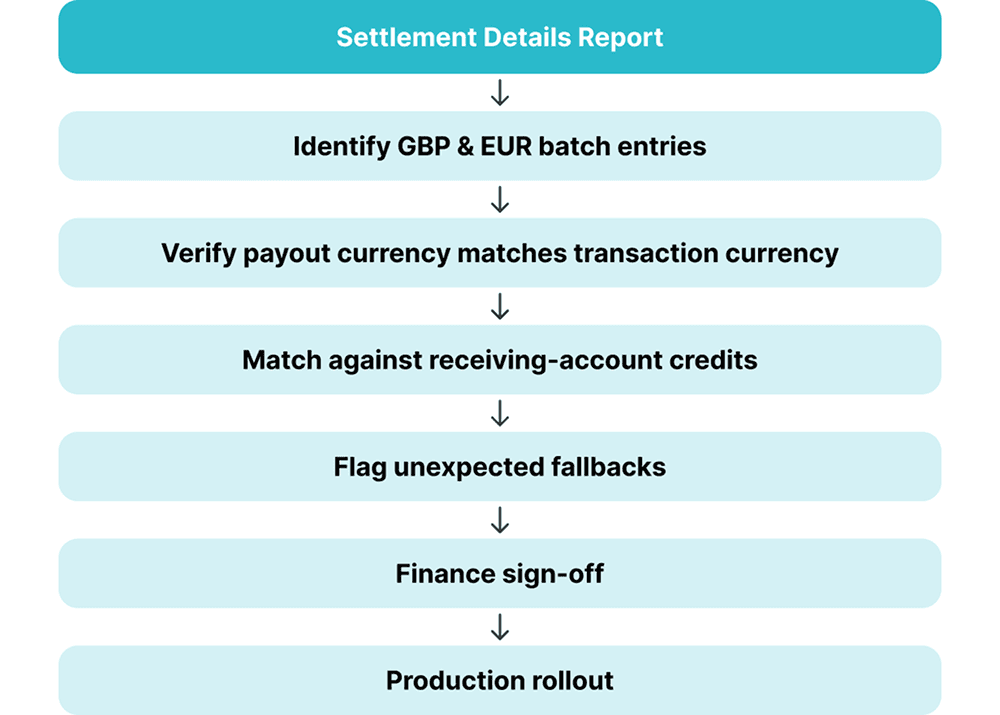
Configuration changes to payout accounts should not go live without a test cycle. Adyen generates a Settlement details report when each payable batch closes. This report is the primary tool for verifying that payout logic is working as intended — not the bank statement, which shows only the net credit after Adyen has already processed the batch.
What to check in the Settlement details report
After making payout-account changes, confirm: GBP transactions show GBP as the payout currency, EUR transactions show EUR, and no transactions are routing through the primary settlement currency unexpectedly. A single report from a GBP-only test batch and one from an EUR-only test batch, reviewed alongside the matching receiving-account credits, will confirm or refute the configuration.
How to run a low-risk GBP/EUR test cycle
Process a small number of GBP transactions and a small number of EUR transactions, close the payable batch, and match the Settlement details report against receiving-account credits. GBP credits should appear as GBP in the receiving account; EUR credits should appear as EUR. Only after this reconciliation is confirmed should the configuration be treated as production-ready.
How to spot fallback-currency issues early
If the Settlement details report shows a payout currency that does not match the transaction currency, the transaction was handled either as a cross-border payout or as a primary-settlement-currency fallback. Cross-border payouts for genuinely unsupported currencies are expected — but they should be budgeted for and not a surprise. Unexpected fallback after payout accounts have been added usually indicates a payment-method settlement support gap or a merchant-account mapping issue, both of which require Adyen support to investigate.
Common Mistakes That Keep Forced FX in Place
Assuming multiple transaction currencies automatically mean multiple payout currencies. Adyen accepting GBP and EUR payments does not mean both are paying out separately. Each requires an explicit payout-account configuration.
Submitting a primary-settlement-currency change request before checking payout-account coverage. In most GBP/EUR conversion cases, a missing payout account is the cause. The support ticket is typically not the right first step.
Using a receiving account that auto-converts on arrival. Correcting Adyen settings and sending funds to an account that converts inbound GBP to EUR produces the same financial outcome.
Confusing DCC with merchant payout settlement. DCC is a shopper-facing conversion choice at checkout. Merchant payout settlement is configured after the transaction, in Customer Area, and involves entirely different settings.
Ignoring payment-method settlement support. A currency can be supported for local payout regionally but not for a specific payment method. Both conditions must be met.
Skipping a reconciliation test after configuration changes. The Settlement details report exists to verify payout logic. Not reviewing it means errors can persist through multiple payout cycles undetected.
Treating local payout and cross-border payout as equivalent in cost and speed. Local payout via Faster Payments or SEPA is typically faster and cheaper than a cross-border SWIFT transfer. The difference affects cash-flow planning.
Next Steps: Preparing the Receiving Infrastructure
Getting Adyen configuration right is step one. Before treating the setup as complete, verify the receiving side as well.
Before going live:
Confirm which currencies the relevant Adyen acquiring region supports for local payout, and which payment methods are in scope.
Map payout accounts by merchant account. Multi-entity businesses must complete this review per merchant account, not once at the company level.
Confirm whether the current receiving account holds GBP and EUR in separate balances, or auto-converts incoming transfers to a base currency.
Run a test reconciliation cycle and review the Settlement details report before shifting full payout volume.
If using an EMI, confirm it is FCA-authorised and review its safeguarding model. Safeguarded funds are not FSCS-protected bank deposits — understand the distinction before making a treasury decision.
For businesses collecting GBP via Adyen and needing to receive and hold it locally, the GBP Faster Payments setup guide for offshore and international businesses covers local receiving infrastructure in more detail. For EUR holding and SEPA reachability, see how offshore companies can open an EUR business account with SEPA access.
💡 Need a receiving account that holds GBP and EUR separately after Adyen settles them? EQWIRE UK Limited is listed by the FCA as an authorised electronic money institution (FRN 901100). It supports GBP, EUR, and USD balance holding, local rail access via Faster Payments and SEPA, and global payouts. Safeguarded funds are not the same as FSCS-protected bank deposits — review how EQWIRE protects your money before making any settlement or treasury decision. Review the multi-currency account structure at eqwire.com →
FAQ
How do I stop Adyen converting GBP to EUR on settlement?
Work through the steps in order. First, confirm GBP local payout is supported for the merchant account's acquiring region and payment methods using Adyen's supported currencies table. Second, add a GBP payout account in Customer Area under Finance → Payout accounts. Third, verify the receiving account holds GBP in a segregated balance rather than auto-converting it. If conversion persists after these steps, contact Adyen support to review the primary settlement currency. Submitting that support request before checking payout-account coverage is the most common sequencing error.
Can I hold Adyen payouts in original currency without conversion?
Yes, if two conditions are met. Adyen must be configured for like-for-like settlement — meaning the currency is supported for local payout in the relevant region, the payment method supports settlement in that currency, and a payout account has been configured. The receiving account must also hold that currency in a segregated balance rather than converting it on arrival. Both conditions must be in place.
What does an Adyen GBP EUR settlement account UK multi-currency EMI setup look like in practice?A UK merchant account with a GBP payout account and a separate EUR payout account, both linked to a UK FCA-authorised multi-currency EMI account that holds GBP and EUR in separate balances. GBP payouts route via Faster Payments; EUR payouts route via SEPA. The finance team controls when and whether to convert between currencies. Safeguarded funds at the EMI are not FSCS-protected bank deposits — the protection mechanism is different, and this distinction matters for treasury and compliance decisions.
How do I configure Adyen settlement to avoid forced FX conversion in a UK setup?
Confirm GBP and EUR both appear in Adyen's UK payout support table with local payout availability. Add a payout account for each currency in Customer Area, linking each to a receiving account that holds that currency. If one receiving account is used for both currencies, confirm it holds GBP and EUR in separate balances rather than applying base-currency conversion. Run a test payout cycle and review the Settlement details report to verify GBP and EUR arrive as separate credits.
Do I need to change the primary settlement currency as well as adding payout accounts?
Not in most cases. For most merchants whose problem is GBP converting to EUR or EUR converting to GBP, the root cause is a missing payout account. Adding the relevant payout account resolves it. The primary settlement currency is relevant when the merchant wants to change the fallback destination for currencies that have no payout account, or when historical configuration creates a mismatch that payout-account additions alone cannot fix. Either way, this change is not self-serve — it requires contacting Adyen support.
Reviewed by
Related Articles

Multi-Currency Account for Property Management Companies: Collect Rents in GBP and EUR

FX-Neutral Settlement: How to Receive Multi-Currency PSP Payouts Without Forced Conversion
Payment Account for Recruitment Agencies: Pay International Contractors in Multiple Currencies
How to Receive PSP Payouts in AED: Adyen, Stripe and PayPal in UAE Dirhams

Power your payments
with EQWIRE
Create your account in minutes and experience smooth, secure global payments.
" height="9.0156px" id="LIcbdboyB" transform="translate(4.987 4.5)" width="9.01562px"/></svg>)