•
•
Batch Payments for UK Businesses: Automate Supplier and Payroll Runs
[aa disclaimer]
Legal Disclaimer: This article is for informational purposes only and does not constitute legal, financial, compliance, or tax advice. Banking eligibility, regulatory requirements, and provider policies vary by jurisdiction. Consult qualified professionals before making decisions.
[/aa]
Every Friday, a UK-based importer sits down to process 40 supplier invoices. Each one gets entered manually into the bank portal — sort code, account number, amount, reference. One transposed digit. One wrong account. Four days to investigate, recover the funds, and placate the supplier.
This is where batch payments change the operation. Instead of entering payments one by one, a finance team prepares a single structured file — usually a CSV — uploads it to their bank or EMI portal, reviews a validation summary, and releases all 40 payments in one authorised run. The entire process takes under 20 minutes.
This guide explains how it works: the underlying payment rails, CSV file requirements, the difference between payroll and supplier runs, and how a single FCA-regulated EMI account can process GBP and EUR payments without routing anything through SWIFT.
[aa key-takeaways]
Key Takeaways
A structured file upload replaces manual payment entry — one file, one approval workflow, one audit trail.
UK businesses process payment runs via Faster Payments (near-instant, 24/7), Bacs (T+3, low-cost), or SEPA Credit Transfer (EUR, T+1).
CSV is the dominant file format for UK batch uploads — columns must match the provider's template exactly, or the upload fails.
Payroll runs and supplier payment runs are treated as separate operational workflows by most UK banks and EMIs.
An FCA-regulated EMI account can handle GBP and EUR payment cycles from one balance, without SWIFT.
[aa btn]Open an EQWIRE Account[/aa]
[/aa]
What Are Batch Payments and How Do They Work for UK Businesses?
A batch payment groups multiple individual transfers into a single file-based transaction. Rather than initiating each payment separately, a business prepares a structured payment file, uploads it through a bank or EMI portal, and releases all payments in one authorised action.
The lifecycle moves through these stages:
Invoice or payroll approval in accounting software
Export or preparation of a structured payment file (CSV, XML, or Bacs-compatible format)
Upload into the payment portal
Portal validation — each row is checked for format errors, flagged rows held
Maker-checker or authorised signatory review
Release to the payment network
Settlement
Reconciliation back to accounting records
Finance teams care less about the upload step itself and more about what surrounds it: approval routing, file validation rules, settlement timing, and how rejected lines are handled.
Batch vs Bulk vs Mass Payouts — What UK Finance Teams Need to Know
These terms are used interchangeably in most articles. They aren't the same thing operationally.
Batch covers a single payment type in one structured file — all outstanding supplier invoices for the week, or one payroll run. Bulk payments combine multiple payment types into a single instruction — payroll, contractor fees, and expense reimbursements processed together. Mass payouts describe high-volume disbursements to many recipients simultaneously, typically used by platforms distributing commissions to affiliates, marketplace sellers, or freelancer networks.
The distinction matters. A finance team managing weekly supplier runs works within batch logic. A SaaS business distributing monthly commissions to 500 affiliates needs mass payout infrastructure — and confusing the two usually means the wrong account type for the job.
Which UK Payment Rails Are Used for Batch Processing?
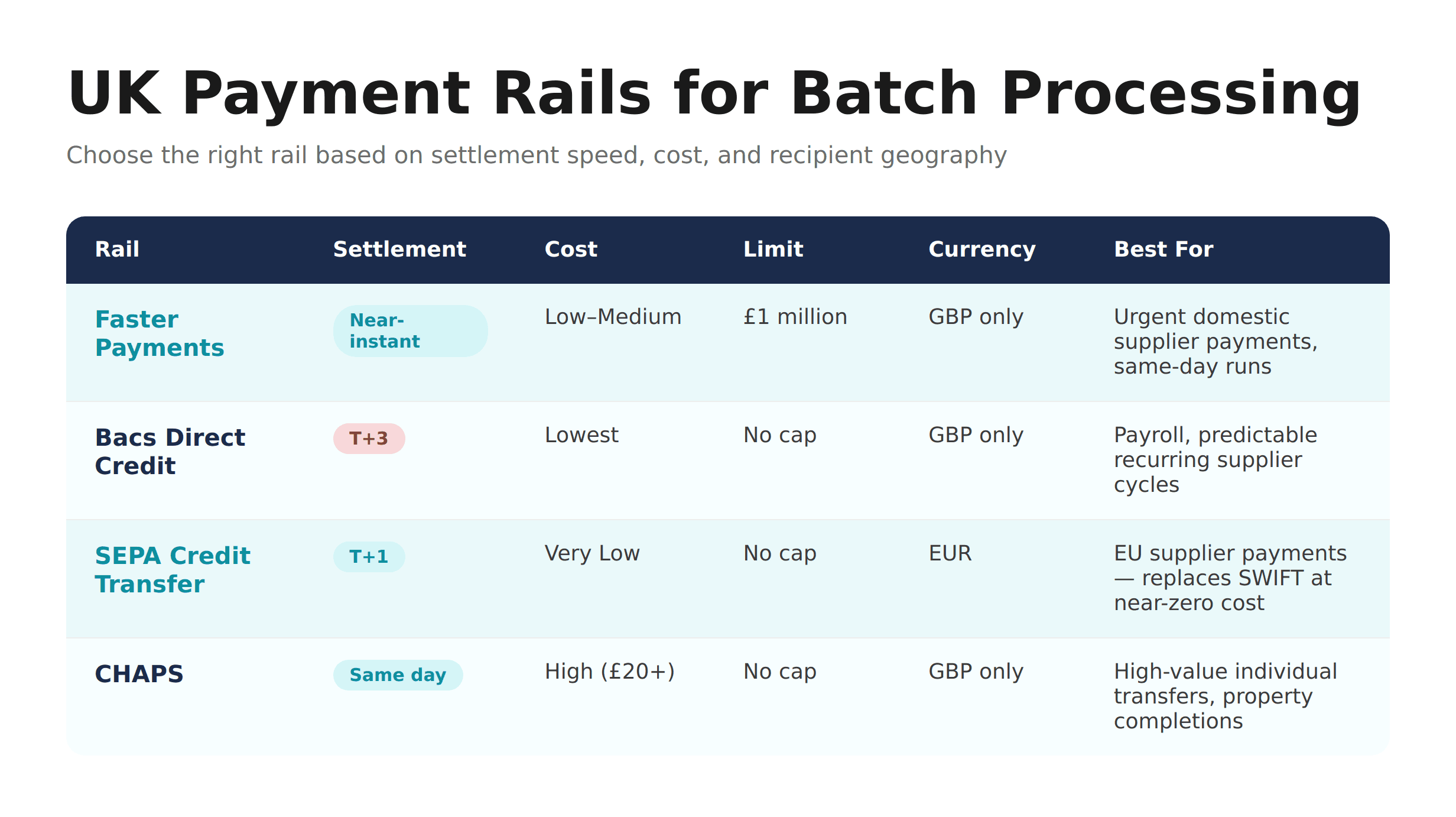
The file format and CSV structure of an upload are only part of the picture. The payment rail determines when money moves, what it costs, and which recipients are reachable.
Faster Payments
Faster Payments, operated by Pay.UK, runs 24 hours a day, 365 days a year. Domestic GBP payments settle near-instantly — typically within seconds. The per-transaction limit is £1 million, though individual banks may impose lower internal caps. There are no submission cut-off windows.
Faster Payments is the dominant rail for domestic UK supplier payments where settlement timing matters. If a payment run misses a Bacs cut-off, Faster Payments keeps the run viable without delay.
Bacs Direct Credit
Bacs Direct Credit operates on a fixed three-working-day cycle: file submitted on Day 1, processed on Day 2, funds land on Day 3. Submission must hit the provider's cut-off — typically 10pm on Day 1 for standard payroll cycles.
Bacs is the lowest-cost rail for high-volume, predictable payment cycles. Eight in ten UK employees are paid via Bacs. Sending directly requires a Service User Number (SUN) and a sponsoring bank relationship, though many providers offer Bacs access without requiring the business to hold its own SUN.
SEPA Credit Transfer
For EUR supplier payments, SEPA Credit Transfer (SCT) settles T+1. IBAN is the required identifier. BIC is not a universal SEPA requirement for standard SCT, though some providers or non-standard corridors may request it.
SEPA covers 36 countries including all EU member states, the UK, Norway, Switzerland, and Iceland. For UK businesses running bulk payment CSV uploads to EU suppliers, SEPA is structurally cheaper and faster than SWIFT for the same corridor — without the £18–£25 per-transfer fees SWIFT typically adds.
CHAPS
CHAPS handles same-day, high-value GBP transfers with no upper limit. Fees are significantly higher — typically £20+ per payment. It is reserved for property completions, large corporate transfers, or urgent payments that exceed Faster Payments limits. Not a standard batch rail.
[aa fast-fact]
Fast Fact: In Q1 2025, Bacs processed nearly 1.7 billion transactions and Faster Payments handled over 1.3 billion — together forming the backbone of UK domestic payment infrastructure.
[/aa]
How to Set Up Batch Payments for UK Business Suppliers — Step by Step
Understanding how to set up batch payments for UK business suppliers starts with the file, not the portal. Most upload failures happen before submission — in the spreadsheet preparation stage.
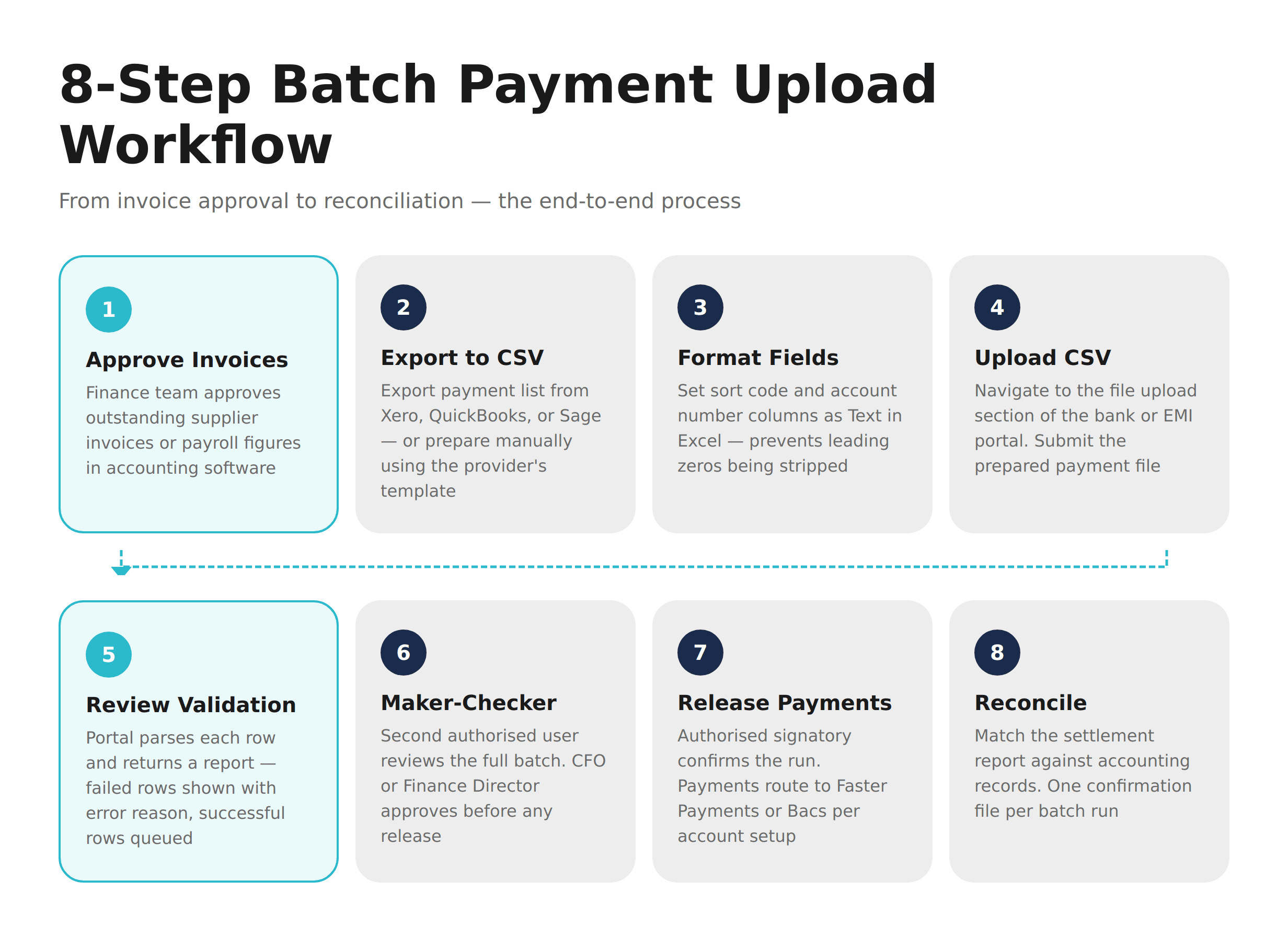
Step 1: Export your invoice list from accounting software.
Xero, QuickBooks, and Sage generate payment export files. Export as CSV or use the provider's payment file template. Check that amounts are numeric — not formatted as currency strings (£1,200.00 breaks most parsers).
Step 2: Map fields to the provider's column order.
Most UK bank and EMI portals require: sort code (6 digits), payee name, account number (8 digits), amount, payment reference. The column order must match exactly. Some portals also require a debit reference and a payment date field.
Step 3: Fix Excel formatting issues before uploading.
Sort codes starting with a zero — like 012345 — are silently stripped to 12345 by Excel's default number formatting. Format the sort code and account number columns as Text before entering any values.
Step 4: Upload the CSV to the payment portal.
Navigate to the file upload or payment automation section of your bank or EMI portal. Select the prepared file and submit. The portal parses each row individually.
Step 5: Review the validation summary.
The portal returns a validation report. Each failed row shows a reason: incorrect sort code format, account number length mismatch, reference too long. Successful rows remain queued.
Step 6: Complete the maker-checker approval.
A second authorised user reviews the batch before release. This is the point where the finance director or CFO approves the run. Some portals allow approval thresholds by role.
Step 7: Release to the payment network.
The authorised signatory confirms the batch. Payments route to Faster Payments or Bacs depending on the provider configuration and account setup.
Step 8: Reconcile to source records.
Once settled, match the batch confirmation against your accounting software. Most platforms generate a settlement report that maps directly to the original payment file.
CSV File Format Requirements for UK Batch Payments
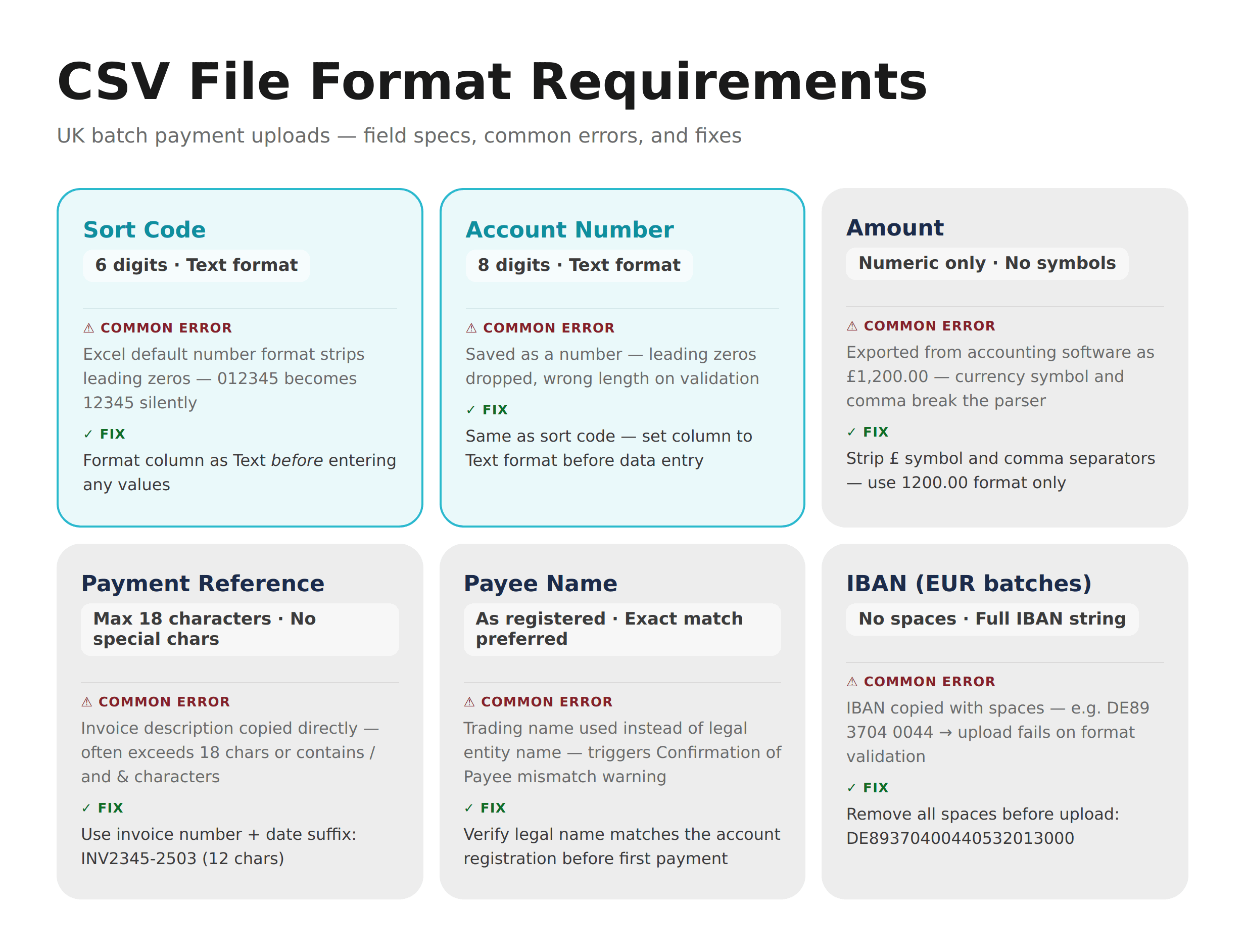
The fields that matter — and the errors that cause rejection:
Field | Requirement | Common Error |
|---|---|---|
Sort code | 6 digits, text format | Excel strips leading zeros |
Account number | 8 digits, text format | Formatted as number — drops leading zeros |
Amount | Numeric only | Currency symbols or comma separators |
Payment reference | Max 18 characters | Too long, or contains special characters |
Payee name | As registered | Mismatches trigger Confirmation of Payee warnings |
For automating batch supplier and payroll payments via a UK FCA EMI account step-by-step, the workflow above applies — with one addition. If the account holds both GBP and EUR balances, GBP and EUR batches must be prepared as separate files, and the correct currency balance selected as the funding source at upload.
Automate Supplier and Payroll Batch Payments from One UK EMI Account
Traditional UK clearing banks offer file-upload payment capabilities, but bulk payment processing via a UK EMI account is operationally different. Multi-currency batch processing at a traditional bank typically requires a separate EUR account, separate onboarding, and often a separate portal. Managing two banking relationships for a single payment cycle adds time and cost.
An FCA-regulated Electronic Money Institution provides business payment infrastructure that consolidates this. An EMI account can hold GBP and EUR balances in the same account structure, accept CSV batch uploads for both currencies, and route GBP payments via Faster Payments and EUR payments via SEPA Credit Transfer — from one portal, with one approval workflow.
This is the operational case for businesses paying both UK and EU suppliers in the same weekly cycle. Instead of running two separate payment processes through different providers, the finance team uploads one GBP batch and one EUR batch from the same account and releases both under the same approval controls. For UK SMEs, bulk GBP EUR payment processing via Faster Payments and SEPA in one account removes the need to maintain separate currency banking relationships and reduces reconciliation time considerably.
On safeguarding: EMI accounts are not covered by the Financial Services Compensation Scheme (FSCS). Under FCA requirements, EMIs must safeguard relevant client funds — holding them in segregated accounts at authorised credit institutions or investing them in secure, liquid assets. This protects client money in the event of the EMI's insolvency, but it is a different protection structure from FSCS deposit insurance.
[aa cta]
Run Supplier and Payroll Payment Runs from One UK Account
Upload a CSV, set approval rules, and release GBP and EUR payments simultaneously — no SWIFT required.
[aa btn]Open a Batch Payment Account[/aa]
[/aa]
Payroll Batch Payments vs Supplier Payment Runs — Key Operational Differences
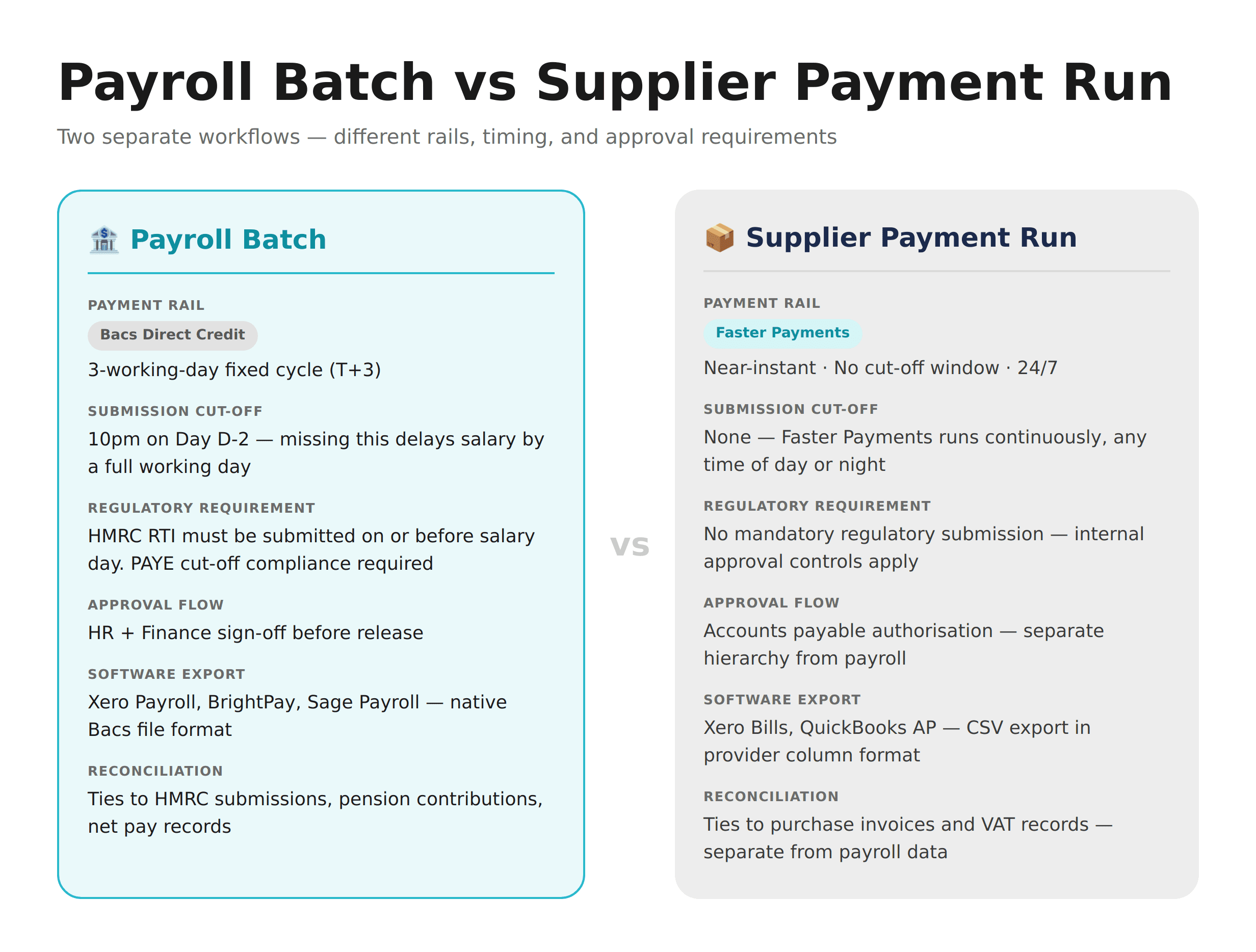
Finance teams often try to run payroll and supplier payments through the same workflow. Most providers and accounting platforms treat them as separate processes — for good reason. The two have fundamentally different operational requirements.
Payment rail: Payroll typically runs via Bacs Direct Credit (T+3 cycle, fixed submission cut-off). Supplier payments run via Faster Payments — near-instant, no cut-off window.
Timing dependencies: Payroll is tied to HMRC RTI reporting. The employer must submit RTI on or before salary day. Missing the Bacs cut-off — typically 10pm on Day D-2 — pushes salaries by a full working day.
Approval structure: Payroll routes through HR and Finance. Supplier runs sit within accounts payable. Combining the two in one workflow creates audit confusion and approval bottlenecks.
Accounting treatment: Payroll software (Xero Payroll, BrightPay, Sage Payroll) exports Bacs-formatted files natively. Accounts payable software exports CSV supplier files in a different column structure. Merging them into one upload typically fails at validation.
Reconciliation: Payroll reconciliation ties to HMRC submissions and pension contributions. Supplier reconciliation ties to purchase invoices and VAT records. Managing mass payouts to affiliates or contractors UK follows supplier payment logic — not payroll — even at high volumes.
Handling Errors and Rejected Payments in a UK Batch Run
A batch upload is not all-or-nothing. When a row fails validation or is rejected by the receiving bank, the rest of the batch continues.
Validation errors are caught before submission. The portal flags each problem row — wrong sort code length, amount formatted as text, reference too long — and holds the batch until the issue is resolved. Correct the flagged rows and re-upload.
Post-submission rejects happen after the batch has been released. The receiving bank returns a rejection for that specific payment — typically because the account is closed, the sort code and account number don't match, or the transaction exceeds an internal limit. Successful payments in the same batch are already settled and unaffected.
Fraud holds occur when the provider's systems flag a payment — unusual recipient, first-time beneficiary above a threshold, or a change to previously registered account details. The payment is paused, not cancelled. The provider contacts the account holder to verify.
Recovery: For post-submission rejects, create a corrected single-line or small-batch file. Confirm account details via Confirmation of Payee before resubmitting. Log the original rejection and correction for audit purposes.
Businesses where sending payouts to 100 recipients at once from a UK account is routine treat error recovery as part of the standard workflow, not an edge case. Platforms running mass affiliate payouts via Faster Payments typically automate resubmission of rejected rows within the same payout cycle.
FAQ
What is the difference between batch payments and bulk payments in the UK?
Batch payments group a single payment type — such as supplier invoices or employee salaries — into one structured file for simultaneous processing. Bulk payments combine multiple payment types (payroll, contractor fees, expense reimbursements) into a single instruction. Bulk is effectively an advanced form of batch processing. Most UK SMBs start with batch workflows for a single use case — supplier runs or payroll — before moving to bulk as volume and complexity grow.
How do I set up batch payments for UK business suppliers?
Export your invoice list from accounting software as a CSV, map fields to your provider's column template (sort code, account number, amount, reference), and upload through the portal's payment file section. Format sort codes and account numbers as Text in Excel to prevent leading zeros being stripped. After upload, review the validation report, complete your maker-checker approval, and release. For a full walkthrough, see our guide on CSV batch payment upload for SME payroll in the UK.
How do I run weekly supplier batch payments via CSV upload from a UK account without SWIFT?
For GBP supplier payments, upload a CSV batch via a UK Faster Payments-enabled bank or EMI account — SWIFT is not involved in domestic GBP transfers. For EUR supplier payments, route via SEPA Credit Transfer from a UK EMI account that holds EUR balances and has SEPA access. This eliminates SWIFT for both corridors. A detailed breakdown is covered in how to run weekly supplier batch payments without SWIFT.
What do I need to automate supplier and payroll batch payments from a UK EMI account?
You need an FCA-regulated EMI account with CSV batch upload capability, sufficient GBP and EUR balance to fund each run, validated beneficiary details (sort code and account number for GBP, IBAN for EUR), and an authorised signatory structure for batch approval. Most UK EMI accounts support up to 1,000 payments per batch file. For SEPA access, confirm the account includes a named EUR IBAN and native SEPA Credit Transfer capability.
Can I send payouts to 100 or more recipients at once from a UK business account?
Yes. UK bank and EMI portals that support file uploads typically accept up to 1,000 payment rows per CSV. For higher volumes, multiple files can be submitted in sequence. The practical limit is usually determined by daily payment thresholds and the time required for the approval workflow — not the number of rows in the file. Businesses running high-volume payouts to EU-based affiliates or contractors should also check their provider's bulk SEPA payment capabilities.
[aa cta]
Automate Your Payment Runs — No Manual Entry Required
EQWIRE's FCA-regulated EMI account supports CSV batch uploads for GBP via Faster Payments and EUR via SEPA — from one account, one balance, no SWIFT required.
[aa btn]Create Your Account[/aa]
[/aa]
Reviewed by



Power your payments
with EQWIRE
Create your account in minutes and experience smooth, secure global payments.
" height="9.0156px" id="LIcbdboyB" transform="translate(4.987 4.5)" width="9.01562px"/></svg>)