
•
•
Articles
Bulk SEPA Payments from a UK EMI Account: A Practical Guide
A UK-based marketing agency with 80 European contractors. Every month, the finance team logs into the bank portal and manually enters each IBAN, payment amount, and reference — one by one. With 80 entries, the process consumes the better part of a working day. Errors are common. One mistyped digit means a failed transfer and a delayed contractor payment.
This is where bulk SEPA payments from a UK EMI account change the operational picture. Instead of manual entry, the finance team uploads a single batch file containing all 80 transfers. The platform validates each IBAN, checks beneficiary names against account records, and dispatches the entire run before the next coffee break.
For any UK business sending regular EUR payments to EU suppliers, contractors, or partners, understanding how SEPA batch payments work from a UK FCA-authorised EMI account — including file formats, cut-off times, VoP compliance, and post-Brexit connectivity — is no longer optional. This guide covers each element in practical operational terms.
What Are Bulk SEPA Payments and Why Do UK Businesses Use Them?
Bulk SEPA payments refer to a single file submission containing multiple SEPA Credit Transfers (SCTs) to different beneficiaries, processed together rather than as individual transactions. A business uploads one file; the payment provider processes every transfer within it as a coordinated batch run.
The use cases are broad. UK e-commerce companies pay Eurozone fulfilment partners and manufacturers in EUR. Digital agencies settle monthly invoices for EU-based freelancers and contractors. SaaS platforms distribute affiliate payouts across multiple countries. Logistics companies clear freight invoices from carriers based in Germany, France, or the Netherlands.
SEPA covers 36 countries and processes transfers exclusively in EUR. For these transactions, SEPA is both cheaper and faster than SWIFT. Businesses that previously relied on manual one-by-one SEPA transfers — or on SWIFT wire transfers with correspondent bank fees on every payment — can significantly reduce cost and processing time by running weekly supplier payment batches within the SEPA network.
The distinction between an FCA-authorised EMI and a traditional business bank account matters here for both SEPA access and fund safeguarding. While traditional UK banks often process SEPA transfers individually with manual approval steps, EMIs built for cross-border operations typically provide batch upload dashboards designed for finance teams running multi-recipient payment runs.
Can a UK EMI Account Send Mass SEPA Transfers to EU Suppliers?
Yes — UK FCA-authorised EMI accounts can send mass SEPA transfers to EU suppliers, provided the EMI maintains regulated SEPA network access via a European correspondent banking relationship.
The UK is not an EU member but remains SEPA-accessible through its banking infrastructure. The key consideration for 2026: UK EMIs that previously connected to SEPA via CENTROlink lost that direct connection on 31 December 2025. Any provider without an alternative European correspondent banking arrangement can no longer process SEPA payments. Businesses should verify their EMI has maintained a post-CENTROlink SEPA connectivity route before running batch files. You can check a provider’s authorisation status on the FCA Financial Services Register.
FCA authorisation confirms the EMI operates within the UK regulatory perimeter, with safeguarded client funds and transaction monitoring obligations. It is not the same as an FCA-authorised bank, but it provides equivalent payment functionality for SEPA transfers.
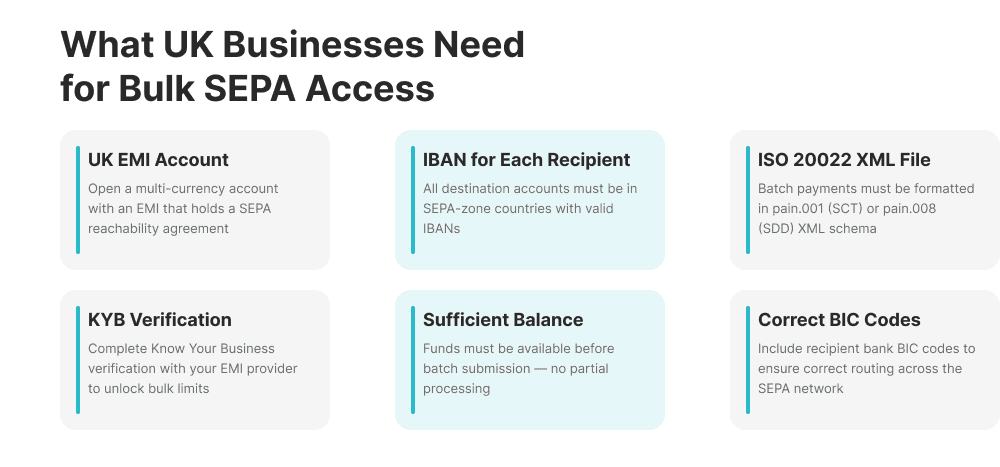
Before submitting a first batch run, verify three things with the provider:
Named EUR IBAN: does the account come with a dedicated EUR account number?
SCT support: is SEPA Credit Transfer explicitly supported, not just SEPA Instant?
Batch upload: does the platform accept CSV or ISO 20022 XML batch files?
All three must be confirmed before a batch run is possible.
How to Send Mass SEPA Transfers to EU Suppliers: Step-by-Step
Step 1 — Build and Validate Your Beneficiary Batch File
Every batch file requires the same core data per row: the beneficiary’s full legal name, IBAN, BIC (if required by the provider), payment amount in EUR, payment reference, and the intended payment date.
Beneficiary names must match the name registered against the IBAN at the receiving bank — this is a Verification of Payee requirement enforced at the validation stage. Finance teams should maintain a master beneficiary register using legal entity names, not trading names or abbreviations. Uploading a structured batch payment file for supplier payroll in the UK follows the same validation and approval workflow as a SEPA batch run, so teams already familiar with domestic batch processes will find the format recognisable.
Step 2 — Choose the Correct File Format
Two formats are supported by most UK EMI platforms:
CSV batch upload — simpler, human-readable, suitable for SME volumes (typically 10 to several hundred transfers). Each row represents one transfer. Always download and use the EMI provider’s specific CSV template — column headers and field order are not standardised across platforms. For a detailed walkthrough of CSV batch upload for SME payroll in the UK, the same file logic applies to SEPA batch runs.
ISO 20022 XML (PAIN.001) — machine-generated, for high-volume or API-driven batch processing. Required for ERP integration (Xero, Sage, SAP, Oracle). Supports complex remittance references and multi-currency initiation structures.
For most UK SMBs, CSV is sufficient; PAIN.001 becomes necessary above several hundred transfers per run or when connecting to an accounting system via API.
Step 3 — Upload, Review, and Submit
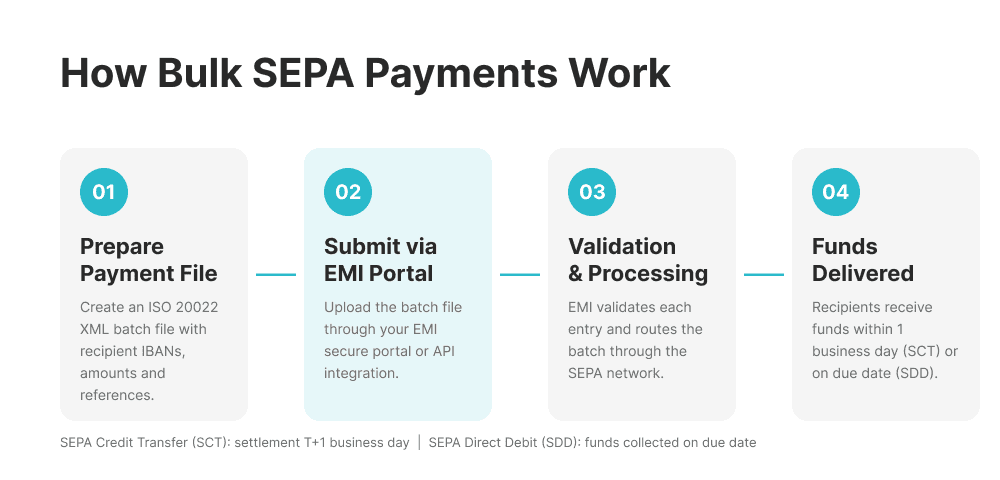
The upload workflow follows a standard sequence: upload the file → automated validation (IBAN format check, VoP name matching, FX conversion preview) → review any flagged errors → authorise → submit.
Many EMI platforms require dual authorisation for large batches — a second approver within the finance team must confirm before dispatch. Batches must be submitted before the provider’s SEPA cut-off time for same-business-day processing.
Step 4 — Monitor Settlement and Reconcile
After submission, the EMI routes the batch to the SEPA network. Standard SCT transfers arrive in beneficiary accounts the following business day (T+1). Most EMI platforms provide real-time payment tracking and downloadable transaction history exports, enabling automated reconciliation by matching payment references to invoice numbers in accounting software.
SEPA Cut-Off Times and Settlement Windows from UK EMI Accounts
SEPA cut-off times for UK EMI accounts typically fall between 10:00 and 14:00 CET for same-business-day dispatch, with T+1 settlement for standard SEPA Credit Transfer.
Two settlement types apply:
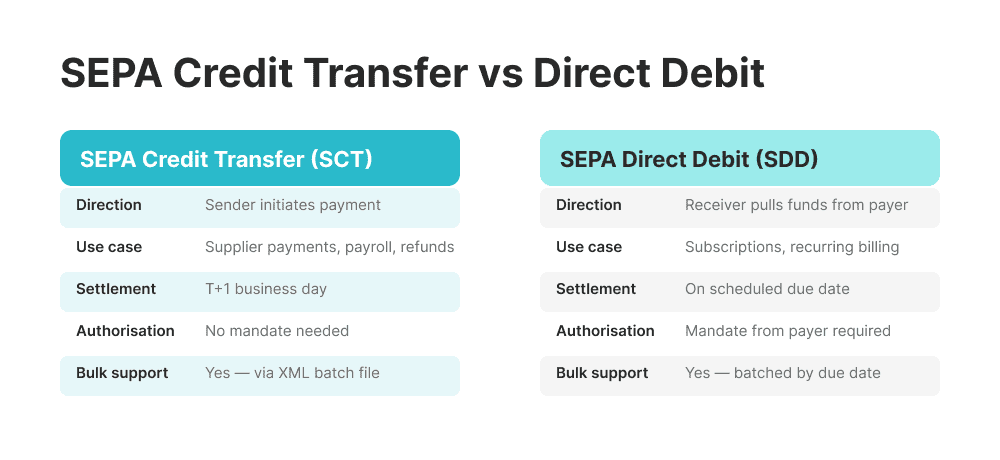
Standard SEPA Credit Transfer (SCT): T+1 settlement. Funds reach the beneficiary bank the following business day. All batch file uploads fall under this scheme. Standard SEPA does not process on weekends or bank holidays, in accordance with the EPC SEPA Credit Transfer Scheme Rulebook.
SEPA Instant Credit Transfer (SCT Inst): settles within 10 seconds, operates 24/7 including weekends, and carries no cut-off time. However, SEPA Instant does not support bulk file upload — each transfer must be initiated individually, making it unsuitable for mass payment runs. The per-transaction limit is €100,000.
Finance teams should account for Eurozone public holidays when scheduling end-of-month supplier runs.
GBP to EUR Conversion Before Sending Bulk SEPA Payments
Most UK businesses hold primary balances in GBP. Before dispatching a SEPA batch in EUR, that balance must be converted. Two approaches apply:
Pre-convert before upload — convert the full batch amount from GBP to EUR at a locked rate before the file is uploaded. This eliminates FX exposure during the processing window and is the preferred approach for large batches where rate movement would be material.
Auto-convert at submission — the EMI platform converts GBP to EUR automatically at submission, using the live mid-market rate plus a transparent spread. Operationally simpler, but the rate is only confirmed at the moment of submission.
FX spread impact scales with batch size. A 0.5% spread on a £50,000 payment run costs £250 — compared with traditional bank SWIFT transfers, where the combined spread and per-transfer fees can reach 2–3% of the total amount.
The most efficient approach is to hold EUR balances directly. Businesses holding GBP, EUR, and USD in a multi-currency UK account can fund SEPA batches directly from their EUR balance — removing the need for GBP conversion before each payment run and avoiding spread costs entirely when incoming EUR receipts fund outgoing EUR batches.
Verification of Payee Requirements for Bulk SEPA Batches
Verification of Payee (VoP), mandatory under the EU Instant Payments Regulation (IPR) effective October 2025, requires each SEPA Credit Transfer to pass a name-to-IBAN check before processing.
For bulk batches, this means every row in the batch file must clear the VoP check. Any entry where the beneficiary name does not match the name registered against the IBAN at the receiving bank generates a warning or rejection at the validation stage.
Common VoP failure causes include:
“Ltd” versus “Limited” in company names
Trading name used instead of legal registered name
Name abbreviations or misspellings
Individual payees listed by first name only, rather than full legal name
The fix is straightforward: standardise the beneficiary register using the exact legal name as registered with the recipient bank.
SEPA vs SWIFT for Bulk EUR Payments to EU Suppliers
For EUR-denominated payments to any of the 36 SEPA member countries, SEPA is the correct payment rail — not SWIFT.
SWIFT routes through correspondent bank intermediaries, each of which may charge fees and deduct amounts from the transfer. Settlement typically takes two to five business days. SEPA transfers in EUR route directly between banks within the SEPA network — no correspondent bank intermediaries, no per-transfer deductions, T+1 settlement.
The rule is simple: if the payment is in EUR and the recipient is in a SEPA country, use SEPA.
Feature | SEPA vs SWIFT — EUR Payments to EU |
|---|---|
Currency | SEPA: EUR only | SWIFT: Multi-currency |
Coverage | SEPA: 36 SEPA countries | SWIFT: Global |
Settlement | SEPA: T+1 standard | SWIFT: T+2 to T+5 |
Cost per transfer | SEPA: Low/none | SWIFT: $10–$40+ per transfer |
Batch file upload | SEPA: Supported (CSV / PAIN.001) | SWIFT: No native standard |
Intermediary banks | SEPA: None | SWIFT: 1–3 correspondents typical |
Amount deducted | SEPA: Full amount received | SWIFT: Deductions possible |
Common Problems When Running Bulk SEPA Batches from the UK
1. Incorrect IBAN format. Manually entered IBANs frequently contain transposition errors. Most EMI platforms validate IBAN format on upload — pre-validating the file before submission avoids delays.
2. VoP name mismatch. Beneficiary name in the batch file does not match the bank-registered legal name. Standardise the beneficiary register to legal names; run VoP pre-checks on all new entries.
3. Submission after cut-off time. Batch submitted after the EMI’s SEPA cut-off is queued for the following business day. Submit by 11:00 CET for same-day dispatch.
4. Insufficient EUR balance at submission. When auto-convert is enabled, GBP converts to EUR at the moment of submission. If the balance is insufficient or the rate has moved, the batch will fail. Pre-fund the EUR balance or lock the FX rate before submitting.
5. AML review hold. A large batch with unfamiliar beneficiaries can trigger a compliance monitoring hold. For significant first-time batches, contact the EMI compliance team in advance and ensure beneficiary documentation is complete.
FAQ
How do I send bulk SEPA payments from a UK business account?
To send bulk SEPA payments from a UK business account, open an account with an FCA-authorised EMI that provides a named EUR IBAN and supports SEPA Credit Transfer with batch file upload. Prepare a beneficiary file in CSV or ISO 20022 XML PAIN.001 format, validate all IBANs and beneficiary names against VoP requirements, ensure sufficient EUR balance, and submit before the EMI's stated SEPA cut-off time. Standard settlement is T+1 business day.
Can a UK EMI account send mass SEPA transfers to EU suppliers?
Yes — UK FCA-authorised EMI accounts can send mass SEPA transfers to EU suppliers, provided the EMI maintains active SEPA network access via a regulated European correspondent bank. Following the CENTROlink connectivity change at the end of 2025, businesses should confirm their provider has a maintained post-CENTROlink SEPA route before submitting batch files.
What is the cut-off time for bulk SEPA payments from a UK EMI?
SEPA cut-off times vary by provider but typically fall between 10:00 and 14:00 CET. Batches submitted before cut-off are dispatched the same business day with T+1 settlement. Batches submitted after cut-off are processed the following business day. SEPA Instant Credit Transfer operates 24/7 with no cut-off time, but does not support bulk file upload.
What file format do I need for a SEPA batch payment upload?
Most UK EMI platforms support CSV batch upload using the provider's own template, or ISO 20022 XML PAIN.001. CSV suits SME volumes of up to a few hundred transfers; PAIN.001 is required for high-volume or API-integrated batch processing. Always use the EMI's template — field order and column headers differ between providers and a generic CSV will be rejected.
How does Verification of Payee (VoP) affect bulk SEPA batch payments?
Verification of Payee (VoP), mandatory under the EU Instant Payments Regulation from October 2025, requires each entry in a SEPA batch file to pass a name-to-IBAN check before processing. Mismatches generate warnings or rejections. Maintaining a verified beneficiary register with exact legal company names — rather than trading names or abbreviations — is the most effective way to prevent batch failures at the VoP validation stage. For a step-by-step workflow on sending bulk SEPA payments to EU suppliers from a UK FCA EMI account, the submission process mirrors the approach covered throughout this guide.
Reviewed by



Power your payments
with EQWIRE
Create your account in minutes and experience smooth, secure global payments.
" height="9.0156px" id="LIcbdboyB" transform="translate(4.987 4.5)" width="9.01562px"/></svg>)