•
•
Agency Payment Account UK: Manage Client Budgets and Media Payouts
[aa disclaimer]
Legal Disclaimer: This article is for informational purposes only and does not constitute legal, financial, compliance, or tax advice. Banking eligibility, regulatory requirements, and provider policies vary by jurisdiction. Consult qualified professionals before making decisions.
[/aa]
UK marketing and media agencies operate as financial intermediaries: client media budgets arrive in the agency's account, get allocated across campaigns, and flow out to publishers, influencers, and affiliates — often across multiple currencies and on tight settlement cycles. A standard UK business current account is not built for this workflow. Manual payment entry, no batch upload functionality, no EUR wallet, and shared account numbers create friction at every step of the payout cycle.
A dedicated agency payment account UK — with named IBAN, Faster Payments access, SEPA capability, and batch CSV upload — eliminates that friction. Client budgets land in the right currency balance, get distributed in bulk with a single file upload, and settle same-day in GBP or next-day in EUR, with a clean audit trail throughout.
This guide covers how to set up that account structure, how to receive and allocate client media budgets, how to run batch GBP and EUR payout cycles, and what operational errors to avoid.
[aa key-takeaways]
Key Takeaways
A standard UK business bank account is not designed for agency-scale payout workflows — it lacks batch CSV upload, EUR wallets, and named IBAN functionality
A dedicated agency payment account with Faster Payments access settles GBP payouts to influencers and publishers same-day, 24/7, with no per-transaction cost at EMI level
Client media budgets are received into a named GBP IBAN and allocated by campaign using payment references — giving a clean audit trail without opening separate accounts
EUR batch payouts to EU affiliates route via SEPA Credit Transfer at T+1 — no SWIFT fees, no currency conversion if a EUR wallet is held
The four most common agency payment errors — wrong IBAN format, mixed client funds, SWIFT-for-EUR, and no maker-checker — each cost real money or trigger compliance risk
[aa btn]Open an Account[/aa]
[/aa]
What Makes an Agency Payment Account Different from a Standard UK Business Account
Most UK agencies open a business current account when they incorporate and never revisit that decision. That account was designed for a single-entity business making occasional payments — not for an intermediary holding and distributing client funds across multiple campaigns, currencies, and payees.
Why Standard UK Banks Create Friction for Agency Payout Workflows
The friction shows up in three ways.
Manual entry limits. High-street banks typically cap the number of individual transfers in a single session — often between 10 and 20 — before triggering additional security checks. An agency paying 60 publishers in a single run hits that cap multiple times, extending what should be a 20-minute task into a multi-hour process.
No batch upload. Most UK retail banks do not support CSV batch file upload for outbound payments. Every beneficiary must be added and authorised individually. There is no way to prepare a payment file in accounting software and import it directly.
No EUR wallet. A standard GBP current account cannot hold EUR. Every EUR payment to an EU affiliate requires a currency conversion at the point of transfer — adding a 1.5–3% FX markup on each transaction — and routes via SWIFT at T+2–3 rather than SEPA at T+1.
What to Look for in a Payment Account for Agencies UK Multi-Currency
A purpose-built agency payment account resolves each of these gaps. An agency payment account UK GBP EUR USD — supporting all three major currencies from a single platform — specifically offers:
A named GBP IBAN — unique to your business, not a pooled sort code/account number
A EUR wallet — hold EUR balances without forced conversion
Batch CSV upload — submit a single file for 10, 50, or 200 payouts at once
Faster Payments access — same-day GBP settlement, 24/7
SEPA Credit Transfer — T+1 EUR settlement for EU payees
Maker-checker approval — separate the person who prepares payments from the person who authorises them
An FCA-authorised EMI account operates differently from a traditional UK business bank account in several ways that matter for agency payout workflows — including safeguarding of client funds and direct access to UK payment rails.
Law firms face a similar client-money challenge under the SRA Accounts Rules — see how UK law firms segregate multi-currency client funds using the same sub-account model.
How to Set Up an Agency Payment Account in the UK — Step by Step
Step 1 — Identify Whether You Need an EMI Account or a Traditional Bank Account
For most agencies running media budget distribution at scale, an FCA-authorised EMI (Electronic Money Institution) account is the right tool. EMI accounts provide direct access to Faster Payments and SEPA, multi-currency wallet functionality, and batch upload capability that retail banks do not offer.
The key distinction: EMI accounts hold funds as e-money, not bank deposits. Client funds are safeguarded under the Payment Services Regulations 2017 rather than protected by FSCS — verify the safeguarding model before opening.
Step 2 — Verify FCA Authorisation of the Provider Before Opening
Before opening any account, confirm the provider holds FCA authorisation (not just registration) as an EMI. Check the FCA Register directly — search by company name and verify the firm status shows "Authorised" rather than "Registered."
Authorised EMIs are subject to stricter capital requirements and conduct rules than registered small EMIs. For an agency holding client media budgets, this is a material distinction.
Step 3 — Open GBP and EUR Wallets and Configure a Named IBAN
Once the account is open, activate both a GBP wallet and a EUR wallet from day one — even if EUR payouts are not immediate. Having the EUR wallet in place means that when a client sends a EUR media budget, it lands in the correct currency balance without automatic conversion.
A named GBP IBAN gives the agency a unique account identifier that clients can wire budgets directly to, with full traceability on the incoming transaction. This is distinct from a shared sort code and account number assigned to multiple users — it eliminates attribution errors on inbound transfers.
How to Receive and Allocate Client Media Budgets
Setting Up a Named GBP IBAN to Receive Client Funds
The inbound flow is straightforward. The client receives the agency's named GBP IBAN and sends the agreed campaign budget via Faster Payments or CHAPS — settling same-day. Because the IBAN is unique to the agency's account, every inbound transfer is automatically attributed correctly. The payment reference field carries the client name or campaign code, feeding directly into reconciliation.
For clients sending EUR budgets, the same process applies to the EUR wallet. The funds land in the EUR balance without conversion until the agency chooses to convert.
Tracking Budget Allocation by Client and Campaign Using Payment References
Most agencies do not need separate accounts per client. Payment references — a structured code assigned to each campaign — carry the allocation information through the full payment lifecycle.
A workable reference structure: [ClientCode]-[CampaignCode]-[Month]. For example, ACME-BRAND-APR26. Every outbound payment from that campaign budget carries this reference; every inbound transfer from the client includes it. The account statement becomes a campaign-level ledger without additional accounting setup.
This structured approach is the operational foundation of any functioning media budget distribution account UK setup.
How to Pay Influencers and Publishers via Faster Payments — The Batch Workflow
The batch workflow moves all payment preparation offline — into a spreadsheet or accounting system — and replaces manual portal entry with a single file upload. Understanding how agencies distribute media budgets to publishers and influencers UK is essential to getting this workflow right: the rail, file format, and approval step each matter.
How to Prepare a Bulk CSV File for Influencer and Publisher Payouts
The CSV file contains one row per payee. Required fields for Faster Payments:
Payee name — as registered with their bank
Sort code — 6 digits, no dashes
Account number — 8 digits
Amount — in GBP, to 2 decimal places
Payment reference — use the campaign code or invoice number
Export this file from the agency's finance system or build it in a spreadsheet template. Validate before upload: check for blank fields, incorrect sort code format, and amounts that exceed Faster Payments transaction limits (typically £250,000 per payment, though provider-level limits apply). The same structure applies to influencer payments, publisher settlements, and affiliate commissions.
Upload, Validate, and Approve — The Batch Payment Workflow Step by Step
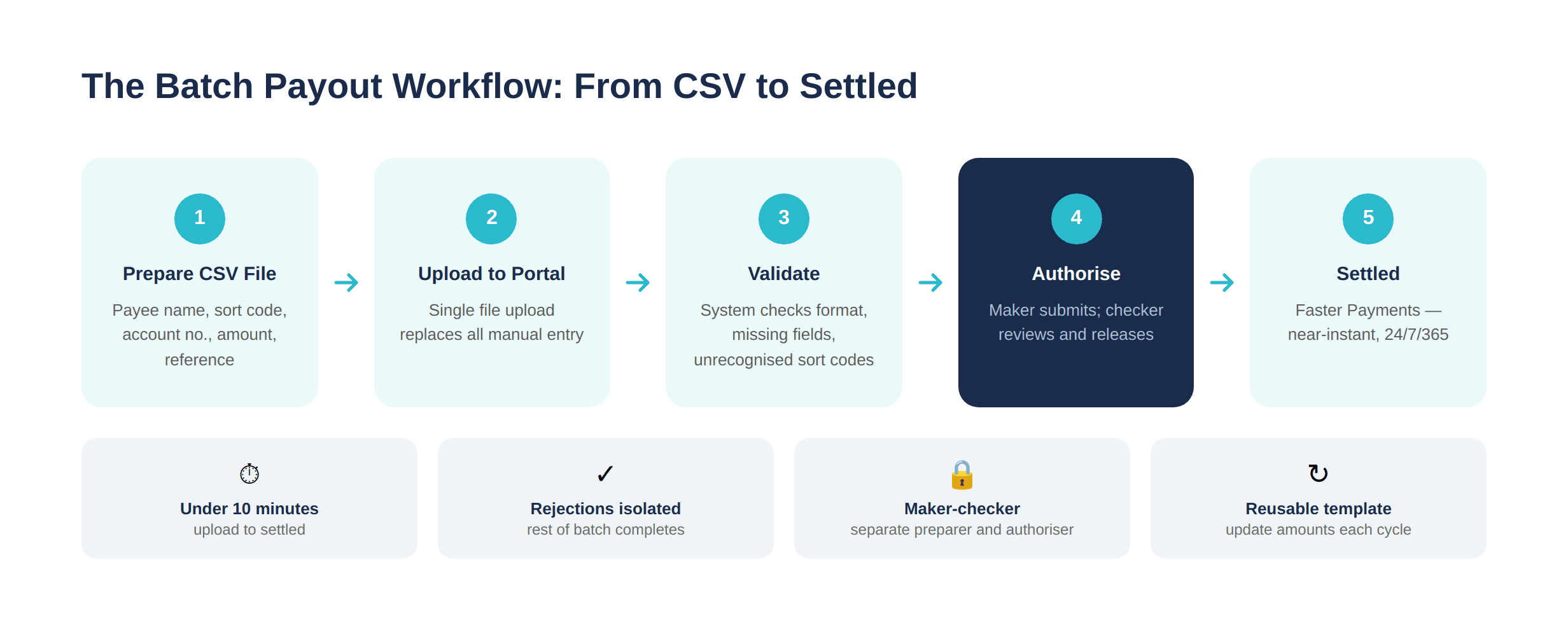
The portal workflow runs as follows:
Upload the CSV file via the batch payments section of the portal
Review the parsed output — the portal displays each row with payee name, amount, and reference
Validate — the system flags formatting errors, missing fields, and unrecognised sort codes before any payment is submitted
Authorise — under a maker-checker setup, the preparer submits for approval; the authoriser reviews and releases
Release — payments enter the Faster Payments network; settlement is near-instant, operating 24/7/365 per Pay.UK's Faster Payments scheme
Upload to settled — assuming a clean file — takes under 10 minutes.
[aa cta]
Stop processing influencer payments one by one
EQWIRE supports batch CSV uploads with same-day GBP settlement via Faster Payments.
[aa btn]Open an Account[/aa]
[/aa]
What to Do When a Payment Line Is Rejected or Bounced
Rejections happen. The most common cause is an incorrect sort code or account number — a single digit error means the payment cannot be matched to a valid account and is returned.
When a line is rejected, the portal isolates the failed payment and returns the funds to the originating balance — the rest of the batch completes normally. The agency receives a rejection notification with the reason code, corrects the payee details, and resubmits that payment individually.
For the batch payment file upload to function as a reliable operational tool, maintain a validated beneficiary register: a master spreadsheet of all recurring payees with confirmed sort codes and account numbers. Update it when payees change their banking details. This eliminates the majority of rejections before they occur.
Paying EU Affiliates in EUR via SEPA
For agencies running campaigns with EU-based publishers, influencers, or affiliate partners, SEPA Credit Transfer is the correct rail — not SWIFT. The cost and speed difference is significant.
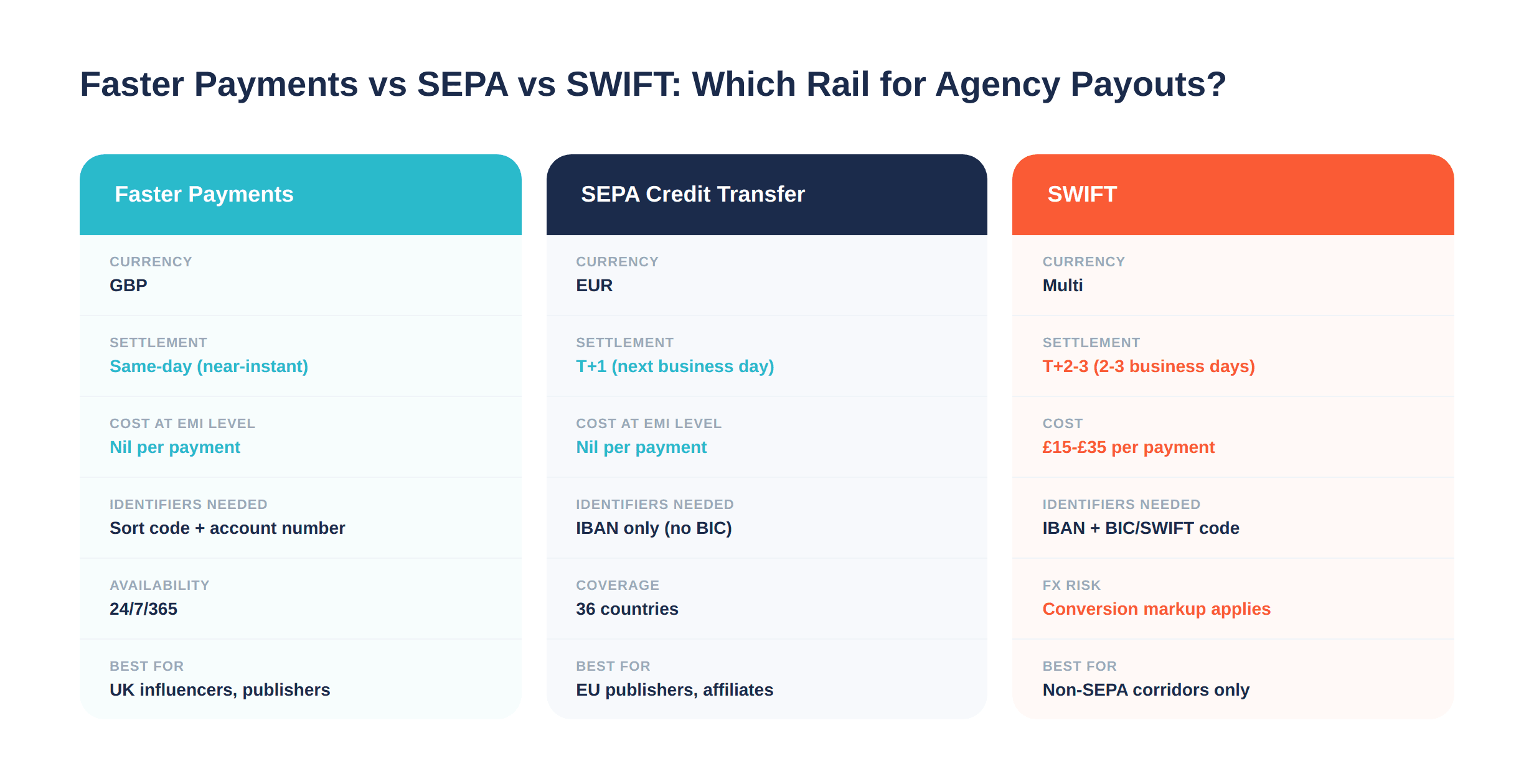
Rail | Currency | Settlement | Typical cost | Requires |
|---|---|---|---|---|
Faster Payments | GBP | Same-day | Nil (at EMI level) | UK sort code + account number |
SEPA Credit Transfer | EUR | T+1 | Nil (at EMI level) | IBAN |
SWIFT | Multi | T+2–3 | £15–£35 per payment | IBAN + BIC/SWIFT code |
When to Use SEPA Credit Transfer for EU Publisher Payments
SEPA Credit Transfer covers 36 countries — all EU member states plus Iceland, Liechtenstein, Norway, Switzerland, and the UK. Any EUR payment to a payee in these countries can route via SEPA rather than SWIFT.
The practical rule: if the payee has an IBAN, use SEPA. No BIC is required for standard SEPA Credit Transfer transactions — IBAN alone is sufficient as the routing identifier. SEPA Instant Credit Transfer settles in under 10 seconds where both sender and recipient banks support it, though availability varies by provider.
A bulk affiliate and influencer payout account UK Faster Payments GBP EUR setup handles both rails from a single account. Influencer payouts UK Faster Payments GBP settle same-day; EUR payouts to EU affiliates go via SEPA — no separate account, no SWIFT fees, no manual currency conversion mid-batch.
EUR Batch Payouts — What the File Needs and How Settlement Works
The EUR batch file follows the same structure as the GBP file, replacing sort code and account number with IBAN. The amount field should be in EUR.
Confirm the EUR wallet holds sufficient balance before submitting — EUR payouts draw from the EUR wallet balance directly. Fund it in advance from the client's EUR budget transfer or from a GBP-to-EUR conversion within the account.
Settlement: SEPA Credit Transfer reaches the recipient the next business day. SEPA Instant, where available, settles in seconds. To automate affiliate payouts via Faster Payments and SEPA from a single platform, ensure the account supports both rails and the batch file can specify payment type per row.
Common Errors Agencies Make When Distributing Client Media Budgets
Here's where money disappears — or where a Friday payment run turns into a Monday investigation.
Error 1: Incorrect sort code or IBAN format. A transposed digit in a sort code causes an immediate rejection. In a 60-payment batch, a 5% error rate means three manual re-submissions after the fact. Fix: validate the beneficiary register before each run, not during it.
Error 2: Mixing agency operating funds with client media budgets. Running agency expenses and multiple clients' campaign budgets through one account without reference segregation makes reconciliation extremely difficult. Fix: use structured payment references consistently from day one.
Error 3: Using SWIFT for EUR payments when SEPA is available. Each SWIFT transfer to an EU publisher costs £15–£35 and takes 2–3 business days. On 20 monthly EU publishers, that is up to £700 in avoidable fees. Fix: verify SEPA support and fund the EUR wallet before each batch.
Error 4: No maker-checker approval step. A single-user workflow — one person prepares and authorises — leaves the agency exposed to internal error and, in the event of a compromised account, to unauthorised disbursement. Fix: configure role-based access controls before processing any large batch.
[aa fast-fact]
Fast Fact: Routing EUR payments via a GBP account adds a 1.5–3% FX markup per transaction. On a £50,000 monthly media budget distributed to EU affiliates, that is up to £1,500 per month in avoidable conversion costs — recoverable immediately by holding a EUR wallet and using SEPA instead.
[/aa]
Agency Payment Account UK — Checklist Before Your Next Payout Run
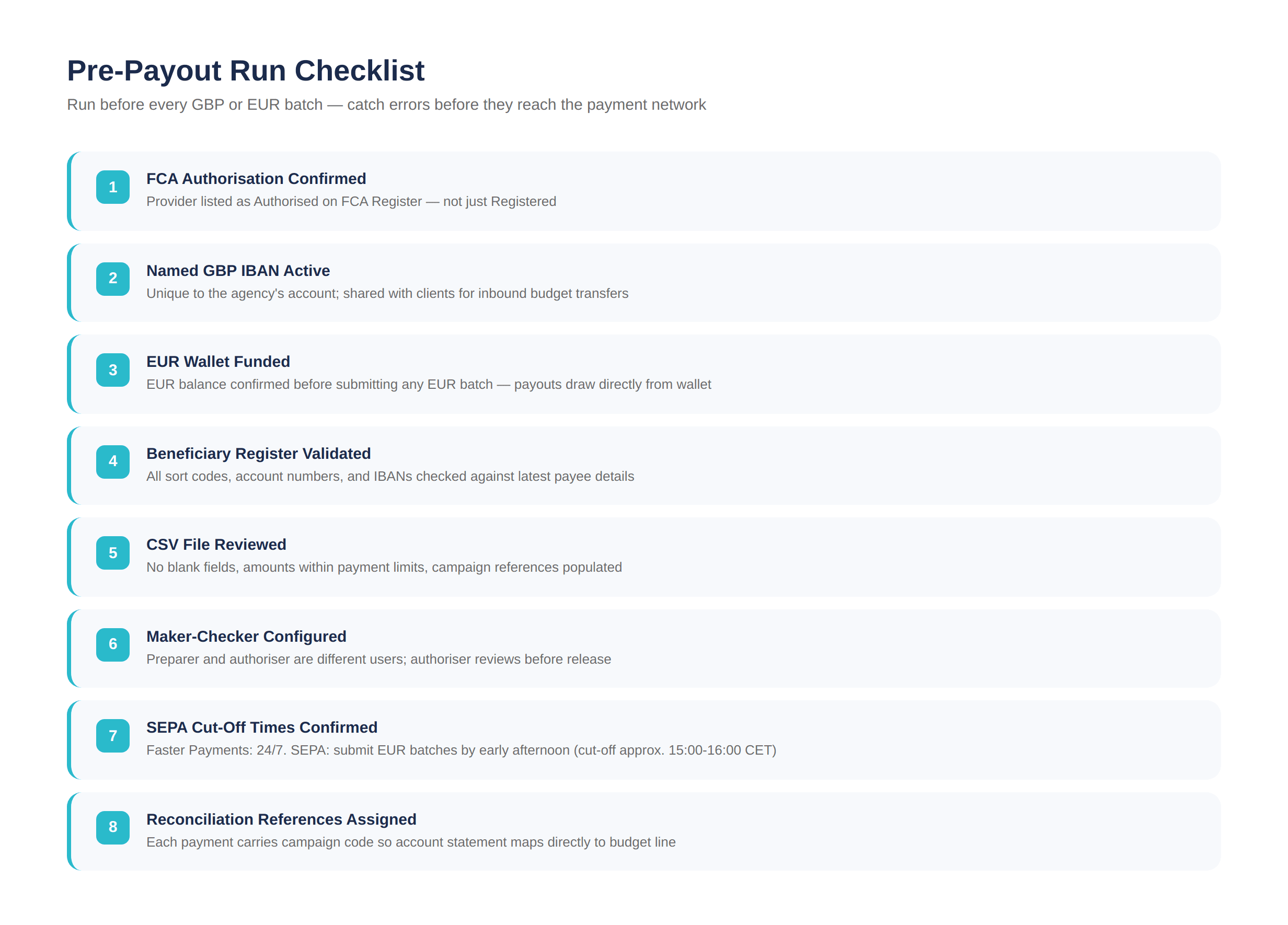
Setting up a step-by-step marketing agency payment account for client budget management and media payouts UK requires getting both the account infrastructure and the operational workflow right. Use this checklist before each payout run to confirm both are in place.
FCA authorisation confirmed — provider is listed as Authorised on the FCA Register, not just Registered
Named GBP IBAN active — unique to the agency's account, shared with clients for inbound budget transfers
EUR wallet funded — EUR balance confirmed before submitting any EUR batch
Beneficiary register validated — all sort codes, account numbers, and IBANs checked against the latest payee details
CSV file reviewed — no blank required fields, amounts within payment limits, references populated
Maker-checker configured — preparer and authoriser are different users; authoriser has reviewed the batch before release
Cut-off times confirmed — Faster Payments operates 24/7; SEPA has business-day cut-offs (typically 15:00–16:00 CET) — submit EUR batches by early afternoon
Reconciliation references assigned — each payment carries the campaign code so the account statement maps directly to the budget line
Running this check before each cycle eliminates the majority of rejections, reconciliation errors, and compliance gaps that accumulate when payout runs are treated as routine rather than controlled.
[aa cta]
Run your next payout cycle in minutes, not hours
Open an EQWIRE multi-currency account and pay influencers and publishers in GBP and EUR from one place.
[aa btn]Create Account[/aa]
[/aa]
EQWIRE is built for agencies managing client budgets and media payouts across currencies — see EQWIRE for Agencies.
FAQ
How do agencies distribute media budgets to publishers and influencers in the UK?
UK agencies typically receive client media budgets into a named GBP IBAN, allocate them by campaign using structured payment references, and distribute to publishers and influencers via Faster Payments batch upload. The best payment account for marketing agency managing client budgets UK provides batch CSV upload, Faster Payments access for same-day GBP settlement, and a EUR wallet for EU payees via SEPA — all within a single FCA-authorised account.
What is the best payment account for a marketing agency managing client budgets UK?
The best account for an agency depends on payout volume and currency mix. For agencies paying 20+ payees per cycle in GBP and EUR, an FCA-authorised EMI account with named IBAN, batch CSV upload, Faster Payments, and SEPA access outperforms a standard UK business bank account on every operational dimension: speed, cost, batch capability, and audit trail. Verify FCA authorisation status on the Register before opening.
How to automate influencer payments UK batch account Faster Payments?
To automate influencer payments UK batch account Faster Payments: prepare a CSV file with payee name, sort code, account number, amount, and reference; upload via the batch payments portal; validate the parsed rows; submit for authoriser approval under maker-checker controls; release. Faster Payments settles near-instantly, 24/7. Maintaining a pre-validated beneficiary register for recurring influencers reduces preparation time to under 5 minutes per cycle.
Bulk affiliate and influencer payout account UK Faster Payments GBP EUR — what to use?
A multi-currency EMI account with both Faster Payments (GBP) and SEPA Credit Transfer (EUR) handles the full bulk affiliate and influencer payout account UK Faster Payments GBP EUR requirement from a single platform. GBP payments to UK-based creators settle same-day via Faster Payments; EUR payments to EU-based affiliates settle T+1 via SEPA. No SWIFT fees, no per-payment FX conversion if EUR balances are maintained separately.
Step-by-step: marketing agency payment account for client budget management and media payouts UK
The setup follows five steps: (1) open an FCA-authorised EMI account with named GBP IBAN and EUR wallet; (2) share the GBP IBAN with clients for inbound media budget transfers; (3) allocate received funds by campaign using payment references; (4) prepare batch CSV files for each payout run — GBP via Faster Payments, EUR via SEPA; (5) submit through maker-checker approval and release. Run the pre-payout checklist before each cycle to catch errors before they reach the payment network.
Reviewed by


Power your payments
with EQWIRE
Create your account in minutes and experience smooth, secure global payments.
" height="9.0156px" id="LIcbdboyB" transform="translate(4.987 4.5)" width="9.01562px"/></svg>)