•
•
Multi-Currency Account for Import-Export Businesses: Manage GBP, EUR, USD and CNY
[aa disclaimer]
Legal Disclaimer: This article is for informational purposes only and does not constitute legal, financial, compliance, or tax advice. Banking eligibility, regulatory requirements, and provider policies vary by jurisdiction. Consult qualified professionals before making decisions.
[/aa]
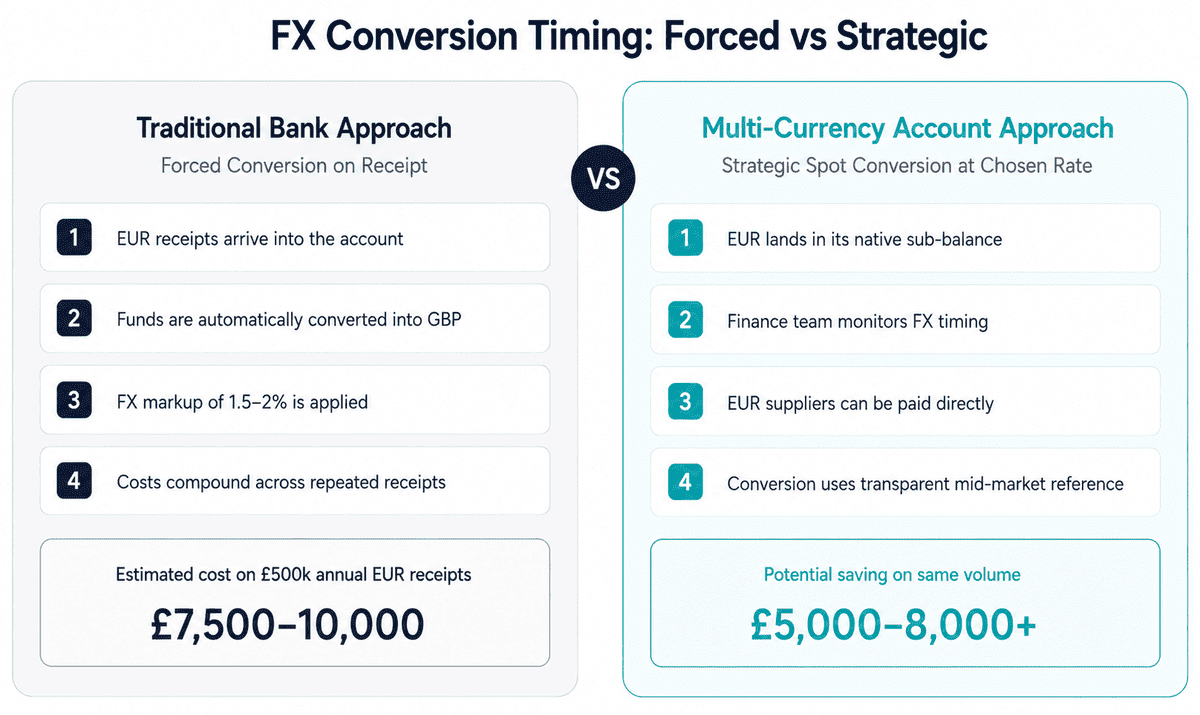
UK businesses trading across four currency corridors face a structural inefficiency built into most standard business bank accounts: every inbound payment in EUR, USD, or CNY triggers an automatic conversion to GBP at the moment of receipt. For a business receiving the equivalent of £500,000 in foreign currency payments each year, a typical 1.5–2% FX markup on every conversion represents £7,500–£10,000 in avoidable costs — before accounting for the time spent reconciling transactions across multiple accounts.
A multi-currency account for import-export businesses handling GBP, EUR, USD and CNY resolves this by holding each currency in a separate sub-balance under one account number. Inbound payments credit in the currency they arrive in. Outbound supplier payments draw from the matching balance. Forced FX conversion is eliminated at the point of receipt, and conversion happens when the business decides — not when the bank does.
This guide covers the practical setup: selecting an FCA-regulated provider, configuring inbound routes for each currency, making outbound payments to suppliers, timing FX conversions, and reconciling multi-currency transactions in accounting software.
[aa key-takeaways]
Key Takeaways
One FCA-regulated Electronic Money Institution (EMI) account holds GBP, EUR, USD, and CNY in separate sub-balances — no automatic conversion on receipt
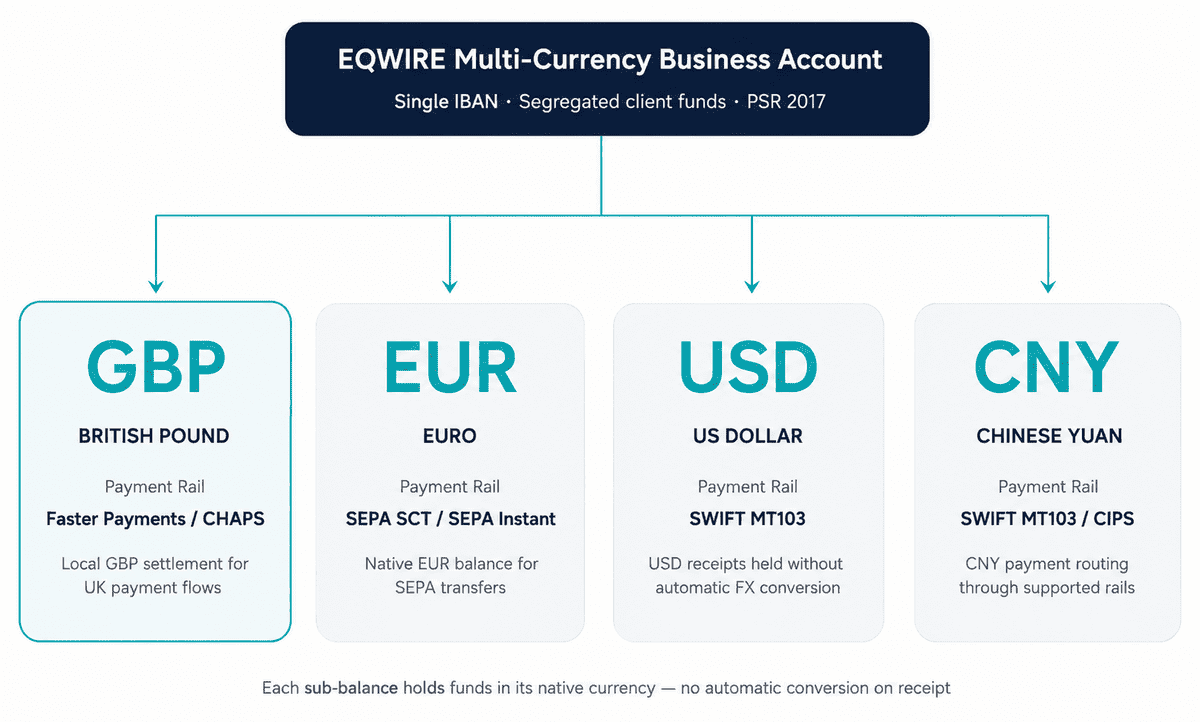
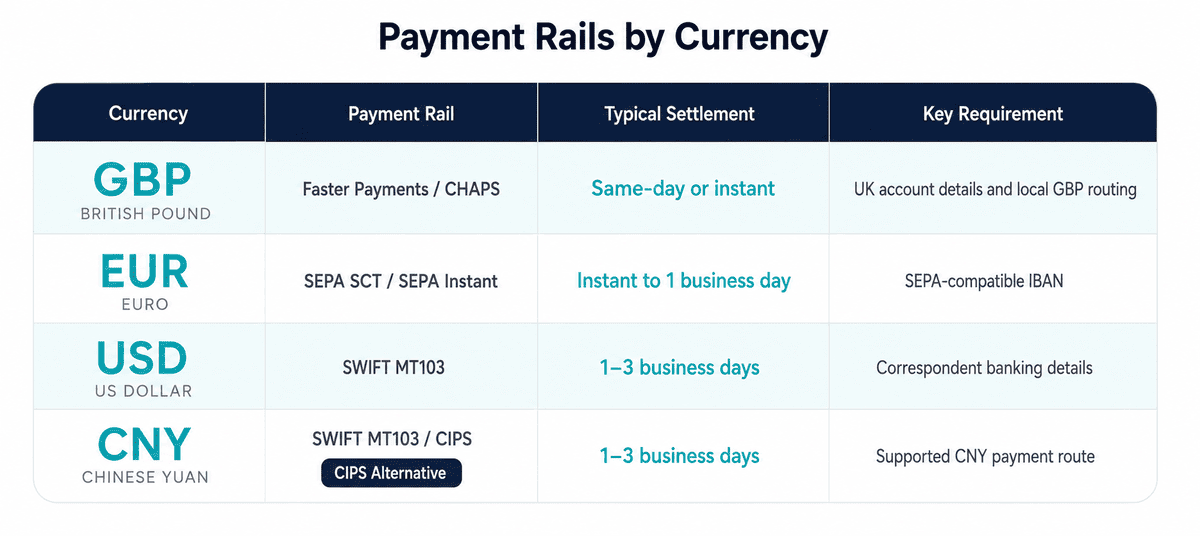
Each currency uses its own payment rail: Faster Payments (GBP), SEPA Credit Transfer (EUR), SWIFT MT103 (USD and CNY)
CNY outbound payments require a purpose-of-payment reference to satisfy PBoC capital control requirements
FX conversion is executed at the account holder's chosen timing — not forced at the point of receipt
Multi-currency transactions integrate directly with Xero and QuickBooks via bank feed or CSV import using transaction-level exchange rates
[aa btn]Book a Call[/aa]
[/aa]
What a Multi-Currency Account Actually Does for Import-Export Businesses
A standard UK business bank account is designed around GBP. When a foreign currency payment arrives, the bank converts it to GBP at the prevailing rate — including a markup — and credits the GBP amount. The business has no choice about timing, rate, or whether conversion happens at all.
A multi-currency account operates differently. Each supported currency — GBP, EUR, USD, CNY — has its own sub-balance within a single account. Inbound EUR credits to the EUR sub-balance. Inbound USD credits to the USD sub-balance. The balances are held in their original currency until the account holder decides to convert, transfer, or pay a supplier in that currency.
For an import-export business:
Importers paying EUR or USD suppliers draw from the matching sub-balance directly, eliminating conversion at the point of payment
Exporters receiving EUR or USD from customers hold the receivables in currency until an advantageous conversion rate appears
Businesses operating both directions can net EUR inflows against EUR outflows, reducing total conversion volume
The account operates under a single UK company name, with a single set of KYC documents, one provider relationship, and one reconciliation workflow.
Selecting an FCA-Regulated Provider
For UK businesses, the compliance baseline is FCA authorisation. An Electronic Money Institution (EMI) authorised under the Payment Services Regulations 2017 holds customer funds in segregated accounts separate from operational capital. This safeguarding requirement means business funds are protected if the provider becomes insolvent.
When evaluating providers for a four-currency import-export account, the relevant criteria are:
Requirement | What to check |
|---|---|
FCA authorisation | Verify on the FCA Financial Services Register — look for "Authorised" status, not "Registered" |
CNY support (both directions) | Confirm the provider supports both inbound CNY receipts AND outbound CNY payments — many list CNY but only handle one direction |
Named IBAN for EUR | A dedicated IBAN in the company name is required for SEPA compatibility |
SWIFT/BIC for USD and CNY | Required for international wire transfers |
GBP sort code | A UK sort code and account number enables Faster Payments and CHAPS |
FX conversion controls | Check whether conversion is automatic or manual, and whether limit orders are available |
Provider selection is the single most consequential step in the setup. An account that does not support outbound CNY will force a separate banking relationship for China payments, defeating the consolidation purpose.
Configuring Inbound Payment Routes by Currency
Each currency requires its own inbound payment infrastructure. After account opening, the configuration steps for a four-currency account are:
GBP — Faster Payments and CHAPS
The account issues a UK sort code and account number. UK customers and PSPs pay via Faster Payments (up to £1m, near-instant) or CHAPS (same-day, no upper limit). No additional configuration is required beyond sharing these details.
For businesses obtaining a GBP sort code without a UK office, an FCA-authorised EMI provides this through the account opening process.
EUR — SEPA Credit Transfer (SCT)
The account issues a named IBAN (International Bank Account Number) in the company name. EU customers pay via SEPA Credit Transfer. The key requirement is that the IBAN is in the company's name — shared or pooled IBANs create reconciliation problems and are rejected by some EU banks as a sending destination.
For businesses receiving EUR via SEPA using a named IBAN, the named IBAN issued by the EMI operates identically to a traditional bank IBAN from the sender's perspective.
USD — SWIFT MT103
USD payments arrive via SWIFT wire transfer. The account provides a SWIFT/BIC code and account number. USD inbound payments from US customers or international buyers credit directly to the USD sub-balance without conversion.
Cut-off times for same-day USD processing are typically 14:00–16:00 UK time. Payments received after the cut-off are processed the following business day.
CNY — SWIFT MT103 with Purpose-of-Payment Reference
CNY inbound payments arrive via SWIFT MT103. The critical additional requirement is the purpose-of-payment reference in the payment instruction. Chinese banks are required by the People's Bank of China (PBoC) to include a purpose code or contract reference in cross-border CNY transfers.
When receiving CNY from a Chinese buyer:
Share SWIFT/BIC and account number with the Chinese buyer
Instruct the buyer to include a contract reference or invoice number as the purpose of payment
Confirm the Chinese sending bank has included the reference before the transfer is instructed
CNY payments without a valid purpose-of-payment reference are frequently returned or held pending clarification, adding 2–5 business days to settlement.
[aa fast-fact]
Fast Fact: BIS research on cross-border payment compliance identifies correspondent banking documentation requirements — including purpose-of-payment references — as one of the primary causes of delay in cross-border CNY settlements from non-Chinese counterparties.
[/aa]
Making Outbound Supplier Payments in Each Currency
With sub-balances funded, outbound payments to suppliers follow straightforward per-currency processes:
GBP suppliers — Faster Payments (same-day, under £1m) or CHAPS (same-day, any amount). Instruct from the account dashboard using sort code and account number.
EUR suppliers — SEPA Credit Transfer from the EUR sub-balance. Settlement is typically next business day across the SEPA zone. The payment debits EUR directly — no conversion to GBP occurs.
USD suppliers — SWIFT MT103 from the USD sub-balance. Settlement is 1–2 business days. International wire instructions require the supplier's SWIFT/BIC and account details.
CNY suppliers — SWIFT MT103 from the CNY sub-balance with a mandatory purpose-of-payment reference. Include the contract or invoice reference in the payment instruction. Confirm the receiving Chinese bank's SWIFT/BIC and CNY account details.
The operational advantage: all four outbound payment types are managed from one dashboard, with one set of account credentials, under one compliance relationship.
Timing FX Conversions Strategically
For most import-export businesses, the FX conversion question is: convert immediately when funds arrive, or hold in currency and convert at a chosen time?
Holding in currency is appropriate when:
The currency will be used to pay a supplier in the same currency (netting eliminates conversion entirely)
The current rate is unfavourable and near-term improvement is expected
The business has predictable outflows in that currency that can be matched against inflows
Immediate conversion is appropriate when:
The business has no outflows in that currency and no expectation of favourable rate movement
Cash flow requirements in GBP are immediate
The business policy is to eliminate open FX positions
For businesses with significant CNY volumes, BIS cross-border payments progress report notes that CNY settlement costs are materially lower when payments are batched and converted at controlled times rather than converted on each individual receipt.
Practical timing tools available on most multi-currency accounts:
Spot conversion — convert at current mid-market rate (plus provider margin) immediately
Limit orders (where available) — set a target rate and convert automatically when reached
Forward contracts (where available) — lock a rate for a future conversion date, eliminating rate uncertainty on known future outflows
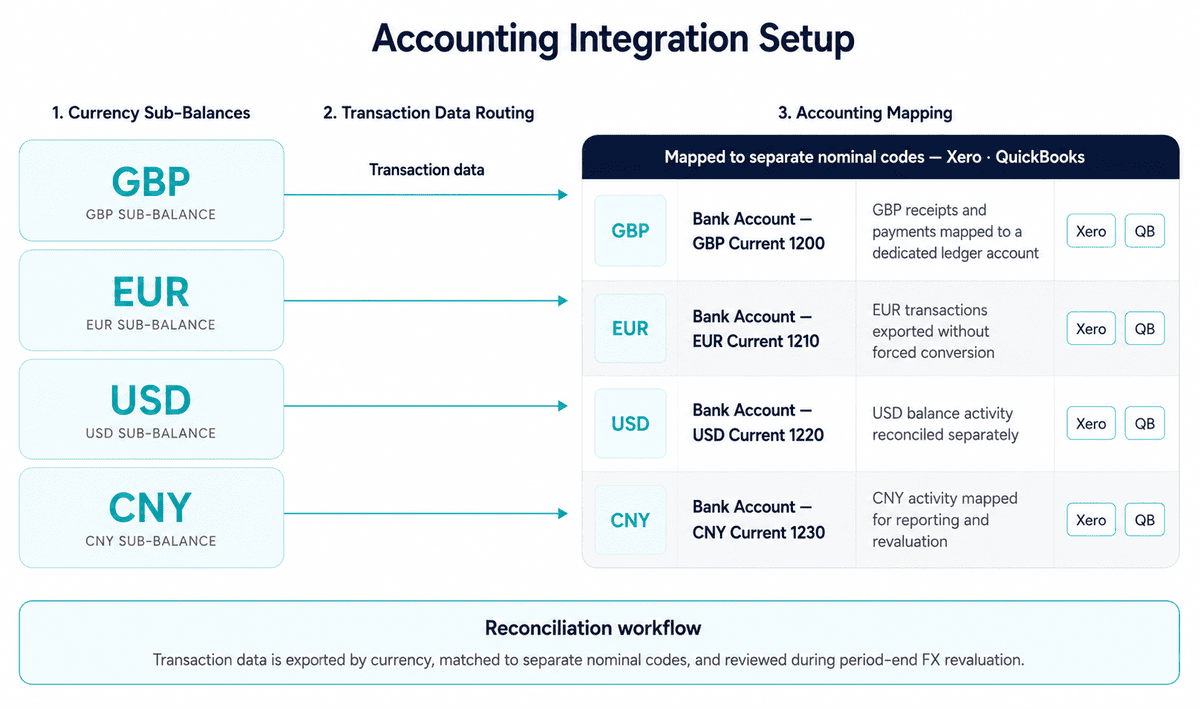
Reconciling Multi-Currency Transactions in Accounting Software
Multi-currency transactions require exchange rates at the transaction level for accurate profit and loss reporting. UK accounting standards require that foreign currency transactions are recorded at the rate on the date of the transaction, with unrealised gains and losses recognised at period end.
For Xero users:
Enable multi-currency in Xero (requires Xero's Premium tier or above)
Create a bank account in Xero for each currency sub-balance (GBP, EUR, USD, CNY)
Import transactions via bank feed (if the provider offers direct Xero integration) or CSV
Xero applies the exchange rate on the transaction date automatically for invoices and payments
At period end, run the Foreign Currency Revaluation report to recognise unrealised FX gains and losses
For QuickBooks Online:
Enable multi-currency in QuickBooks account settings
Create separate bank accounts for each currency
Import transactions via bank feed or CSV
Record exchange rates on each transaction manually if auto-import does not capture them
Run the Exchange Gain or Loss report at period end
HMRC's Business Income Manual at BIM39515 specifies the acceptable methods for determining exchange rates on foreign currency transactions for UK tax purposes. The transaction-date rate method (using the rate on the day of the transaction) is the standard approach and is supported by both Xero and QuickBooks.
[aa fast-fact]
Fast Fact: HMRC allows businesses to use an average rate for a period (such as a monthly average) as an alternative to transaction-date rates, provided it is applied consistently. For businesses with high transaction volumes in EUR, USD, or CNY, the monthly average approach can significantly reduce the administrative burden of reconciliation.
[/aa]
Common Setup Errors and How to Avoid Them
Three setup errors account for most operational problems with multi-currency import-export accounts:
1. Using a pooled or shared IBAN for EUR
Some providers issue a shared IBAN (the provider's IBAN, not a named IBAN in the company name) for EUR receipts. EU sending banks and corporate treasury systems increasingly reject these as a destination, as they cannot confirm the named payee. Always verify that the EUR IBAN issued is in the company's name before sharing with EU customers.
2. Omitting the purpose-of-payment reference on CNY payments
This is the single most common cause of CNY payment returns. Include a contract reference or invoice number on every outbound CNY payment. Instruct Chinese buyers to do the same on inbound CNY payments.
3. Selecting a provider that lists CNY but only supports one direction
Some EMIs support inbound CNY (receiving from Chinese buyers) but not outbound CNY (paying Chinese suppliers), or vice versa. An import-export business typically needs both. Verify both directions explicitly with the provider before account opening.
[aa cta]
One Account for GBP, EUR, USD and CNY
Open an EQWIRE multi-currency account and manage all four currency corridors from one FCA-regulated account — no forced conversion on receipt, no multiple banking relationships.
[aa btn]Get Started[/aa]
[/aa]
FAQ
How do I receive CNY payments from a Chinese buyer into a UK business account?
A UK business with a multi-currency account that supports CNY can receive Chinese yuan payments via SWIFT MT103. The UK account holder shares the SWIFT/BIC code and account details with the Chinese buyer, who instructs their bank to send CNY. The essential requirement is that the Chinese sending bank includes a valid purpose-of-payment reference — a contract reference or invoice number satisfying PBoC capital control requirements. Knowing how to set up a multi-currency business account to receive and pay CNY invoices as a UK importer means selecting an FCA-authorised provider that specifically supports both inbound and outbound CNY (not CNH). Once the payment is received, the CNY credits to the CNY sub-balance and can be held or converted at the business's chosen timing.
Can I pay a EUR invoice directly from a EUR balance without converting to GBP first?
Yes — when a multi-currency account holds a EUR sub-balance, outbound EUR payments draw directly from that balance without triggering a GBP conversion. The payment is instructed as a SEPA Credit Transfer in EUR, debits the EUR sub-balance at the exact invoice amount, and settles at the EU supplier's bank in EUR. No FX conversion occurs. The only scenario requiring conversion is if the EUR sub-balance has insufficient funds — in that case, a GBP-to-EUR conversion would be needed to top it up before the payment is instructed.
How long does a SWIFT payment to China in CNY take to arrive?
A SWIFT MT103 payment from a UK account to a Chinese bank in CNY typically settles within 1–2 business days from the date of instruction. The precise timeline depends on the cut-off time at the UK sending provider (typically 10:00–14:00 UK time for same-day SWIFT processing), the correspondent banking chain between the UK and Chinese institutions, and whether the receiving Chinese bank requires additional documentation under PBoC rules before crediting the funds. Including a correct purpose-of-payment reference materially reduces the risk of processing delays at the Chinese end.
What documents do I need to open a multi-currency business account in the UK?
UK-regulated Electronic Money Institutions (EMIs) typically require: certificate of incorporation (or equivalent company registration), proof of registered business address, and identity verification for each director and any individual holding more than 25% beneficial ownership. Some providers also request a description of business activities and expected payment corridors. The full onboarding process — document submission through to account activation — takes 1–5 business days with an FCA-authorised EMI, compared to 4–8 weeks and often in-branch appointments at a traditional high-street bank.
How do UK importers manage GBP, EUR, USD and CNY balances in one account?
UK importers manage multiple currency balances through a dedicated currency account that maintains a separate sub-balance for each currency — GBP, EUR, USD, and CNY hold independently without automatic conversion between them. The account issues a single UK sort code and account number for GBP, a SEPA-compatible IBAN for EUR, and SWIFT/BIC details for USD and CNY. Inbound payments credit directly to the relevant sub-balance. Outbound supplier payments draw from the matching balance. When conversion is required, finance teams execute it via the account dashboard at a time of their choosing. The same sub-balance separation logic applies when routing PSP settlement payouts — businesses receiving Stripe or Adyen payouts in multiple currencies use an identical account structure.
For UK import-export businesses, a multi-currency account for GBP, EUR, USD and CNY consolidates four separate currency flows into one FCA-regulated structure. Payment rails are matched to currency, conversion is controlled by the business, and each sub-balance integrates cleanly with standard accounting software. The result is fewer institutions to manage, lower FX costs on supplier payments, and a reconciliation workflow built for multi-currency operations rather than bolted onto a single-currency account.
The selection step matters: an importer-exporter multi-currency account must specifically support both receiving and sending in all four currencies, including CNY — a distinction that eliminates providers that list CNY as supported but only handle one direction. Verifying FCA authorisation via the FCA Financial Services Register is the minimum starting point before opening any account used for business funds.
Reviewed by
Related Articles

UK Business Account for an Industrial Exporter Managing Deposits, Refunds and Final Invoices

Importing from China: How to Hold CNY and Pay Chinese Suppliers Directly

Multi-Currency Account for Hong Kong Trade: Hold HKD, USD and CNY Together

SWIFT Code Lookup: Find BIC Code for International USD and CNY Payments

Power your payments
with EQWIRE
Create your account in minutes and experience smooth, secure global payments.
" height="9.0156px" id="LIcbdboyB" transform="translate(4.987 4.5)" width="9.01562px"/></svg>)