
•
•
Articles
How to Receive PSP Payouts in AED: Adyen, Stripe and PayPal in UAE Dirhams
[aa disclaimer]
Legal Disclaimer: This article is for informational purposes only and does not constitute legal, financial, compliance, or tax advice. Banking eligibility, regulatory requirements, and provider policies vary by jurisdiction. Consult qualified professionals before making decisions.
[/aa]
E-commerce businesses selling to UAE customers frequently discover that their PSP payouts arrive in GBP or USD rather than UAE dirhams. The root cause is a default configuration at the settlement layer, not a limitation of the payment method. Global PSPs assign settlement currency based on the merchant's account registration country, so a UK-incorporated entity using Adyen or Stripe will receive funds in GBP unless the account is explicitly reconfigured for AED.
This guide covers the exact steps to receive PSP payouts in AED through Adyen, Stripe, and PayPal: the account types that qualify as payout destinations, the dashboard settings required on each platform, and the four most common configuration errors that prevent AED settlement from completing.
[aa key-takeaways]
Key Takeaways
Adyen supports AED like-for-like settlement when three conditions are met: UAE regional eligibility on the merchant account, payment method support for AED, and a configured AED payout account, with a T+2 settlement schedule.
Stripe requires two separate configuration steps for AED payouts: adding an AED-compatible payout account and explicitly enabling AED as a settlement currency in the dashboard.
Stripe applies a T+5 business day payout schedule to UAE accounts by default, compared to T+2 for Adyen's AED settlement.
AED does not route through SWIFT's standard correspondent banking network; payout destinations must participate in UAE domestic payment rails, either a UAE bank account or an AED-capable EMI account.
UK-regulated EMI accounts authorised by the FCA can serve as valid AED payout destinations when AED is configured as a named wallet currency and linked as a transfer instrument in the PSP dashboard.
[aa btn]Book a Call[/aa]
[/aa]
Why AED Payouts Default to GBP or USD
How PSPs Assign Settlement Currency
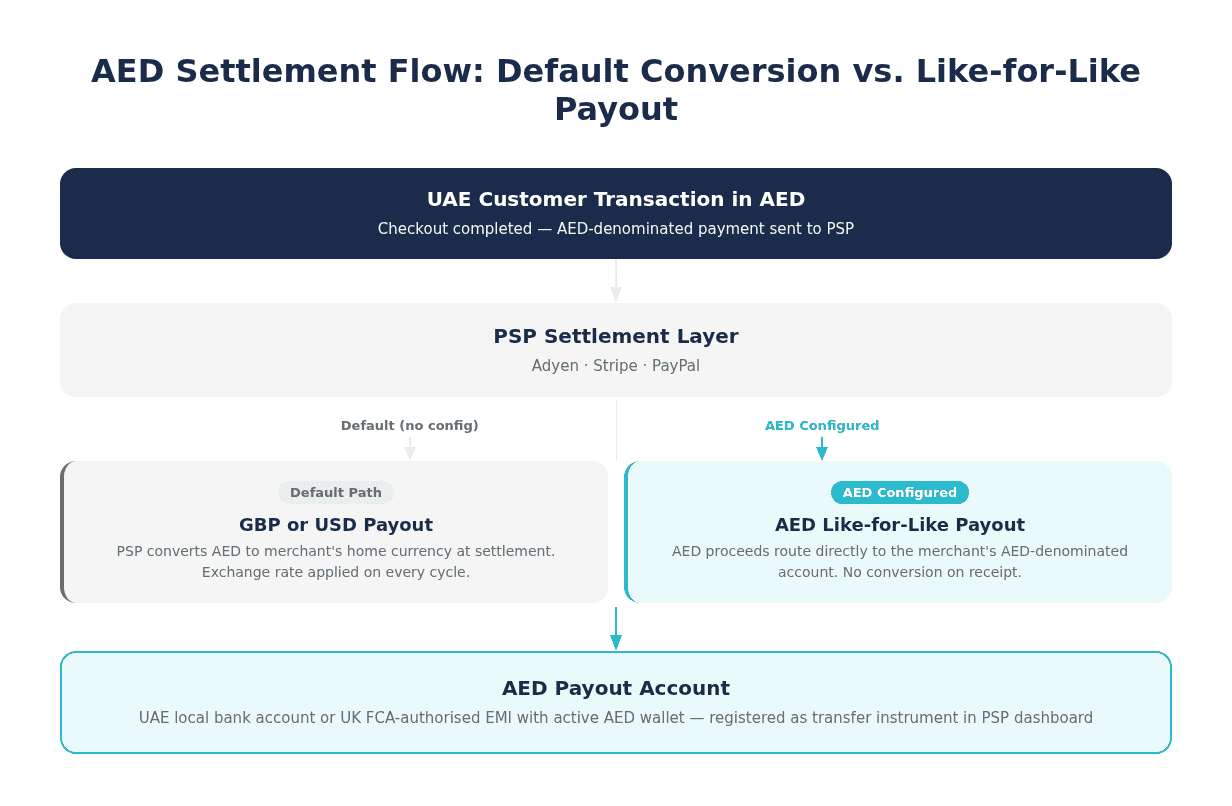
Global PSPs establish settlement currency at account creation, defaulting to the legal entity currency of the registered merchant. A UK company holding a Stripe or Adyen account receives payouts in GBP as standard, regardless of the transaction currency the buyer used. A customer in Dubai completing a checkout in AED generates a dirham-denominated transaction, but the merchant receives GBP after the PSP applies a conversion at the point of settlement.
This default behaviour is not an error. It is a practical design for merchants operating in a single home currency. The problem arises for businesses selling into the UAE specifically, where retaining funds in AED reduces exposure to GBP/AED exchange rate fluctuations and avoids repeated conversion costs across high-volume settlement cycles. At scale, the difference between converting on every settlement cycle and holding AED directly is a meaningful line item in monthly reconciliation.
AED as a Non-SWIFT Settlement Currency
AED occupies a distinct category among global settlement currencies. Unlike GBP or EUR, UAE dirhams do not route through the SWIFT correspondent banking network for PSP settlement. Domestic AED payments flow through UAE-regulated infrastructure overseen by the Central Bank of the UAE under the Retail Payment Services and Card Schemes (RPSCS) regulatory framework.
The practical implication is that a standard UK or EU bank account cannot receive AED payouts from Adyen or Stripe, even one marketed as multi-currency. The payout destination must be an account that participates in UAE domestic payment rails: a UAE local bank account or an AED-denominated account held with an institution that has UAE banking connectivity. Establishing the correct payout account is the prerequisite for any PSP AED configuration.
How to Receive Adyen Payouts in AED
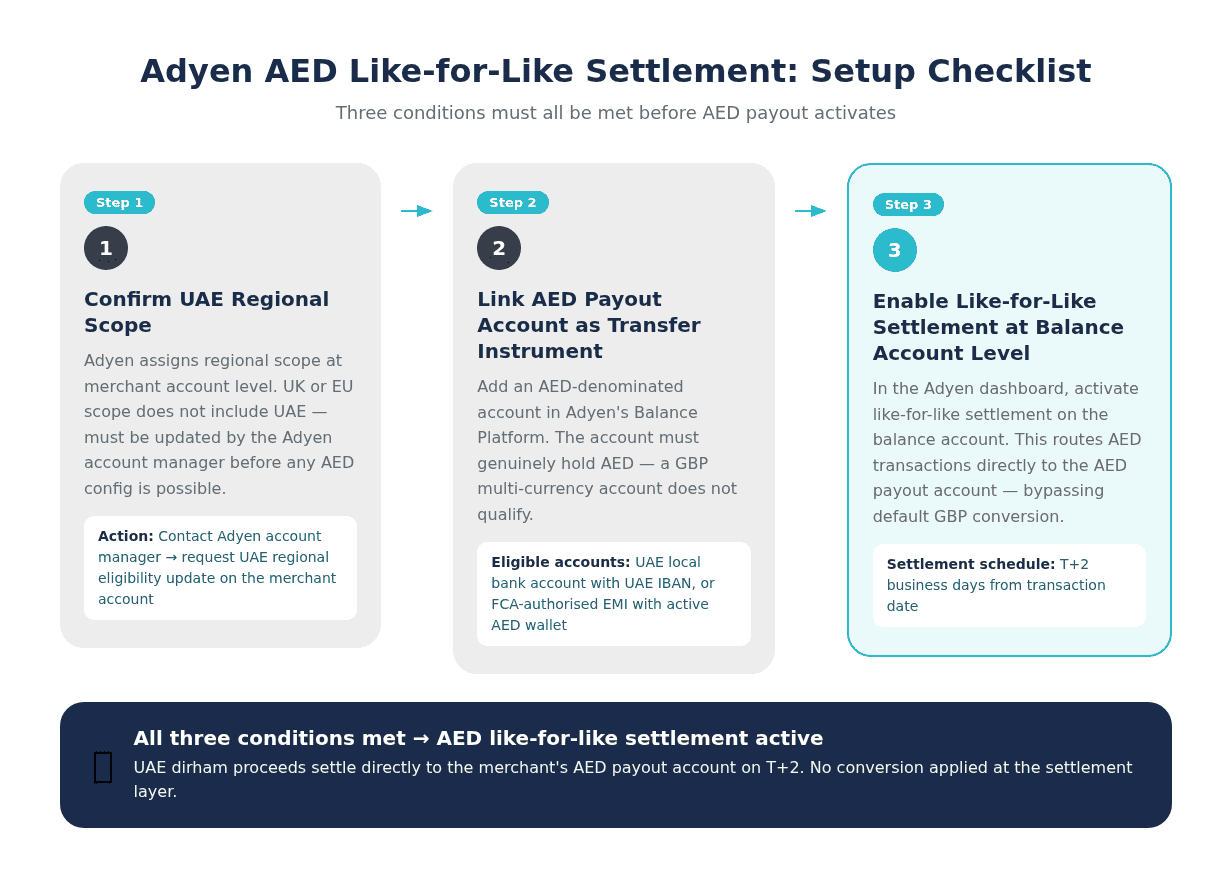
Adyen's like-for-like settlement model retains AED transaction proceeds in UAE dirhams and pays them out without conversion, provided all three eligibility conditions are present on the merchant account. Full technical documentation on Adyen's supported settlement currencies specifies which currencies qualify by region and payment method.
Step 1: Confirm UAE Regional Eligibility
Adyen assigns regional scope to each merchant account during onboarding. Merchants with UAE regional scope are eligible to configure AED as a settlement currency. A UK or EU merchant adding a UAE storefront without updating regional settings will find AED like-for-like settlement unavailable, even if the payment method supports it. Merchants in this position need to contact their Adyen account manager to update the account's regional configuration before proceeding with any further AED setup steps.
Step 2: Add an AED Payout Account as a Transfer Instrument
Adyen disburses AED funds to a payout account registered as a transfer instrument in the Balance Platform. The account must be denominated in AED. A GBP account with multi-currency labels or a SWIFT-routed account will not satisfy the requirement. Merchants can add a UAE local bank account or an AED-capable EMI account. Once linked, Adyen's system validates the account currency before accepting payout instructions in AED. The same validation logic applies to PSP settlement into a multi-currency EMI account: the receiving account must hold AED as an active denomination, not a converted balance from another currency.
Step 3: Enable Like-for-Like Settlement at the Balance Account Level
With regional scope confirmed and the AED payout account linked, the final step is enabling like-for-like settlement in the Adyen dashboard at the balance account level. This instructs Adyen to route AED transactions directly to the AED payout account in the original currency, bypassing the default GBP conversion. Adyen's standard AED payout schedule is T+2 business days from transaction date. The like-for-like model that bypasses Adyen's FX conversion at the balance account level is the final enabling step, effective only after regional scope and payout account are both confirmed.
How to Receive Stripe Payouts in AED
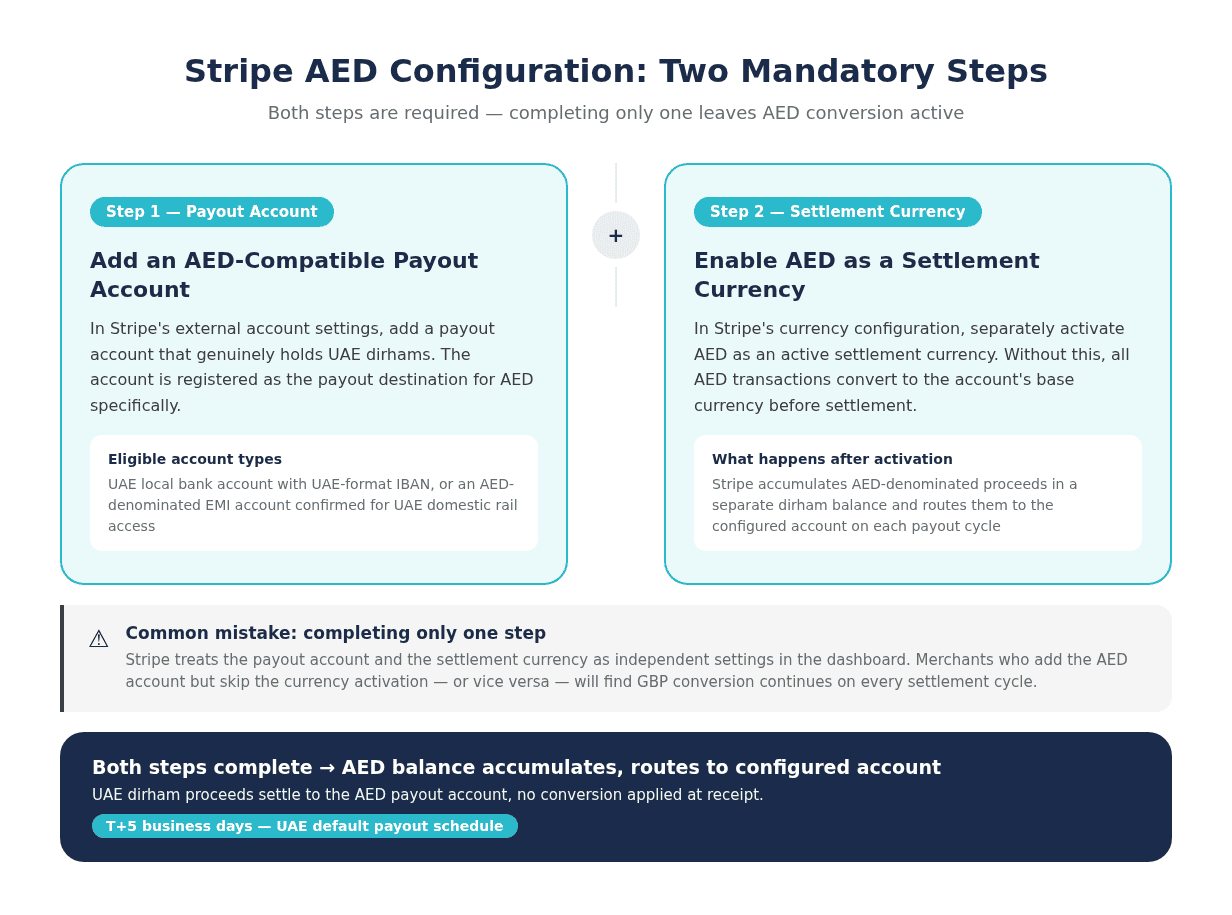
Stripe's multi-currency settlement framework holds balances per currency and pays out each currency to a separately configured bank account. Stripe's multi-currency settlement documentation explains the balance and payout mechanics in full. For AED specifically, two configuration steps are mandatory. Neither one alone is sufficient.
Step 1: Add an AED-Compatible Payout Account
Stripe requires a payout bank account that can receive UAE dirhams. The merchant adds either a UAE local bank account with a UAE IBAN or an AED-denominated EMI account via Stripe's external account settings. The account must be registered as the payout instrument for AED specifically. Standard UK or EU accounts cannot receive AED payouts from Stripe, regardless of the account holder's multi-currency arrangement with their bank. Stripe's UAE payout requirements specify that the registered payout account must match the AED settlement currency and pass Stripe's bank account verification checks before payouts can route.
Step 2: Enable AED as a Settlement Currency
Adding a payout account does not activate AED settlement. Merchants must separately navigate to Stripe's currency configuration and enable AED as an active settlement currency. Without this step, Stripe converts all AED transactions to the account's base currency before settlement and no AED balance accumulates. After enabling, Stripe begins holding AED-denominated proceeds separately and routes them to the configured account on each payout cycle. The two steps are treated as independent settings in Stripe's dashboard, which is why merchants frequently complete one and miss the other.
Step 3: Verify the T+5 Payout Schedule
Stripe applies a T+5 business day payout schedule to UAE accounts by default. This timeline is longer than the T+2 schedule typical for European accounts and reflects Stripe's UAE-specific risk assessment parameters. Finance teams should factor this schedule into cash flow planning when AED represents a material share of revenue. Merchants with UK-registered Stripe accounts that also process UAE transactions may find that AED payouts operate on a separate cycle from their primary GBP payout run.
[aa fast-fact]
Fast Fact: Stripe's default payout schedule for UAE accounts is T+5 business days, compared to T+2 for Adyen's AED like-for-like settlement. On high transaction volumes, this difference meaningfully affects working capital availability.
[/aa]
Receiving PayPal Payouts in AED
PayPal's AED handling differs structurally from Adyen and Stripe. Rather than a settlement-cycle disbursement model, PayPal retains AED in a wallet balance and releases funds to a linked bank account on request or on a withdrawal schedule set by the merchant. This distinction matters for businesses that want predictable, automated payout timing.
PayPal UAE Business Account Requirements
Withdrawing AED from a PayPal business account requires a PayPal account registered in the UAE or a jurisdiction PayPal UAE supports for dirham withdrawal. PayPal does not offer automated like-for-like settlement in the PSP sense. AED funds accumulate in the PayPal wallet and are withdrawn manually or via a scheduled transfer. PayPal's applicable transfer fees and minimum withdrawal thresholds for AED apply per the account's regional terms and are subject to periodic updates.
Transferring AED to a Bank or EMI Account
PayPal supports AED withdrawal to UAE local bank accounts. For businesses using a UK-regulated EMI provider, AED withdrawal eligibility depends on whether the EMI holds a UAE correspondent arrangement that allows inbound PayPal transfers in dirham. Not all UK EMIs support this routing path. Merchants should confirm AED receipt capability directly with their EMI provider before configuring PayPal payout routing to that account. Attempting to route AED to an account without confirmed UAE domestic rail access will result in conversion or transfer failure.
[aa cta]
Receive AED Payouts Directly Into a Multi-Currency Account
EQWIRE provides FCA-regulated multi-currency accounts that hold AED as a named wallet currency, accepted as a payout destination by Adyen and Stripe. No automatic conversion on receipt.
[aa btn]Create Account[/aa]
[/aa]
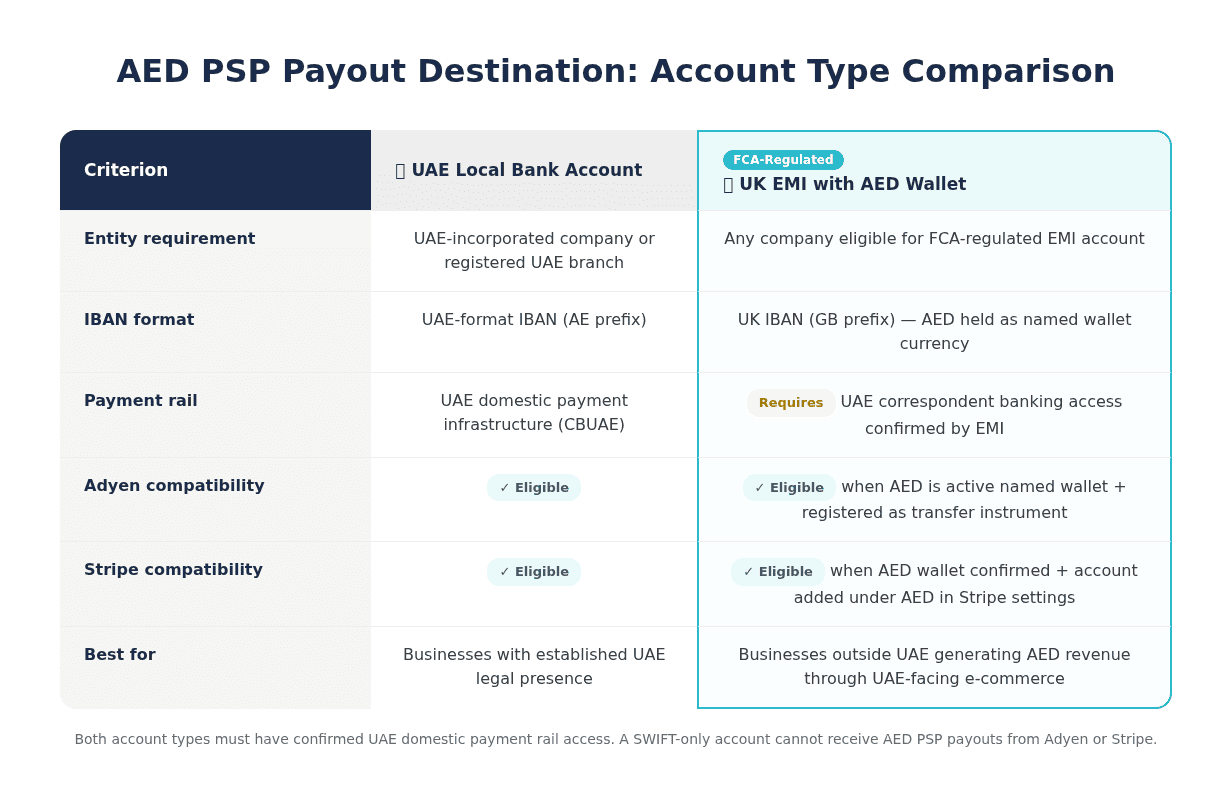
What Account Can Receive AED PSP Payouts
The payout account type is the most commonly overlooked variable in PSP AED configuration. Both Adyen and Stripe validate the destination account's currency denomination before executing an AED payout instruction. A mismatch between the account's declared currency and the AED instruction causes the payout to either fail outright or revert to conversion.
UAE Local Bank Account
A company with a UAE legal presence, either a UAE-incorporated entity or a company with a registered UAE branch, can open an AED-denominated account at a UAE commercial bank. The account receives a UAE-format IBAN and participates in UAE domestic payment infrastructure, making it a fully eligible AED payout destination for Adyen and Stripe. This is the most direct route for businesses with an established UAE operating entity. UAE-registered companies that also require UK-format sort code details for GBP flows can open a GBP account for UAE companies alongside the AED setup without requiring a separate UK legal entity.
UK EMI Account with AED Wallet Capability
UK-regulated Electronic Money Institutions authorised by the Financial Conduct Authority can offer AED as a named wallet currency within a multi-currency account structure. The FCA's requirements for EMI safeguarding govern how client funds held in non-sterling currencies must be protected. An FCA-authorised EMI account with AED configured as an active wallet provides a valid payout destination for both Adyen's Balance Platform and Stripe's external account settings, provided the account is formally registered as a transfer instrument with the PSP.
This structure is particularly relevant for businesses outside the UAE that generate AED revenue through UAE-facing e-commerce and want to hold dirhams without converting on receipt. The EMI account must have confirmed UAE domestic rail access to receive AED inbound transfers, not just a display label showing an AED balance. Linking an EMI account to Stripe and Adyen for PSP settlement requires registering the account as a separate transfer instrument per currency on each platform.
Common Configuration Errors That Block AED Payouts
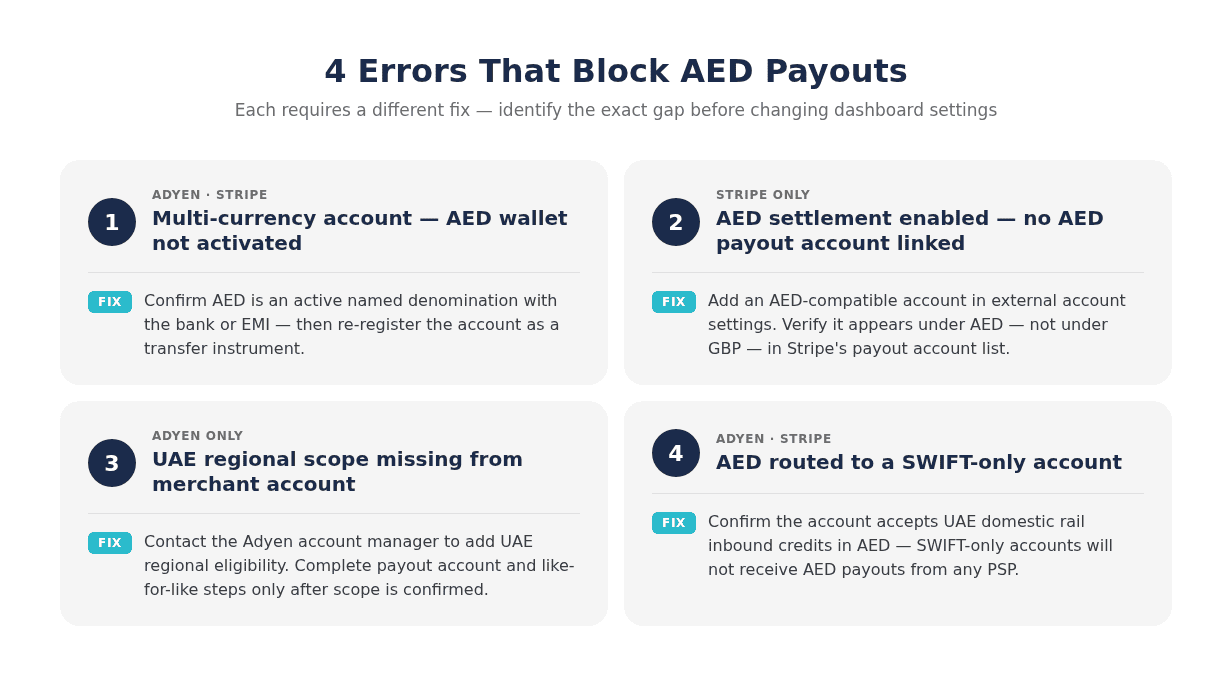
Most AED payout failures on Adyen and Stripe result from four distinct configuration gaps. Each produces a different error state and requires a specific corrective action.
The first error is adding a multi-currency bank account without activating AED as a named wallet currency. A GBP account with a multi-currency label does not constitute an AED account. Both Adyen and Stripe query the account's active currency designation at the time of payout instruction. If AED is not an active denomination, the PSP will either reject the instruction or convert to the account's primary currency.
The second error applies specifically to Stripe: enabling AED as a settlement currency without linking a qualifying AED payout account. Stripe processes these two settings independently. Enabling the currency creates an AED balance bucket; without a matching payout account, that balance has no routing destination and Stripe reverts to the default conversion on the next settlement cycle.
The third error involves Adyen's regional eligibility requirement. A merchant with UK or EU regional scope in their Adyen account cannot enable AED like-for-like settlement until UAE scope is added. Merchants who configure the AED payout account and enable like-for-like settlement but skip the regional update will receive an error at the time of the first AED payout attempt, often without a clear explanation from the platform.
The fourth error is attempting to route AED through a SWIFT-only account. AED is not a standard SWIFT correspondent currency. PSPs route AED payouts through UAE domestic rails, and an account that only supports SWIFT inbound transfers will not receive them. The RPSCS regulatory framework governs the domestic infrastructure through which AED settlement flows. Merchants must confirm with their bank or EMI that the account accepts UAE domestic inbound credits in dirham before configuring any PSP for AED payout routing.
FAQ
How do e-commerce businesses receive Adyen and Stripe payouts in AED without converting to GBP first?
To receive PSP payouts in AED without GBP conversion, a business must complete platform-specific configuration steps on each PSP, not just add a bank account. On Adyen, this means confirming UAE regional eligibility, linking an AED-denominated transfer instrument, and enabling like-for-like settlement at the balance account level. On Stripe, the merchant adds an AED-compatible payout account and separately enables AED as a settlement currency in the dashboard. Both Stripe steps are mandatory; completing only one results in continued GBP conversion. The payout account must be genuinely AED-denominated, as a GBP account with multi-currency features will not satisfy the routing requirements of either platform.
Does Stripe support AED settlement for UAE-connected merchant accounts?
Stripe supports AED as a settlement currency for accounts processing UAE transactions. The merchant must add a UAE bank account or an AED-capable EMI account as a payout instrument and then explicitly activate AED in the settlement currency settings. Once both steps are complete, Stripe accumulates AED transaction proceeds in a separate dirham balance and disburses them to the configured account. The default payout schedule for UAE accounts is T+5 business days.
What is like-for-like settlement in Adyen and how does it apply to AED?
Like-for-like settlement is Adyen's mechanism for retaining transaction proceeds in the original transaction currency and paying them out without conversion. For AED, this means UAE dirham card transactions settle directly to the merchant's AED payout account rather than converting to GBP or another base currency. Adyen applies like-for-like settlement only when three conditions are met: UAE regional scope is active on the merchant account, the relevant payment method supports AED, and an AED payout account is linked as a transfer instrument. When all three conditions are satisfied, AED payouts process on a T+2 business day schedule.
Can a UK FCA-regulated EMI account receive AED payouts from Adyen or Stripe?
A UK EMI account can function as an AED payout destination when AED is configured as an active named wallet currency on the account and the account is registered as a transfer instrument in the PSP's payout settings. FCA-authorised EMIs that offer AED wallets with UAE correspondent banking access can satisfy Adyen's and Stripe's account validation checks. The critical requirement is that AED must be a genuinely active denomination on the EMI account and the EMI must confirm it can receive UAE domestic payment rail inbound transfers in dirham.
How to receive Stripe payouts in AED UAE dirhams without triggering automatic GBP conversion
Automatic GBP conversion in Stripe occurs when either the AED settlement currency is not enabled or no AED payout account is linked, or both. The correct sequence is: first, add a UAE bank account or AED-denominated EMI account in Stripe's external account settings and designate it as the payout account for AED; second, navigate to Stripe's currency configuration and activate AED as a settlement currency. If GBP conversion continues after completing both steps, the likely cause is that the payout account was added under the GBP currency bucket rather than as an AED-specific destination. Merchants should verify that the external account appears under AED in Stripe's payout account list, not under the primary GBP account.
PSPs default to home-currency settlement because it works for most merchants. For businesses generating AED revenue from UAE customers, that default results in currency conversion on every payout cycle — a cost that compounds across high transaction volumes. The configuration steps for Adyen, Stripe, and PayPal each require a dedicated AED payout account and explicit dashboard settings before AED settlement activates.
The payout account, whether a UAE local bank account or an FCA-authorised EMI account with AED wallet capability, must be in place before enabling AED settlement in the PSP dashboard. Businesses that generate consistent AED volumes and want to hold dirhams without conversion on receipt can register for a multi-currency account with AED wallet capability at EQWIRE and link it directly to their Adyen or Stripe configuration.
Reviewed by

Related Articles

Multi-Currency Account for Property Management Companies: Collect Rents in GBP and EUR

FX-Neutral Settlement: How to Receive Multi-Currency PSP Payouts Without Forced Conversion
Payment Account for Recruitment Agencies: Pay International Contractors in Multiple Currencies
How to Receive PSP Payouts in AED: Adyen, Stripe and PayPal in UAE Dirhams

Power your payments
with EQWIRE
Create your account in minutes and experience smooth, secure global payments.
" height="9.0156px" id="LIcbdboyB" transform="translate(4.987 4.5)" width="9.01562px"/></svg>)