
•
•
Articles
How to Hold Multi-Currency Balances Without Forced FX Conversion
[aa disclaimer]
This article is for informational purposes only and does not constitute legal, financial, compliance, or tax advice. Banking eligibility, regulatory requirements, and provider policies vary by jurisdiction. Consult qualified professionals before making decisions.
[/aa]
A UK accountant reviews the morning's incoming payments. A €4,200 invoice from a German client has arrived — but the account shows £3,974 GBP. The platform converted it overnight at a 2.8% spread. No alert. No rate shown. No choice offered.
This is forced FX conversion in action. It occurs on every inbound foreign-currency payment in most standard UK business accounts — automatically, at whatever rate the platform applies, before the account holder logs in. For a business receiving €100,000 per year from EU clients, that spread costs between £1,500 and £3,000 annually.
The alternative is an account that holds multi-currency balances in separate wallets for GBP, EUR, and USD. Incoming payments settle in the matching currency without triggering a conversion. This guide shows how to stop forced FX conversion: hold GBP EUR USD separately in UK multi-currency account — and convert only when you decide.
[aa key-takeaways]
Key Takeaways
Most standard UK business accounts auto-convert incoming foreign currency at receipt — typically at 1.5–3% above mid-market rate
A true multi-currency account provides separate named IBANs for GBP, EUR, and USD — payments settle in the matching wallet without conversion
FCA-authorised EMIs — not traditional UK banks — are the primary providers of genuine multi-currency balance accounts in the UK
Stripe and Adyen payouts can be routed to matching currency wallet IBANs, eliminating an entire layer of forced conversion
Three common configuration errors routinely trigger auto-conversion even in accounts that support currency wallets — and each one is avoidable
[aa btn]Create Account[/aa]
[/aa]
Is Your Account Auto-Converting Currencies? How to Check
Not every account marketed as "multi-currency" prevents auto-conversion. The label is applied broadly. The underlying capability varies.
Here is a five-point audit to determine whether your current account is holding funds in the original currency — or converting them at receipt.
Check | What to look for | Auto-converting if... |
|---|---|---|
1. Statement review | Incoming EUR or USD payment | It appears as GBP on the date it arrived |
2. IBAN structure | Ask: does each currency have its own IBAN? | There is only one GBP IBAN for all incoming funds |
3. Provider terms | Search for "conversion" in the account T&Cs | Language reads "converted at point of receipt" |
4. Settlement description | How incoming payments are labelled | System shows no original currency — only GBP equivalent |
5. FCA register | Check if provider is registered as an EMI | Provider is a bank, not an FCA-authorised electronic money institution |
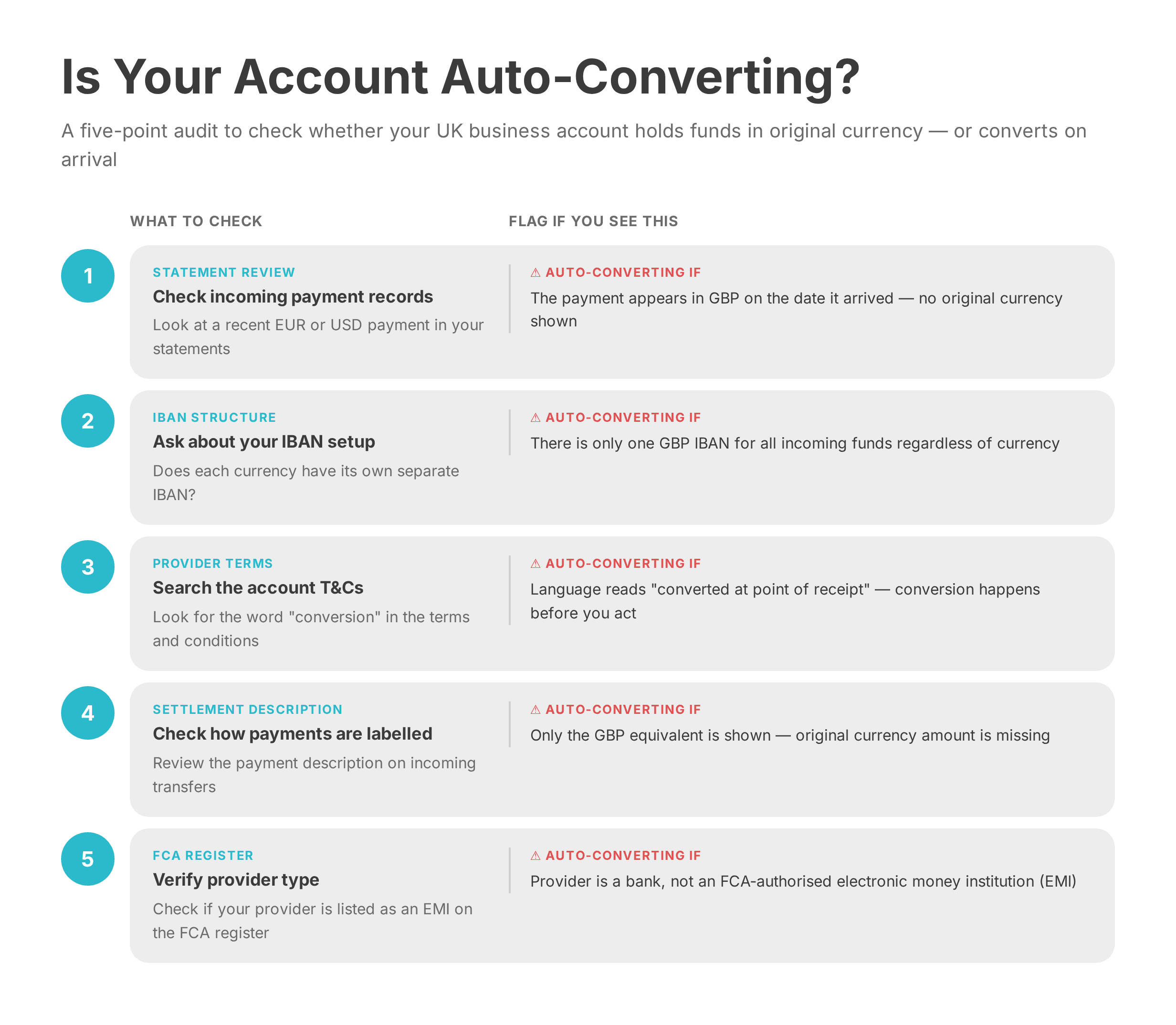
If three or more checks flag a problem, the account is converting inbound payments before any action can be taken. Switching to a proper multi-currency EMI account will stop auto FX conversion multi-currency account UK businesses currently absorb as a fixed operating cost.
What Your Account Needs to Hold Multi-Currency Balances Without Converting
To hold funds in original currency UK account holders need to look beyond the label. A genuinely non-converting multi-currency account must meet all four of the following criteria.
Separate named IBANs per currency. Each wallet — GBP, EUR, USD — must have its own unique IBAN. When a EUR payer sends funds to the EUR IBAN, settlement occurs in EUR. No conversion is triggered at the account level.
FCA authorisation as an electronic money institution. The architecture that allows currency wallets to hold GBP EUR USD without FX conversion UK is characteristic of providers operating under the Electronic Money Regulations 2011. Traditional UK high-street banks convert inbound foreign currency to GBP at settlement — this is standard to their infrastructure, not a configurable option.
No default conversion at receipt. Account settings must treat each wallet as independent. Incoming EUR should not trigger a GBP conversion unless manually initiated.
Manual conversion control. All FX conversions are initiated by the account holder — specifying amount, direction, and timing.
EQWIRE, an FCA-authorised multi-currency EMI, provides named GBP, EUR, and USD wallets that meet all four criteria. UK businesses can hold multi-currency balances UK business-ready — receiving EUR from EU clients and USD from US customers with each balance held separately until a conversion is needed. For a full comparison of account structures, see the key differences between FCA-authorised EMIs and traditional banks for UK business accounts.
[aa fast-fact]
Fast Fact: The FCA's PS25/12 policy statement — effective May 2026 — introduces enhanced safeguarding requirements for EMIs, including stricter reconciliation standards and mandatory annual audits. This strengthens, not reduces, the protection of customer funds held in multi-currency EMI accounts.
[/aa]
[aa cta]
Open a Multi-Currency Account That Holds GBP, EUR and USD Separately
Set up named currency wallets with EQWIRE and stop auto FX conversion — convert only when the rate works for you.
[aa btn]Open Your Account[/aa]
[/aa]
Step-by-Step: Setting Up Separate GBP, EUR, and USD Wallets
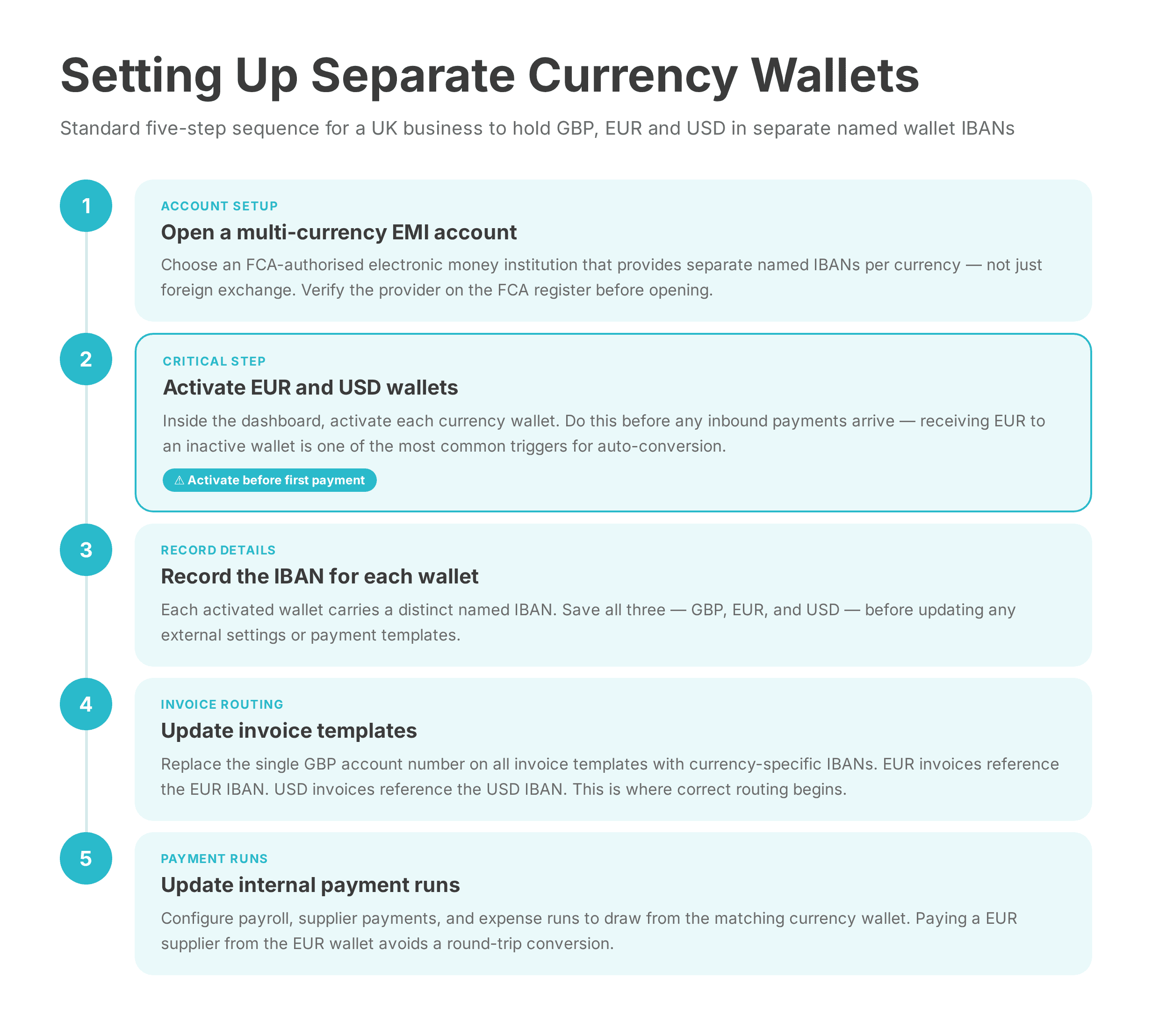
Once an account meets the four criteria above, activating separate currency wallets typically takes less than a working day. Below is the standard setup sequence.
Step 1: Open a multi-currency EMI account
Open an account with an FCA-authorised electronic money institution that explicitly supports separate currency wallets — not just foreign currency exchange. Verify the provider on the FCA register before opening.
Step 2: Activate EUR and USD wallets
Inside the account dashboard, activate EUR and USD wallets. Some EMIs activate all currency wallets by default; others require a manual request per currency. Activate wallets before receiving any inbound payments in those currencies. Receiving EUR to an account with no active EUR wallet is one of the most common triggers for auto-conversion.
Step 3: Record the IBAN for each wallet
Each activated wallet will carry a distinct named IBAN. GBP, EUR, and USD will each have separate account details. Record all three before updating any external settings.
Step 4: Update invoice templates
Replace the single GBP account number used across invoice templates with currency-specific IBANs. EUR invoices sent to EU clients should reference the EUR IBAN. USD invoices sent to US clients should reference the USD IBAN. This is the operational core of how to hold GBP EUR USD in business account without forced conversion — the routing starts at the invoice.
Step 5: Update internal payment runs
If payroll, supplier payments, or expense runs draw from a central account, update each run to pull from the matching currency wallet. Paying a EUR supplier from the EUR wallet avoids an additional round-trip conversion.
Routing PSP Payouts Without Forced Conversion
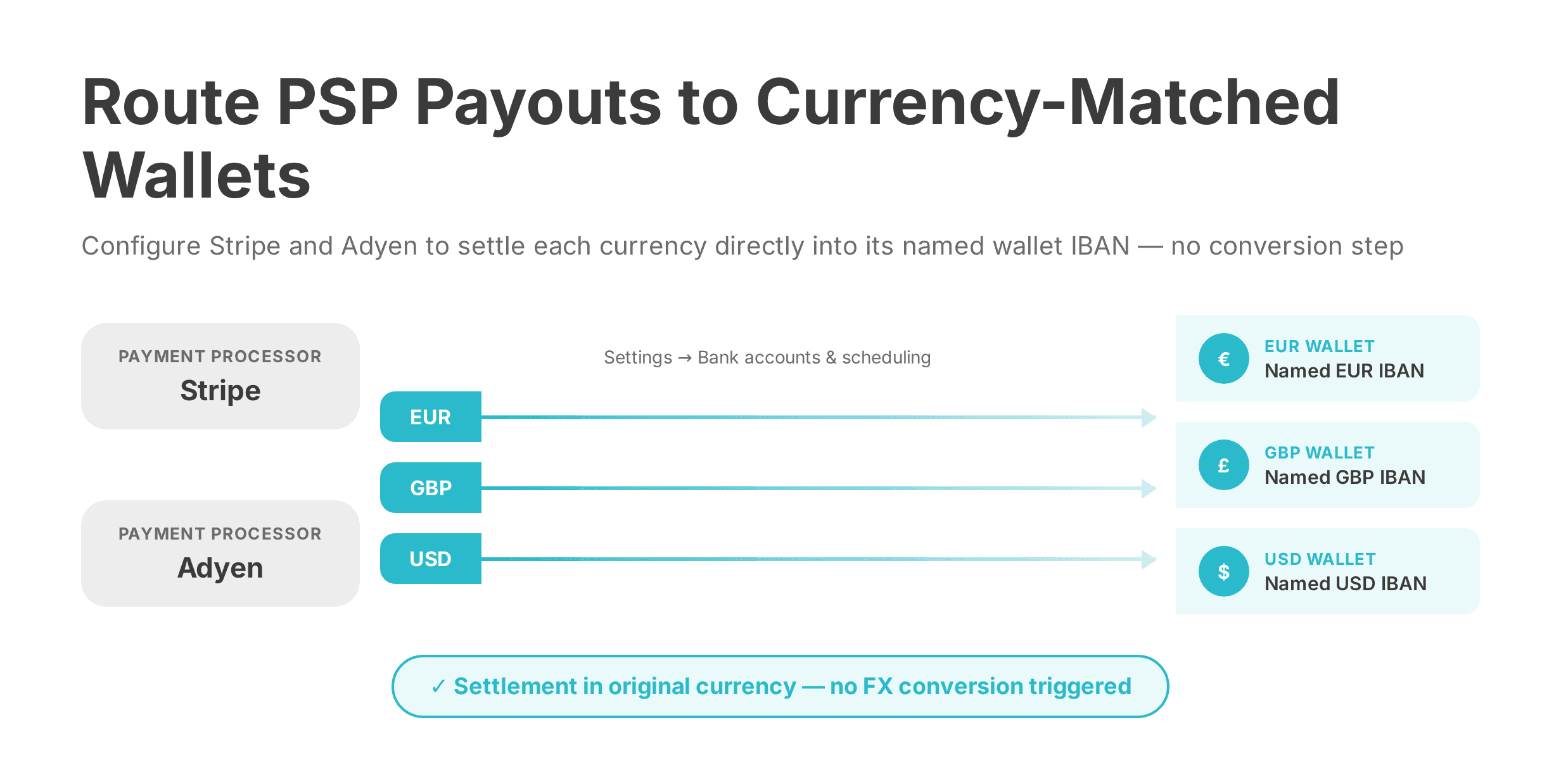
Stripe and Adyen settle funds to whichever bank account details are configured in the PSP dashboard. If all payout destinations point to a single GBP IBAN, every settlement — regardless of the original currency — routes to GBP and converts on arrival. The fix requires one change per PSP.
Stripe payout configuration
In the Stripe dashboard, navigate to Settings → Bank accounts and scheduling. Add a separate payout account for each currency: link the EUR wallet IBAN as the EUR payout destination, and the GBP wallet IBAN for GBP payouts. This is how to hold Stripe GBP payouts in original currency without conversion UK EMI — the settlement routes to the matching wallet, and Stripe applies no conversion.
For more detail on configuring PSP settlement correctly, see how PSP settlement works with a multi-currency EMI account and Stripe settlement account alternatives for UK businesses.
Adyen payout configuration
In the Adyen Customer Area, access the Settlement configuration and add per-currency bank accounts. EUR settlements from European card processing route to the EUR wallet IBAN; GBP settlements route to the GBP wallet. The balance builds in the correct currency — ready to pay EUR supplier invoices without an intermediate conversion step.
For Adyen-specific routing guidance, see how to receive Adyen payouts without forced FX conversion.
[aa fast-fact]
Fast Fact: A UK e-commerce business settling the equivalent of £400,000 in EUR annually through Stripe can lose £6,000–£12,000 per year in FX spread if all payouts route to a single GBP account. Routing EUR settlements to a EUR wallet eliminates this cost entirely.
[/aa]
Three Configuration Errors That Trigger Auto-Conversion
These errors occur in accounts that technically support multi-currency wallets. Each one creates a conversion event that the account holder never intended to trigger.
Error | Trigger | Annual cost (£400k turnover) | Fix |
|---|---|---|---|
Single GBP IBAN used for all PSP payouts | EUR and USD payments route to GBP account, converting at the routing layer | £6,000–£12,000 | Configure separate IBAN per currency in each PSP payout setting |
Currency wallets not activated before first payment | No EUR or USD wallet exists to receive funds — platform defaults to base GBP currency | Full conversion cost on every inbound payment | Activate all required wallets before expecting any foreign-currency inbound |
Using a standard UK bank instead of an EMI | Bank converts all inbound foreign currency to GBP at settlement — this is structural, not configurable | 1.5–2.5% per payment, compounded annually | Switch to an FCA-authorised EMI with independent currency wallet support |
The third error is the most expensive — and the most overlooked. No setting change within a standard UK bank account will stop auto FX conversion on multi-currency business account UK. The conversion happens at settlement, in the bank's own infrastructure. Switching account type is the only reliable fix.
To understand the FX cost differences between account types in more detail, see how to get competitive FX rates without hidden markups.
Businesses that address all three errors — correct account type, activated wallets, and accurate PSP routing — typically reduce annual FX costs by 60–80% compared to operating on a standard GBP business bank account. For operations teams managing regular international supplier payments, this represents direct improvement to gross margin with no revenue impact.
The broader principle behind this approach is treasury optimisation: hold multi-currency balances UK SME finance teams can act on now — routing EUR receipts to the EUR wallet, USD receipts to the USD wallet, and converting in bulk when rates are favourable. Handled correctly, this shifts the business from reactive FX absorption to active cross-border FX management for UK SME: hold balances and convert on your terms. For a deeper breakdown of multi-currency account structures in the UK context, see how multi-currency accounts work for UK businesses holding GBP, EUR and USD.
The FCA's new PS25/12 safeguarding requirements — coming into force May 2026 — further reinforce the regulatory stability of EMI-held multi-currency balances. For UK businesses comparing account structures, the combination of wallet-level currency isolation and FCA safeguarding makes a well-chosen EMI the most practical option for ongoing FX cost control. For additional perspective on FX risk reduction strategies for UK SMEs, the FX risk management guide for UK SMEs provides a useful external reference point.
FAQ
How do I hold GBP, EUR, and USD in a UK business account without forced conversion?
Open an account with an FCA-authorised EMI that provides separate named IBANs for GBP, EUR, and USD. Activate each currency wallet before receiving payments, then direct each client or PSP to the matching IBAN. This is the standard process for how to hold GBP EUR USD in business account without forced conversion — payments settle in the correct wallet and no conversion is triggered at receipt. EQWIRE offers this structure as an FCA-authorised multi-currency EMI.
Can a UK business hold multiple currency balances without FX conversion?
Yes. FCA-authorised EMIs provide currency wallets that hold incoming payments in their original denomination. Traditional UK banks do not — they convert inbound foreign currency to GBP at settlement by default. Whether a UK business can hold multiple currency balances without FX depends entirely on the account type: an EMI account with separate wallets supports it structurally; a standard business bank account does not.
How do I stop auto FX conversion on my multi-currency business account?
Three steps address the most common causes. First, confirm the account is with an FCA-authorised EMI — not a bank. Second, activate all required currency wallets before any inbound payments arrive. Third, configure each PSP payout destination to use the currency-matched wallet IBAN rather than a default GBP account. Together, these steps stop auto FX conversion on multi-currency business account UK operations rely on — at the account level, at the wallet level, and at the PSP routing level.
How do I route Stripe payouts to a multi-currency wallet without conversion?
In the Stripe dashboard under Settings → Bank accounts and scheduling, add a separate payout account for each currency. Enter the EUR wallet IBAN as the EUR payout destination, the USD IBAN for USD, and the GBP IBAN for GBP. Stripe routes each settlement to the correct account without converting. This is also how to hold Stripe GBP payouts in original currency without conversion UK EMI — the GBP wallet receives GBP settlements directly, with no intermediary conversion step.
What currencies can a UK business hold without converting?
GBP, EUR, and USD are supported as standard by most FCA-authorised EMIs offering multi-currency accounts in the UK. Many providers extend this to 20–30 currencies, including AUD, CAD, CHF, and JPY — each with a named wallet and IBAN. The available currency list varies by provider. Businesses with payment flows across multiple regions should verify coverage before opening an account to ensure all required balances can be held without automatic conversion.
Reviewed by

Related Articles

FX-Neutral Settlement: How to Receive Multi-Currency PSP Payouts Without Forced Conversion
How to Receive PSP Payouts in AED: Adyen, Stripe and PayPal in UAE Dirhams
Multi-Currency Account for Import-Export Businesses: Manage GBP, EUR, USD and CNY

Director Dividend Account: Receiving GBP, EUR and USD as a Company Director

Power your payments
with EQWIRE
Create your account in minutes and experience smooth, secure global payments.
" height="9.0156px" id="LIcbdboyB" transform="translate(4.987 4.5)" width="9.01562px"/></svg>)